Change Management IP Mesh AP's




 Ally Member
I have the following setup(Firewalls/AP's in Nebula, Switches on premise)
Building A
ZyXEL FLEX 100
2*NWA210AX
1*ZyXEL GS1900
1*NWA55AXE (Wireless Bridge Enabled)
Building B
1*NWA55AXE (Wireless Bridge Enabled)
1*ZyXEL XGS1935-52HP
2*ZyXEL NWA130BE
Both switches, NWA210AX's and NWA130BE are VLAN11 joined for management. Works fine. So in bridge, switches and AP's VLAN11 tagged are added
I can place the first NWA55AXE in VLAN11 Management VLAN, but then I can't see my other AP anymore and the switch/AP's in building B aren't accessible anymore. If I do the same with NWA55AXE in building B first, then it also doesn't want to come online.
I should think that my VLAN tags are configured fine because the last AP's in the string work fine in the VLAN11, but as soon as I configure the AP's "in the middle" everything is broken.
All Replies
-
Hi @nielsscheldeman,
To proceed with troubleshooting, please confirm the following:
- Check "Allowed VLANs" on both NWA55AXE APs first:
- Go to Site-wide > Devices > Access points > Wireless Bridge settings section. In the Allowed VLANs field, ensure 11 is explicitly added (e.g.,
11or1,11if you still need untagged/VLAN 1 traffic) on both the Root AP and the Repeater AP.
- Go to Site-wide > Devices > Access points > Wireless Bridge settings section. In the Allowed VLANs field, ensure 11 is explicitly added (e.g.,
- Verify Switch Port Tagging:
- Double-check that the switch ports on both the GS1900 (Building A) and the XGS1935-52HP (Building B) connecting directly to the NWA55AXE APs are configured as Trunk ports with VLAN 11 set as Tagged.
- Change the Management VLAN:
- Once the wireless bridge is confirmed to allow VLAN 11 and the switch ports are correctly tagged, please change the Management VLAN of the Repeater AP (Building B) to 11 first, wait for it to provision, and then apply the same change to the Root AP (Building A).
To help us investigate further, could you please enable Zyxel Support Access and provide your org/site names so we can review your devices directly?
Zyxel Tina
0 - Check "Allowed VLANs" on both NWA55AXE APs first:
-
Hello,
1 and 2 are 100% correct because the switch and regular AP's behind the bridge are already joined in that Management VLAN. As soon as I change the AP's of the bridge to the Management VLAN, everything is broken in and behind the bridge.
0 -
Hi @nielsscheldeman,
Sorry for the late reply!
Could you please confirm whether your network topology matches the diagram below?
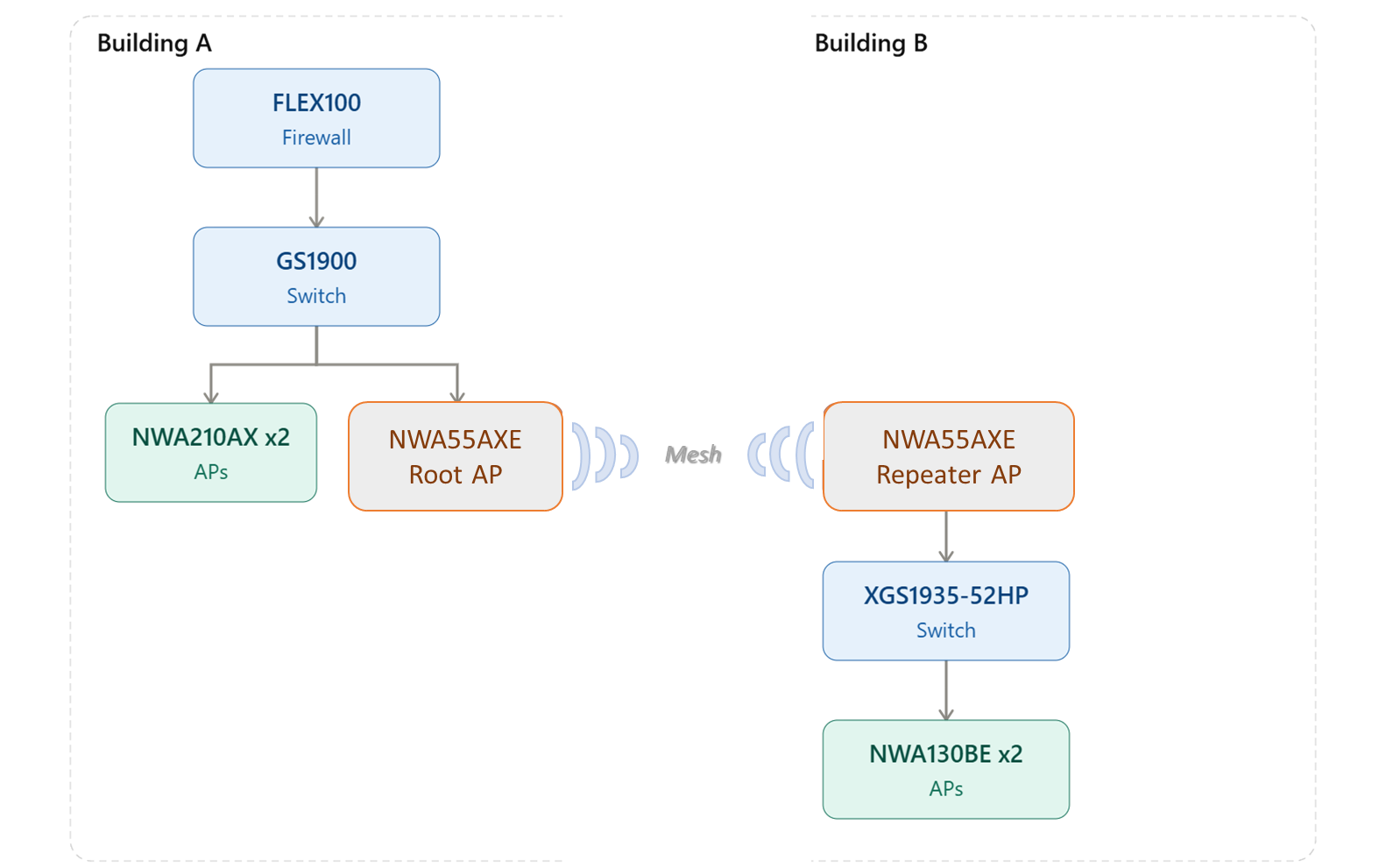
Additionally, please disable Wireless Bridge on the Building A NWA55AXE (Root AP) and check if the issue improves.
If the problem persists, please enable Zyxel Support Access and provide your org/site names so we can investigate further.
Zyxel Tina
0 -
Hello, Yes that is indeed my topology :) I will do that next time I'm on site, remote bit difficult to troubleshoot this :)
0





 Zyxel Employee
Categories
- All Categories
- 442 Beta Program
- 3.1K Nebula
- 243 Nebula Ideas
- 6.8K Security
- 783 USG FLEX H Series
- 389 Security Ideas
- 1.8K Switch
- 87 Switch Ideas
- 1.5K Wireless
- 58 Wireless Ideas
- 7.2K Consumer Product
- 325 Service & License
- 527 News and Release
- 101 Security Advisories
- 31 Education Center
- 10 [Campaign] Zyxel Network Detective
- 5.3K FAQ
- 34 Documents
- 91 About Community
- 122 Security Highlight


