How to test LAN to LAN WiFi throughput?
Options

Zyxel_Melen
Posts: 5,172




 Zyxel Employee
Zyxel Employee
in Other Topics
Q: How to test LAN to LAN WiFi throughput? I want to check intranet speed to verify the AP's performance.
A:
Topology:
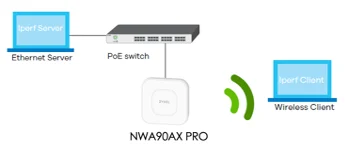
Prepare test steps:
Install iperf3 and openspeedtest server :
- Install iperf3 on Ethernet Server and Wireless Client.
- Download iperf3 from: (For Windows OS, download Iperf3-3.1.3-win64).
- Install openspeedtest server on LAPTOP_1. You can download it from: .
Iperf3 Installation:
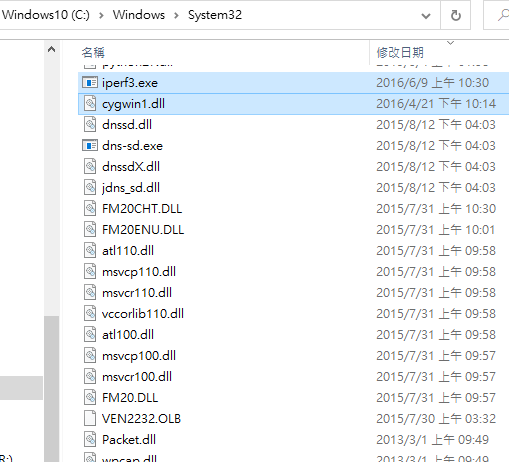
- Extract the iperf3 zip file and copy cygwin1.dll and iperf3.exe to C:\Windows\System32 so that you can use the iperf3 command without specifying the path.
Openspeedtest Installation:
- Download OpenSpeedTest-Server 2.x.x.exe for Windows X86-64 on Ethernet Server.
- Execute the downloaded file, and the server will start automatically without the need for additional settings.

Test steps:
IPERF
1. To execute iperf, Please open cmd in Windows OS and execute below commands on the clients acting as the iperf server.
2. C:\> iperf –s

3. For the Windows client (LAPTOP2) connected on the NBG7510 router.
C:\> iperf -c 192.168.100.100 -P 10 -t 10 -i 1
The attached parameter means the client will connect to the server IP 192.168.100.100 and test for 10 seconds with 10 parallels per second


OPENSPEEDTEST
Open chrome browser on LATOP2 and type the IP address show on the server site
Then you can click start to do the test.

Zyxel Melen
0


Categories
- All Categories
- 442 Beta Program
- 3.1K Nebula
- 243 Nebula Ideas
- 6.8K Security
- 783 USG FLEX H Series
- 389 Security Ideas
- 1.8K Switch
- 87 Switch Ideas
- 1.5K Wireless
- 58 Wireless Ideas
- 7.2K Consumer Product
- 325 Service & License
- 527 News and Release
- 101 Security Advisories
- 31 Education Center
- 10 [Campaign] Zyxel Network Detective
- 5.3K FAQ
- 34 Documents
- 91 About Community
- 122 Security Highlight