802.11r does not work with WPA3-Enterprise or WPA3-Personal security
Options

Zyxel_JoyLee
Posts: 218


 Zyxel Employee
Zyxel Employee
Under the current specifications of the Zyxel product architecture and Nebula system, 802.11r (Fast Roaming/Fast Transition) support when using WPA3-Enterprise and WPA3-Personal is as follows:
1. Conclusion: Not Supported
Under the current system specifications and firmware design, when WPA3 security mode is enabled (whether WPA3-Personal or WPA3-Enterprise), the 802.11r fast roaming feature will not function or will be automatically disabled by the system.
Nebula:

USG FLEX:
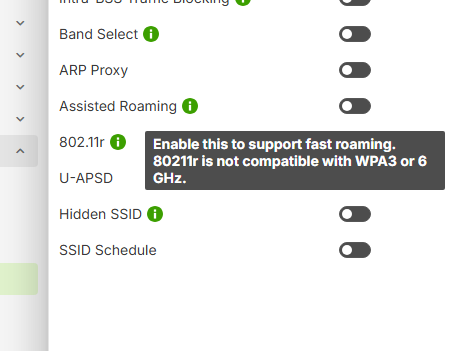
- Supported only in WPA2 mode: The 802.11r fast roaming feature in Zyxel systems is currently only compatible with WPA2 security settings.
2. Behavior on WiFi 6 and WiFi 7 APs
WiFi 7 AP
- WiFi 7 (802.11be) limitation: When operating in WiFi 7 (802.11be) wireless mode, the WiFi 7 standard mandates the use of WPA3 encryption.
- Because WPA3 is mandatory in WiFi 7 mode, 802.11r will be forcibly disabled in this wireless mode — even if you enable the 802.11r toggle in the Nebula management interface, it will have no actual effect.
- If 802.11r functionality is strongly required on a WiFi 7 AP, the radio mode must be downgraded to WiFi 6 (802.11ax) and the SSID security set to WPA2.
WiFi 6 Professional AP
- Supports 802.11r/k/v. However, when the SSID's encryption method is changed to WPA3-Personal or WPA3-Enterprise, the AP will follow WPA3 specifications and the 802.11r feature will be automatically disabled.
- To use 802.11r fast roaming, the SSID must remain configured in WPA2 mode.
Note:802.11r being disabled is a limitation on our end. We currently have plans to support it in the future.
0
Categories
- All Categories
- 442 Beta Program
- 3.1K Nebula
- 243 Nebula Ideas
- 6.8K Security
- 783 USG FLEX H Series
- 389 Security Ideas
- 1.8K Switch
- 87 Switch Ideas
- 1.5K Wireless
- 58 Wireless Ideas
- 7.2K Consumer Product
- 325 Service & License
- 527 News and Release
- 101 Security Advisories
- 31 Education Center
- 10 [Campaign] Zyxel Network Detective
- 5.3K FAQ
- 34 Documents
- 91 About Community
- 122 Security Highlight