Streamlining Hardware Transitions with Nebula Device Replacement
Options

Zyxel_Lynn
Posts: 212




 Zyxel Employee
Zyxel Employee
Effortless Hardware Migration: Nebula Device Replacement
The new "Replace Device" feature in Nebula is designed to provide a streamlined experience when swapping out faulty or aging hardware. This tool automates complex steps such as configuration inheritance and license transfers.
Inherited Attributes
When the replacement process is executed, the new device automatically inherits several properties from the old unit:
- Device Identity: The old device's ID is transferred.
- Configuration: All per-device NCC settings are applied.
- Licenses: Eligible NCC licenses are moved to the new device (note: bundle licenses are generally tied to the original hardware and may not transfer).
Eligibility and Requirements
- Device Types: Supported for APs, non-staking switches, ATP/USG Flex series, H series, and mobile/security routers.
- Privileges: Owners, delegated owners, and administrators with full privileges can perform the replacement.
- New Device Condition: The replacement unit must be the same model as the original. It must either be unregistered or registered in the organization inventory but not yet assigned to a site.
How to Perform a Replacement
1. Select the old device in the device list.
2. Click the Action button and select Replace Device.
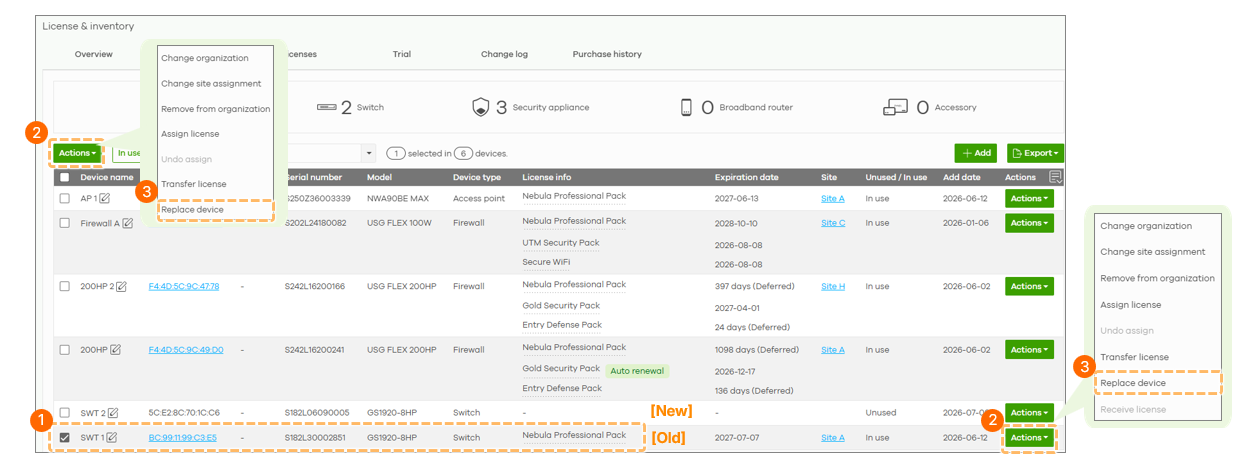
3. Select the available replacement device from the list or add a new one via MAC and Serial Number.
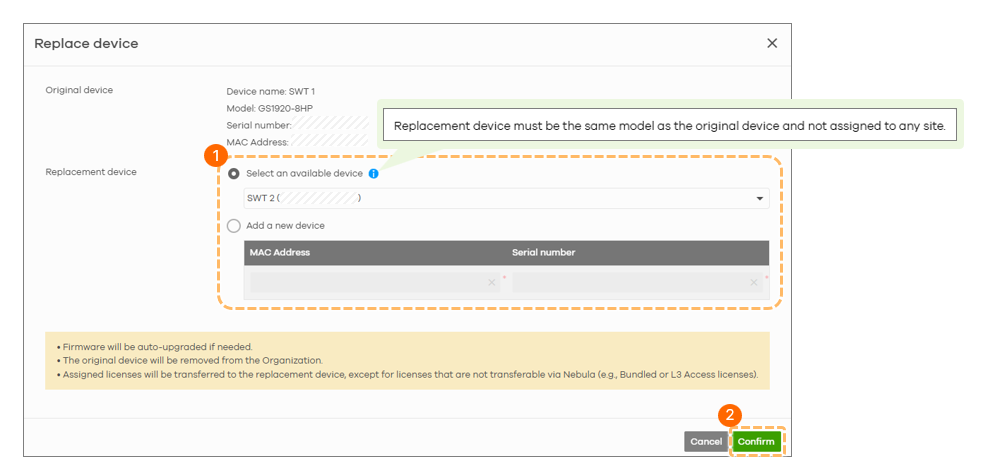
4. Click Confirm. NCC will then add the new device to the site, apply configurations, transfer licenses, and remove/reset the old device.
0
Categories
- All Categories
- 442 Beta Program
- 3.1K Nebula
- 243 Nebula Ideas
- 6.8K Security
- 783 USG FLEX H Series
- 389 Security Ideas
- 1.8K Switch
- 87 Switch Ideas
- 1.5K Wireless
- 58 Wireless Ideas
- 7.2K Consumer Product
- 325 Service & License
- 527 News and Release
- 101 Security Advisories
- 31 Education Center
- 10 [Campaign] Zyxel Network Detective
- 5.3K FAQ
- 34 Documents
- 91 About Community
- 122 Security Highlight