Advanced License Management via UIX Enhancements
Options

Zyxel_Lynn
Posts: 212




 Zyxel Employee
Zyxel Employee
Refined License Assignment UIX
To prevent accidental license misassignments, Zyxel has introduced three distinct license assignment modes in Nebula, offering granular control over how licenses are distributed.
License Assignment Modes
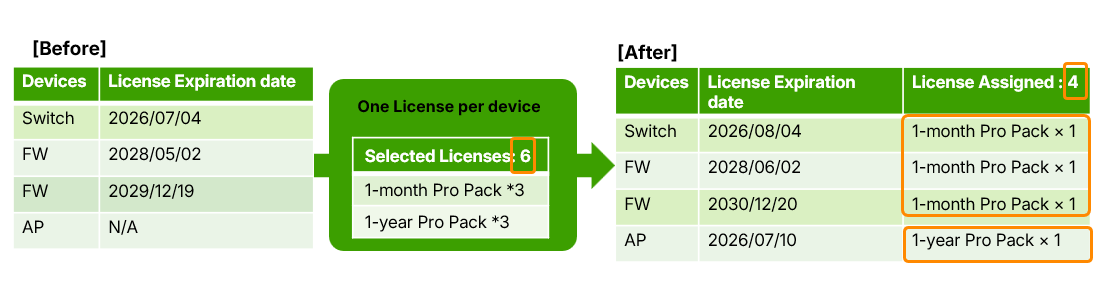
- One License Per Device (Default): Automatically assigns one selected license to each device in the table. Assignments follow an alphabetical model name logic (A to Z) and prioritize shorter durations first.
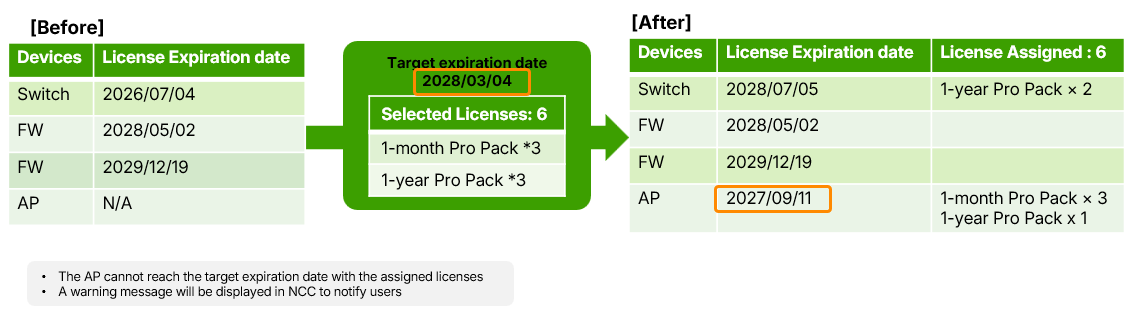
- Target Expiration Date: Administrators set a specific date (e.g., March 2028). NCC then calculates and consumes the necessary license pool to extend each device's expiration as close to that date as possible. If the license pool is insufficient for a specific device, a warning is displayed.
- Custom Assignment: Provides full manual control. Users click specific devices to manually input the exact number of licenses (e.g., two 1-year Pro Packs) to be assigned to that specific unit.
Verification Tools
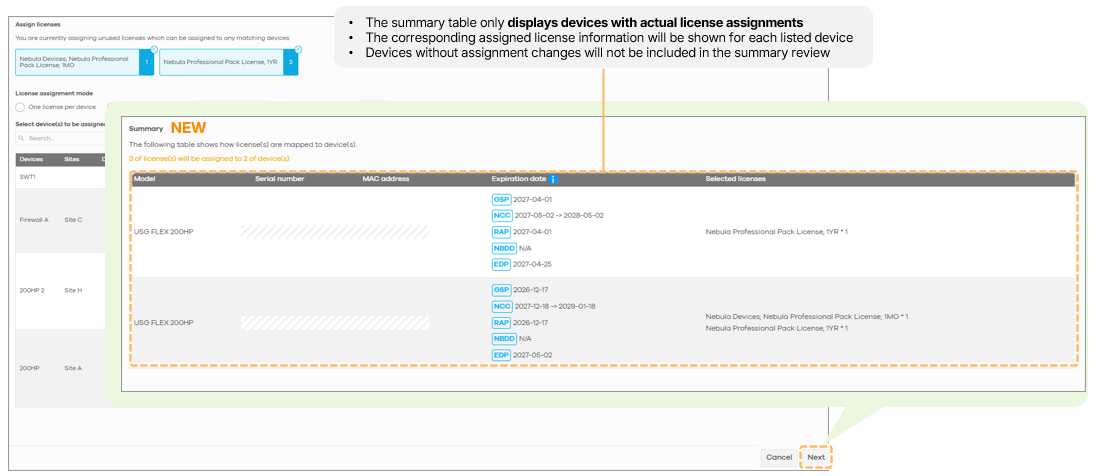
The updated interface includes a Summary Table before final execution, acting as a final checkpoint to verify that the intended devices are receiving the correct licenses. Search and reset tools are also available to quickly manage large inventories.
0
Categories
- All Categories
- 442 Beta Program
- 3.1K Nebula
- 243 Nebula Ideas
- 6.8K Security
- 783 USG FLEX H Series
- 389 Security Ideas
- 1.8K Switch
- 87 Switch Ideas
- 1.5K Wireless
- 58 Wireless Ideas
- 7.2K Consumer Product
- 325 Service & License
- 527 News and Release
- 101 Security Advisories
- 31 Education Center
- 10 [Campaign] Zyxel Network Detective
- 5.3K FAQ
- 34 Documents
- 91 About Community
- 122 Security Highlight