How to configure a custom NTP server on a cloud-managed AP's local GUI?
Options

Zyxel_Bella
Posts: 605




 Zyxel Employee
Zyxel Employee
For a small-scale deployment, you can configure a user-defined NTP server locally on the AP's local GUI.
- Open the AP local Web GUI by entering its lan IP address on browser.
2. Open System Settings > Network
3. enter the desired NTP server in the Time Server Address field, you can also use Sync Now to trigger synchronization.
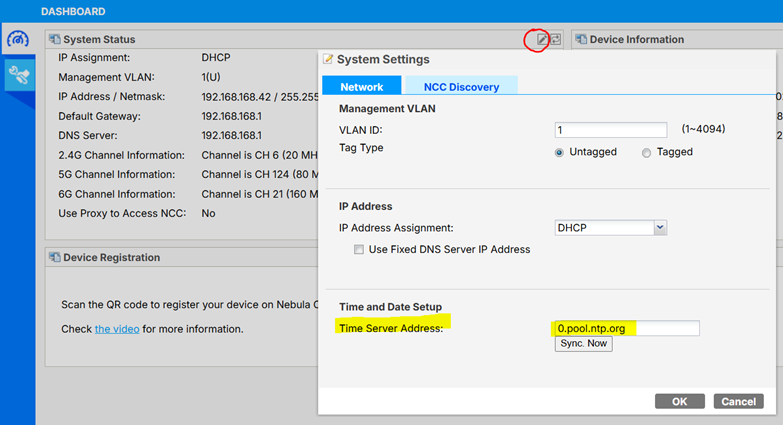
4. Click OK to Save the changes
0
Categories
- All Categories
- 442 Beta Program
- 3.1K Nebula
- 243 Nebula Ideas
- 6.8K Security
- 783 USG FLEX H Series
- 389 Security Ideas
- 1.8K Switch
- 87 Switch Ideas
- 1.5K Wireless
- 58 Wireless Ideas
- 7.2K Consumer Product
- 325 Service & License
- 527 News and Release
- 101 Security Advisories
- 31 Education Center
- 10 [Campaign] Zyxel Network Detective
- 5.3K FAQ
- 34 Documents
- 91 About Community
- 122 Security Highlight