How to configure DHCP Option 42 to custom NTP server for AP time synchronization?
Options

Zyxel_Bella
Posts: 605




 Zyxel Employee
Zyxel Employee
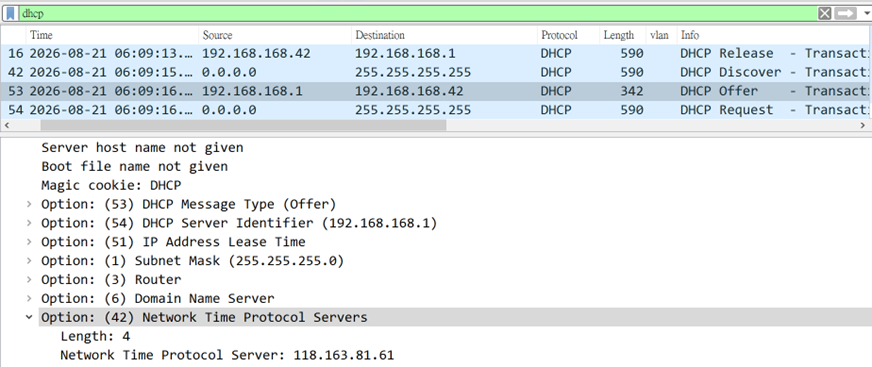
For mass deployment, configure DHCP Option 42 (Network Time Protocol Servers) on the DHCP server. When the AP obtains its IP address by DHCP, it can also receive the NTP server address or addresses provided in Option 42.
Step 1 - Configure DHCP Option 42 on your DHCP server.
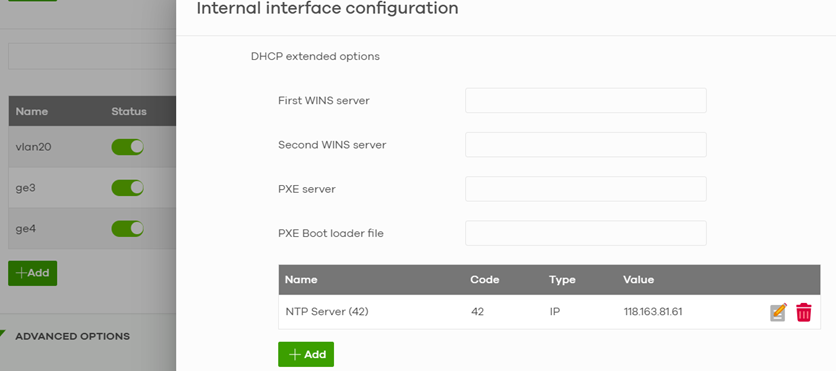
Step 2 - Renew the AP DHCP lease or reconnect the AP so it receives the DHCP information.
Router> renew dhcp lan
0
Categories
- All Categories
- 442 Beta Program
- 3.1K Nebula
- 243 Nebula Ideas
- 6.8K Security
- 783 USG FLEX H Series
- 389 Security Ideas
- 1.8K Switch
- 87 Switch Ideas
- 1.5K Wireless
- 58 Wireless Ideas
- 7.2K Consumer Product
- 325 Service & License
- 527 News and Release
- 101 Security Advisories
- 31 Education Center
- 10 [Campaign] Zyxel Network Detective
- 5.3K FAQ
- 34 Documents
- 91 About Community
- 122 Security Highlight