GS1920-48HPv2 – IGMP memberships age out at Host Timeout with WyreStorm AVoIP



 Freshman Member
We are troubleshooting an IGMP multicast issue with a WyreStorm NetworkHD/NEXT 4K AVoIP system using three Zyxel GS1920-48HPv2 switches managed through Nebula.
Network topology
Switch A is the core switch and IGMP Querier. Switches B and C are configured as Aggregators. B and C connect directly to A by fiber; the switches are not daisy-chained. The WyreStorm devices are on VLAN 20. IGMP Snooping is enabled and Unknown Multicast Drop is enabled for VLAN 20.
The inter-switch uplink ports are configured for Normal Leave and IGMP Querier Mode = Fixed. Decoder access ports use Immediate Leave. We have verified multicast operation and the expected groups appear in the IPv4 Multicast Status tables while the system is working.
Problem
The WyreStorm decoders initially join multicast groups 225.1.0.0 and 226.1.0.0, and video routing operates normally. However, once the switch Host Timeout expires, those two memberships disappear from the affected decoder ports. At that point the decoder remains online, but video routing no longer changes.
The WyreStorm controller and our RTI control system both indicate that the requested matrix route has changed, but the actual display remains on the previous source.
Rebooting the affected decoder immediately causes 225.1.0.0 and 226.1.0.0 to reappear in the IPv4 Multicast Status table, and video routing immediately resumes. Interestingly, routing changes requested while the decoder was in the failed state take effect when the decoder finishes rebooting.
The default Host Timeout shown in WyreStorm's Zyxel configuration documentation is 260 seconds. As a temporary workaround, we increased Host Timeout to 108000 seconds (30 hours) and reboot the decoder PoE ports approximately every 24 hours. This prevents the memberships from aging out during normal operation, but obviously does not solve the underlying problem.
Test performed to eliminate the fiber/uplink path
We moved one affected decoder from Switch B and connected it directly to Switch A, the switch running the IGMP Querier.
We then allowed its Host Timeout to expire.
The directly connected decoder exhibited exactly the same failure: 225.1.0.0 and 226.1.0.0 disappeared, routing stopped working, and rebooting the decoder immediately restored both multicast memberships and routing.
This appears to eliminate the B/C fiber uplinks and the Aggregator switches as the primary cause.
Current switch software
GS1920-48HPv2
Firmware: V5.00(ABMK.3)
We are trying to determine whether the decoders are failing to respond to periodic IGMP queries, or whether the GS1920 is receiving the membership reports but not refreshing the Host Timeout/multicast table.
Questions for the community
- Is Host Timeout expected to be refreshed by an IGMP Membership Report received from the decoder in response to the querier's periodic General Queries?
- Is there a way on the GS1920 to verify that General Queries are actually being transmitted and that Membership Reports are being received from a specific decoder port?
- Are there known issues with IGMP membership aging/report processing on V5.00(ABMK.3)?
- Should IGMP Snooping VLAN Mode be set to Fixed rather than Auto for VLAN 20 in this application? WyreStorm's older Zyxel configuration guide specifies Fixed mode.
- Could Nebula's IGMP topology configuration or Report Proxy behavior affect membership refresh in this configuration?
- Are there any additional IGMP timers or settings we should check that could explain why memberships survive exactly until Host Timeout and are then removed?
We have before/after screenshots below showing the multicast table with 225.1.0.0/226.1.0.0 absent after Host Timeout and immediately restored following decoder reboot.
Any suggestions for additional diagnostics would be appreciated. Our goal is to determine whether the membership reports are not being generated by the endpoint or are being generated but not recognized/refreshed by the switch.
Image 1 — Switch C after Host Timeout: Timed-out decoder ports have lost
225.1.0.0/226.1.0.0 memberships.
Image 2 — Switch C after decoder reboot: 225.1.0.0/226.1.0.0 memberships immediately return and routing resumes.
Image 3 — Switch A after Host Timeout: Decoder connected directly to the querier on port 18 exhibits the same failure, eliminating the fiber/edge-switch path.
Image 4 — Switch A after decoder reboot: 225.1.0.0/226.1.0.0 return on port 18 and routing resumes.
Learning these switches and how to get everything setup for AVoIP systems so any help would be greatly appreciated.
Thanks,
Mark
All Replies
-
Hi @Mark_KC ,
Could you confirm whether your topology looks like the diagram above?
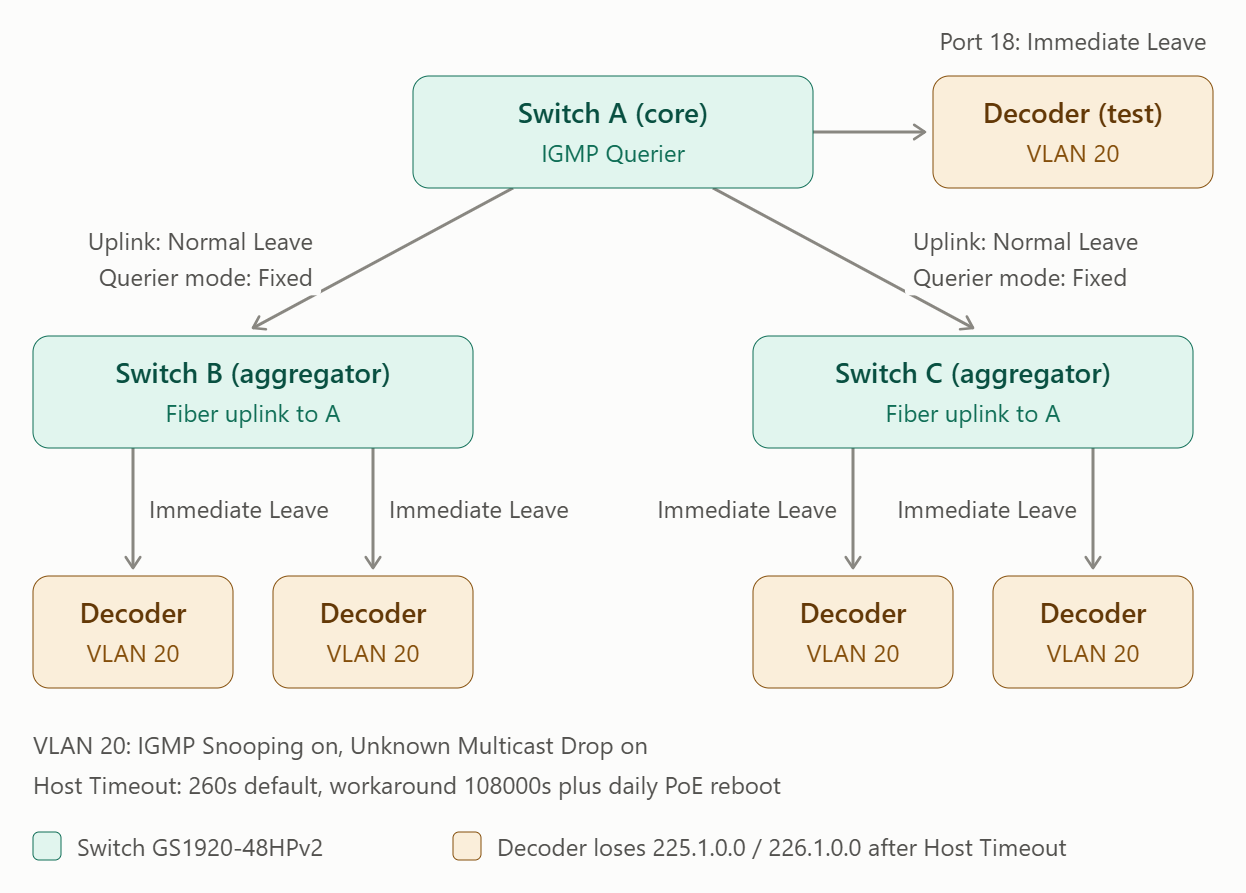
By the way, to better assist you and investigate this issue, could you please share your Nebula organization and site name, and enable Zyxel Support?
Zyxel_Judy
0 -
Zyxel_Judy,
Thank you for taking a look.Yes, your diagram accurately represents the physical topology used during our testing, with one configuration correction and one clarification.
Correction: The decoder ports are currently configured for Normal Leave, not Immediate Leave. The fiber uplinks are also configured for Normal Leave, with IGMP Querier Mode set to Fixed.
Clarification: The decoder shown directly connected to Switch A port 18 was temporarily moved from Switch B to Switch A specifically for troubleshooting. Under normal operation, the decoders are connected to Switches B and C.
We performed this test specifically to eliminate the fiber uplinks and aggregator switches as possible causes. The decoder directly connected to Switch A exhibited the same behavior as the decoders connected through B/C: 225.1.0.0 and 226.1.0.0 were present after boot and routing operated normally; after Host Timeout expired, those groups disappeared and routing stopped; rebooting the decoder immediately restored both groups and the previously requested routing change appeared on the display.
The same behavior was observed on multiple decoders connected to Switch C.
I am happy to provide the Nebula organization/site information and enable Zyxel Support access. Before doing so, however, I would like the site treated as read-only for troubleshooting unless we specifically approve a configuration change. We have local WebUI multicast settings that we do not want overwritten or synchronized by a Nebula configuration push.
Please let me know if support access can be used to inspect the site without making or pushing configuration changes. If so I can provide the Nebula organization/site information and enable Zyxel Support access for further investigation. I know I have seen where to do this but am not finding it right now.
Thanks,
Mark0 -
Hi @Mark_KC ,
Of course. We will only access your Nebula organization and site to review the configuration, and we will not make any configuration changes. If a change is needed, we will let you know so you can make it yourself.
The method to enable Zyxel support here:
Zyxel_Judy
0 -
Thank you Zyxel_Judy, I have enabled support access.
Thanks,
Mark0 -
Hi @Mark_KC ,
After reviewing your switch configuration, we found the items that should be corrected, VLAN 20 has no IP address on the switches.
Currently none of the three switches has an IP address for VLAN 20. Please add one on each switch:
- Go to SYSTEM > IP Setup > IP Setup tab.
- On the Management IP Address screen, click Add/Edit and add the VLAN 20 IP address.
Note: For Switch A (the IGMP Querier), please assign the lowest IP address of the three switches (for example, 192.168.20.1), so that Switch A remains the Querier.
If you’ve completed the steps above but the 225.1.0.0 and 226.1.0.0 memberships still disappear when the Host Timeout expires, please check where your encoders are connected.
- If your encoders are connected only to Switch A:
Ports 47 and 48 on Switch A (connected to Switch B and Switch C) are currently set to IGMP Querier Mode Fixed. Please change both ports to Auto.
Why: Fixed makes the switch always use the port as an IGMP query port. The switch then treats the port as connected to an IGMP multicast router (or server) and forwards IGMP join and leave packets to it. Fixed is intended for a port where an IGMP multicast server is connected. If the encoders are connected only to Switch A, ports 47 and 48 connect only to Switch B and Switch C, so they should not be treated as query ports. With Auto, the switch uses a port as a query port only if the port receives IGMP Query packets. - If your encoders are not connected only to Switch A:
Please share the full topology with us, including the encoders and all other network devices. We’ll continue to check from there.
Zyxel_Judy
0 -
Zyxel_Judy,
Thank you for the review and the feedback. I am working on setting up a test system in our lab configured exactly as the system you reviewed then make the changes from there. I will update as soon as that is completed.
Thanks,
Mark0 -
Zyxel_Judy,
Sorry for the delay but it took a bit before I had time to setup the lab system and begin testing. I followed your recommendation of adding the IP interface for VLAN 20 and that was what was needed. Have been testing for several days as well and all looks good.
Thanks again for the very valuable help.
Mark0





 Zyxel Employee
Categories
- All Categories
- 442 Beta Program
- 3.1K Nebula
- 243 Nebula Ideas
- 6.8K Security
- 783 USG FLEX H Series
- 389 Security Ideas
- 1.8K Switch
- 87 Switch Ideas
- 1.5K Wireless
- 58 Wireless Ideas
- 7.2K Consumer Product
- 325 Service & License
- 527 News and Release
- 101 Security Advisories
- 31 Education Center
- 10 [Campaign] Zyxel Network Detective
- 5.3K FAQ
- 34 Documents
- 91 About Community
- 122 Security Highlight





