How can I disable the Wi-Fi function permanently on the FWA70 (outdoor mobile router)?
Options

Zyxel_JoyLee
Posts: 220


 Zyxel Employee
Zyxel Employee
The "WiFi disabled" configuration in the Web GUI is effectively not persistent across a reboot.
This is by design for installation purposes.
To prevent the Wi-Fi from being turned off automatically if the installation is not completed within the time limit, the device is designed so that Wi-Fi is re-enabled after a reboot.
If you do not want the Wi-Fi to turn on automatically after a reboot, please follow these steps:
1. Log in to the GUI
2. Go to Wi-Fi > Others > Auto Switch Off Interval, and turn this option off
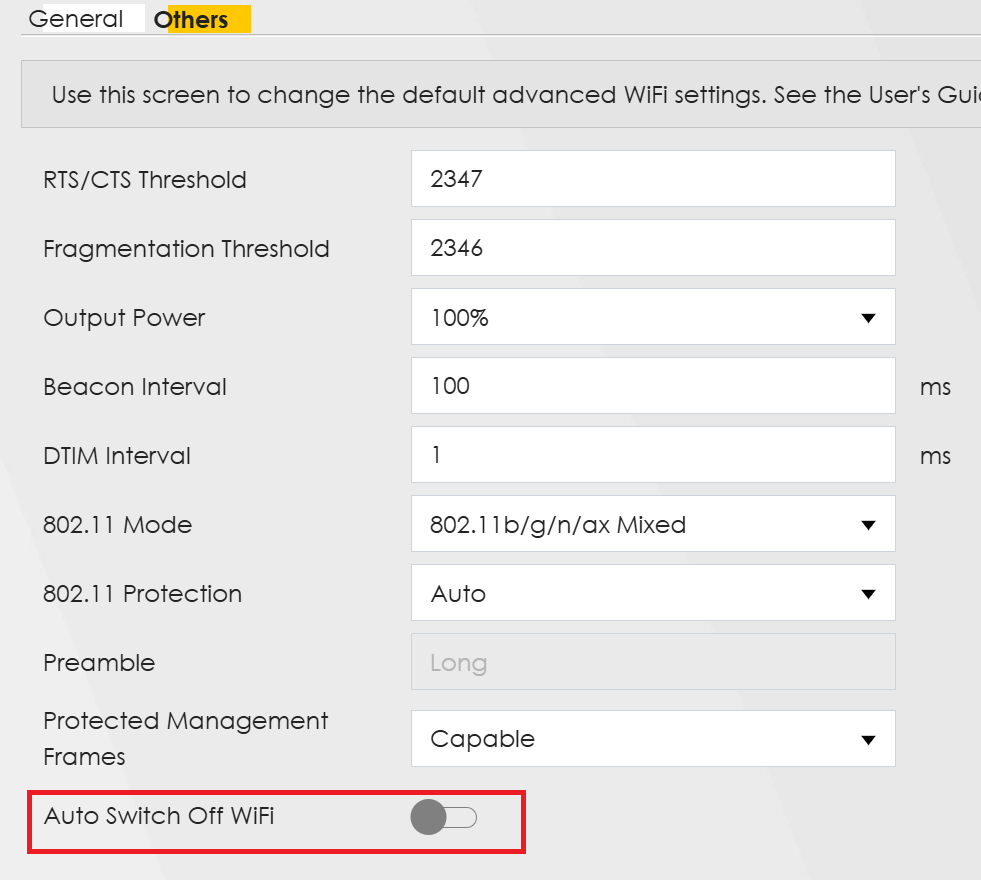
3. Go back to the Wi-Fi page, turn off Wi-Fi, and save the settings.
0
Categories
- All Categories
- 442 Beta Program
- 3.1K Nebula
- 243 Nebula Ideas
- 6.8K Security
- 783 USG FLEX H Series
- 389 Security Ideas
- 1.8K Switch
- 87 Switch Ideas
- 1.5K Wireless
- 58 Wireless Ideas
- 7.2K Consumer Product
- 325 Service & License
- 527 News and Release
- 101 Security Advisories
- 31 Education Center
- 10 [Campaign] Zyxel Network Detective
- 5.3K FAQ
- 34 Documents
- 91 About Community
- 122 Security Highlight