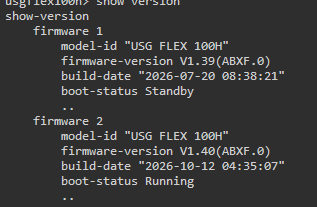
Flex 100H: After firmware update to 1.40 port1 is often down for a few seconds



 Freshman Member
Hello,
after firmware update to 1.40 port1 is often down for a few seconds.

With firmware 1.39 the problem wasn't.
What could I do to get a more stable connection on WAN Port1.
All Replies
-
Same cable than before update, nothing changed in hardware?
Whats wrong - it's horrible this unstable connection.
0 -
Oh Wow… I've a 500H and seems that I've the port P2 completely down after the firmware upgrade.
I use the port P2 not too frequently (I've connected on P2 a NAS and is not always powered ON).
The last date that I've used the NAS (on P2) was on October Saturday 17th or Sunday 18th and in this case works.On 20th, I've updated to 1.40 and when I've tried to use the NAS, the P2 port not work anymore.
Zyxel, can be the same problem?
Thank you
0 -
Hi @SiegfriedH,
To help us narrow down the issue, could you please try the following:
- Swap the cable. Please test with a different Ethernet cable, ideally a known-good one, to rule out a hardware (layer 1) issue.
- Fix the port speed manually. Set the speed to 1 Gbps / Full Duplex instead of auto-negotiation, and see if the link flaps still occur.
If the problem persists after these tests, to avoid further impact on your network, we suggest rolling back to firmware 1.39 for now and monitoring whether the port remains stable.
Please feel free to let us know the results of the above tests!
Zyxel Tina
0 -
Hi Tina,
changed cable - same problem - tested 3 different cables, all time the same problem.
Changed port speed manually the port still flaps … so nothing will help.Next I'll do is role back to 1.39 - hope this will work.
0 -
-
-
Downgraded to 1.39, loaded a saved 1 day old configuration back an the 100H runs perfect and rocksolid.
System now works about 24h without any loose of connection and port flaps.So I think the Firmware 1.40 has a few mysteries inside …
all the best from Austria.
0





 Master Member



 Zyxel Employee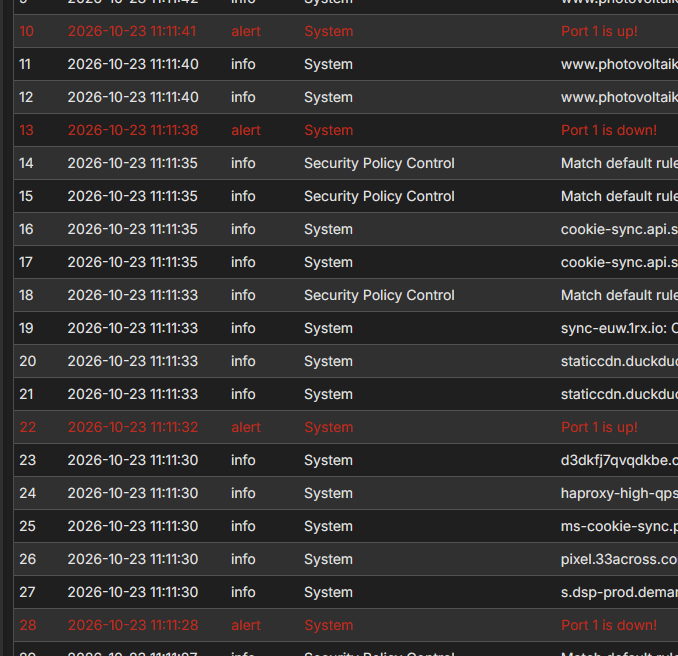
Categories
- All Categories
- 442 Beta Program
- 3.1K Nebula
- 243 Nebula Ideas
- 6.8K Security
- 783 USG FLEX H Series
- 389 Security Ideas
- 1.8K Switch
- 87 Switch Ideas
- 1.5K Wireless
- 58 Wireless Ideas
- 7.2K Consumer Product
- 325 Service & License
- 527 News and Release
- 101 Security Advisories
- 31 Education Center
- 10 [Campaign] Zyxel Network Detective
- 5.3K FAQ
- 34 Documents
- 91 About Community
- 122 Security Highlight


