[USG FLEX H] How to Configure Secure Wi-Fi for Remote AP scenario on Controller-Managed APs?


 Zyxel Employee
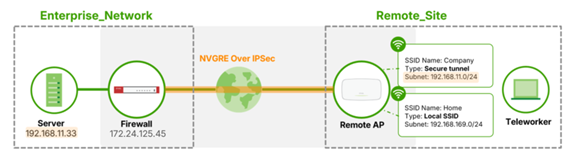
In a Secure Wi-Fi, AP acts as a VPN Client and establish the IPsec tunnel to Gateway then the traffic of tunnel mode SSID can be protected by IPsec VPN. This approach provides data encryption for teleworker’s traffic (NVGRE over IPsec VPN) without any settings on user end device. The example instructs how to set up Secure Wi-Fi on AP controller to encrypt the traffic from station in remote site to enterprise network.
Note: This feature is supported from firmware version uOS 1.40.
The capability of Remote AP can be checked at: Wireless > Access Point > AP List > Show Advanced Settings.

Set up Secure Wi-Fi on AP controller
There’re two stages when deploy the Secure Wi-Fi on AP managed by AP Controller and status is online.
Stage one, finish the configuration inside enterprise network.
- Configure AP role as Remote AP and SSID setting
- Update the Controller IP as the firewall’s WAN IP
Stage two, remote users power up the AP, and then the IP Sec tunnel will be established automatically.
- Power up remote APs at remote side
Configure AP role as Remote AP and SSID setting
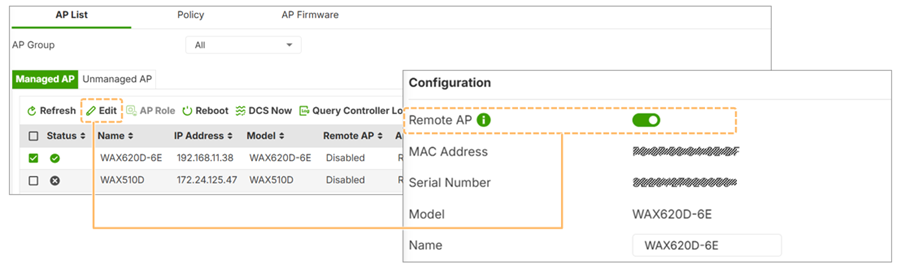
Secure Wi-Fi is per AP setting at Wireless > Access Point > AP List > Specific AP.
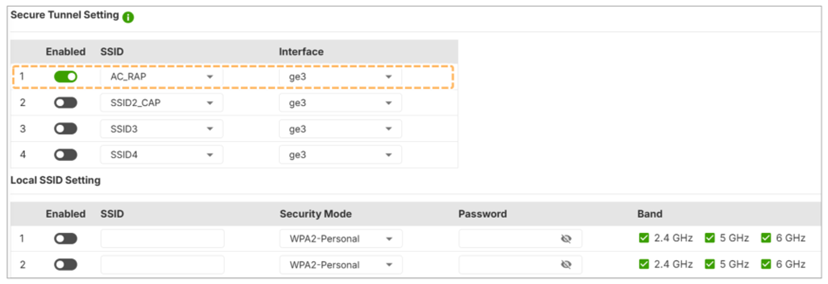
Enable the AP Role to Remote AP. The maximum of Secure Tunnel SSIDs is up to four.
Then define which interface the traffic will be tunneled to, and where to transmit the traffic at.
Update the Controller IP as the firewall’s WAN IP
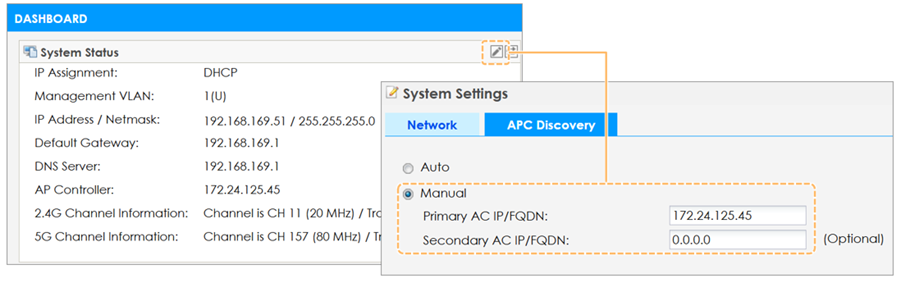
Besides setting the SSID also need to override the Controller’s IP address on AP to let it connect back to enterprise network gateway after booting up in remote site. If gateway supports dual WAN, add another WAN IP in the “secondary controller” column. FQDN is also an available input option for dynamic WAN IP, but requires corresponding DNS settings. Assign Gateway’s WAN IP as AP’s Controller IP at AP local GUI: DASHBOARD > Click Edit icon > APC Discovery > select Manual to enter the IP
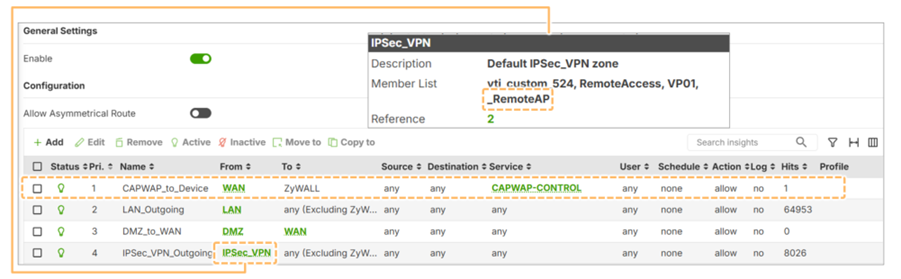
Firewall Policy Rule that is for CAPWAP connection and Remote AP VPN IP for Remote AP VPN Client use will be auto-added when Remote AP is enabled.
On remote AP, Storm Control is automatically activated in order to avoid huge broadcast traffic flooding from wireless part to Gateway and to other Remote APs. Both Wireless and Ethernet Storm Control will be auto-enabled on Remote AP.
Power up remote APs at remote side
Remote users power up the AP, and then the IP Sec tunnel will be established automatically.
Test the Result
After Remote AP boots up in the remote site, AP will automatically establish the IPSec VPN connection with enterprise network side. AP and tunnel information displays on the Web GUI at: VPN Status > Remote AP VPN

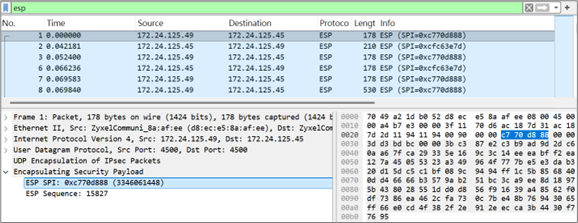
Connect a remote client to the SSID and verify that the traffic is encrypted


Categories
- All Categories
- 442 Beta Program
- 3.1K Nebula
- 244 Nebula Ideas
- 6.9K Security
- 807 USG FLEX H Series
- 392 Security Ideas
- 1.8K Switch
- 88 Switch Ideas
- 1.5K Wireless
- 60 Wireless Ideas
- 7.3K Consumer Product
- 333 Service & License
- 541 News and Release
- 106 Security Advisories
- 31 Education Center
- 10 [Campaign] Zyxel Network Detective
- 5.5K FAQ
- 34 Documents
- 89 About Community
- 124 Security Highlight