Unjustified connections NWA50AX PRO access point

 Freshman Member


Hello,
I purchased an NWA50AX PRO access point and configured it in standalone mode right out of the box, with update the latest firmware V7.10 (3) It works very well, no complaints on that front.
However, I am seeing some very surprising connections for a standalone device. It is connected to a firewall with Suricata on its interface, which is not happy.
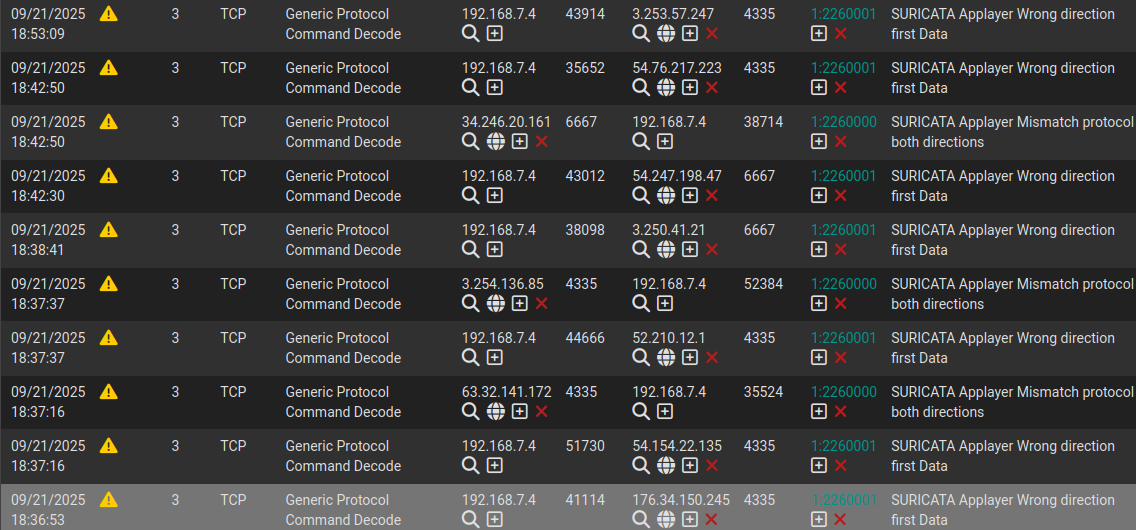
I have a log on the access point that mentions a Nebula connection on TCP port 4335.

I think that in standalone mode, it shouldn't connect or be joined by other services such as ntp, update...
I never registered this access point on a Nebula portal.
Maybe there is a service running in the background. Can you help me shut it down properly and permanently?
Thank you.
Best regards,
Best Answers
-
The following SSH disable this:
configure terminal

netconf inactivate

write
to undo it
no netconf inactivate
write
0 -
Hi @c777,
Based on the screenshots you shared, both service port 4335 and 6667 are used in TCP for Nebula Cloud Management(NETCONF). You may check the status through ZON utility. If it is enabled, please check the Disable NCC Discovery box to prevent Nebula connection attempts.
This option is available if the selected device supports NCC discovery. You must have Internet access to use this feature. Use this icon on the selected device to disable the NCC discovery feature.
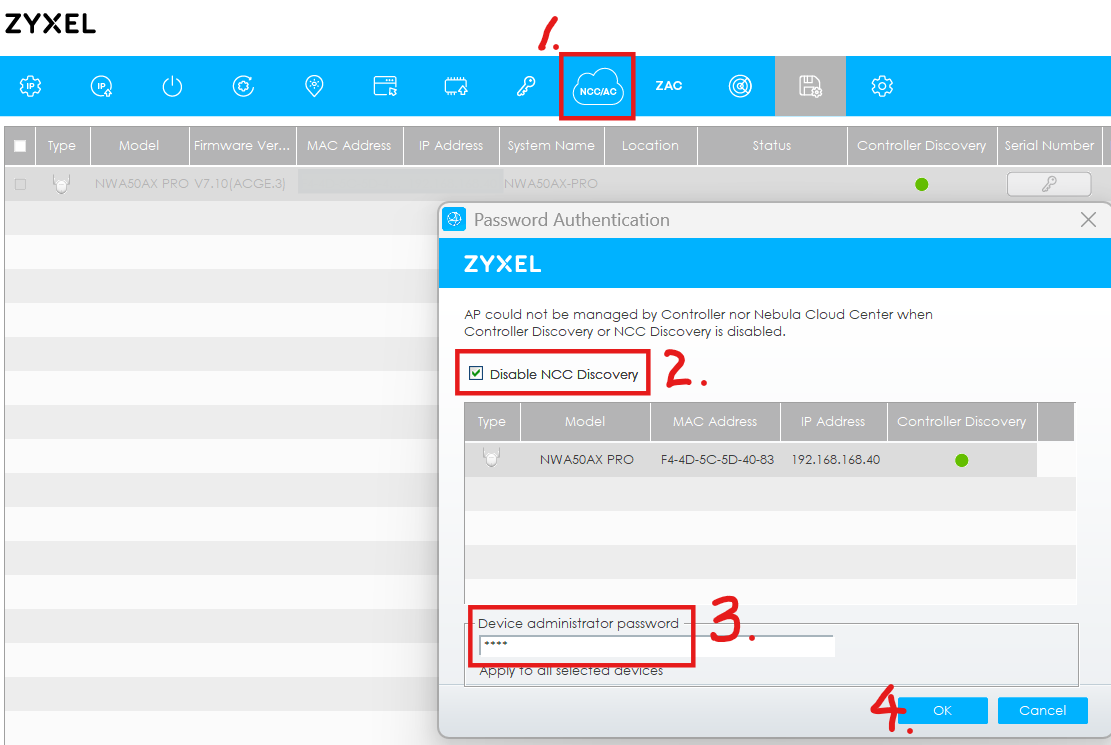
Another method is to run the commands via SSH as mentioned by @PeterUK.
However, if the status is already disabled, please provide us with the diagnostic info file via private message so we can investigate further.
Zyxel Tina
0

 Guru Member



 Zyxel Employee



All Replies
-
The following SSH disable this:
configure terminal

netconf inactivate

write
to undo it
no netconf inactivate
write
0 -
Are you using the AP in NAT mode? If so you should switch it to Local Bridge so that your Router handles all the traffic.
0 -
Hi @c777,
Based on the screenshots you shared, both service port 4335 and 6667 are used in TCP for Nebula Cloud Management(NETCONF). You may check the status through ZON utility. If it is enabled, please check the Disable NCC Discovery box to prevent Nebula connection attempts.
This option is available if the selected device supports NCC discovery. You must have Internet access to use this feature. Use this icon on the selected device to disable the NCC discovery feature.
Another method is to run the commands via SSH as mentioned by @PeterUK.
However, if the status is already disabled, please provide us with the diagnostic info file via private message so we can investigate further.
Zyxel Tina
0 -
Great, it works very well, thank you very much!
0 -
There is no such menu on NWA50AX PRO, but the ssh command of PeterUK works very well.
Thank you.
0 -
The screenshots is from the application ZON, not in the WebGUI.
0
 Master Member
Categories
- All Categories
- 442 Beta Program
- 2.9K Nebula
- 219 Nebula Ideas
- 127 Nebula Status and Incidents
- 6.5K Security
- 602 USG FLEX H Series
- 344 Security Ideas
- 1.7K Switch
- 84 Switch Ideas
- 1.4K Wireless
- 52 Wireless Ideas
- 7K Consumer Product
- 298 Service & License
- 480 News and Release
- 92 Security Advisories
- 31 Education Center
- 10 [Campaign] Zyxel Network Detective
- 4.8K FAQ
- 34 Documents
- 87 About Community
- 105 Security Highlight


