how to create vpn ssl with client openvpn
All Replies
-
Hi all,
I could make it work.
But when you enable 2FA for the VPN, you have to enable 2FA for all your users or they can't reach the LAN.
I thought you could enable 2FA for the users you want, and the other ones could use the VPN as usual, but apparently no.
So I don't understand why there is a box to check/uncheck 2FA for each user ?
0 -
Hi @rcd
Enabling 2FA stands for more security. Therefore, it is not a good way to enable 2FA for specific users, as it could cause security weaknesses.
Zyxel Melen0 -
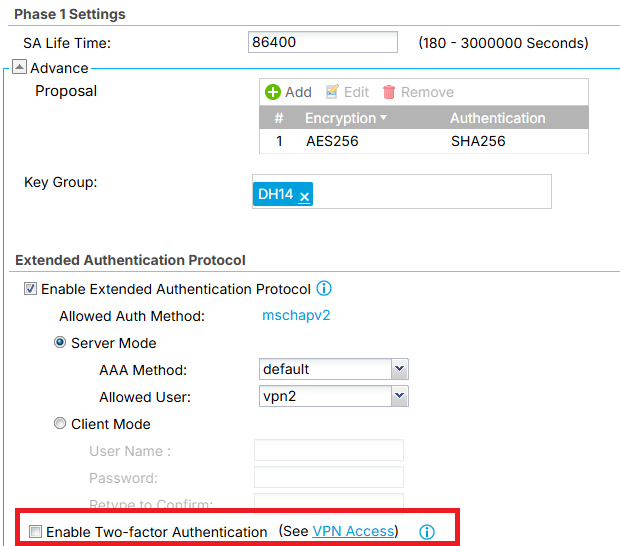
On FLEX200 (non H)not per user but per IKE gateway which can be trickly to do two on one WAN IP you can enable or disable for that gateway for given user groups when 2FA is globally enabled.
 0
0 -
0
-
I set up an SSL VPN, and my PC connects seamlessly to OpenVPN. However, when OpenVPN is connected, my PC stops browsing until I disconnect the VPN. How can I fix this? Thanks
0 -
Is the SSL VPN set to Internet and Local Networks (Full Tunnel) ?
On the FLEX H for the Internet over SSL VPN the WAN must be in trunk even if its passive.
if needed add a routing rule like this
Incoming any
Source Address important add the IP pool of your SSL VPN like 192.168.51.0/24
next hop WAN
Also have you added firewall rules for zone SSL_VPN ?
From SSL_VPN to Zywall DNS
From SSL_VPN to WANDo tests like DNS and ping
0 -
I set up a split tunnel. I don't want to use my internet connection via VPN (full tunnel)
0 -
open RemoteAccess_SSLVPN.ovpn in notepad do you see
redirect-gateway
0 -
Yes, there is a voice
pull-filter ignore "redirect-gateway"
0 -
Hi @methesrl ,
Sorry for the late response. Could you let us know whether your PC is able to browse the internet while connected to OpenVPN? If the issue persists, we have some suggestions that may help.
If the
RemoteAccess_SSLVPN.ovpnfile containsredirect-gateway, it indicates that your SSL VPN is configured as full tunnel, not split tunnel.We recommend reconfiguring the SSL VPN to split tunnel mode, remember to add your Local Network, then re-downloading the SSL VPN Configuration Download file and re-importing
RemoteAccess_SSLVPN.ovpnfile into your OpenVPN client. After that, please test again to see whether internet browsing works while the VPN is connected.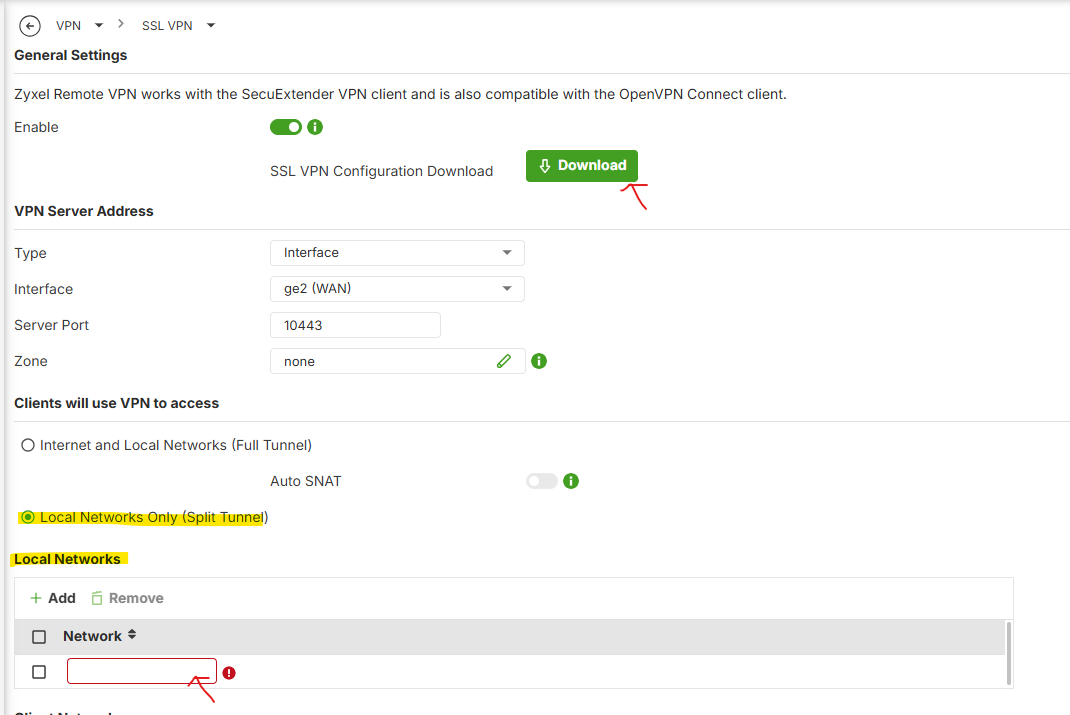
Zyxel_Judy
0
![[Deleted User]](https://us.v-cdn.net/6029482/uploads/defaultavatar/nN4PAQRO7TCNP.jpg)
 Freshman Member

 Zyxel Employee




 Guru Member







Categories
- All Categories
- 442 Beta Program
- 3.1K Nebula
- 237 Nebula Ideas
- 6.8K Security
- 740 USG FLEX H Series
- 376 Security Ideas
- 1.8K Switch
- 87 Switch Ideas
- 1.5K Wireless
- 58 Wireless Ideas
- 7.2K Consumer Product
- 319 Service & License
- 512 News and Release
- 99 Security Advisories
- 31 Education Center
- 10 [Campaign] Zyxel Network Detective
- 5.3K FAQ
- 34 Documents
- 91 About Community
- 119 Security Highlight


