Can't change EN password GS2220-28HP [FW V5.00(ABRR.2)]

 Freshman Member
I'm trying to use SSH cli on my switch.
GS2220-28HP# enable
Password: 1234
Warning: The enable password is default. Please change the enable password first.
GS2220-28HP# enable password 12345
enable *password
% Invalid input detected at '*' marker.
GS2220-28HP# password
%Invalid command "password"
Best Answers
-
Hi @cynik606,
Regarding the issue you’re experiencing, let me clarify this for you. Please note that you need to enter config mode to set up the password if you receive the message, “Warning: The enable password is default. Please change the enable password first.” For example:
GS2220# enablePassword: 1234Warning: The enable password is default. Please change the enable password first.GS2220# configGS2220(config)# password 12345Enable password level 14 set.GS2220(config)# exit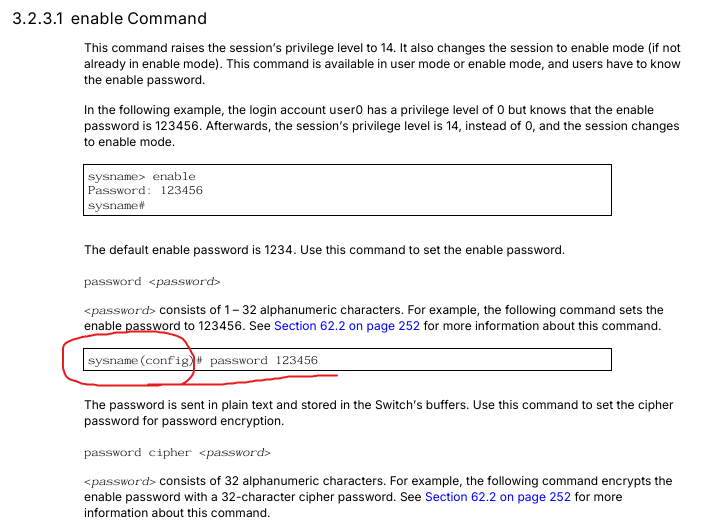
Zyxel Tina
1 -
Hi @cynik606,
Additionally, we have implemented an enhanced security feature for password configuration. If you prefer to keep your password hidden while setting it, we recommend using the following commands to ensure it is not visible to others during the process.
GS2220# configGS2220(config)# password privilege 14 passwordNew password:Retype password:Enable password level 14 set.
Zyxel Tina
1

 Zyxel Employee



All Replies
-
Hi @cynik606,
Regarding the issue you’re experiencing, let me clarify this for you. Please note that you need to enter config mode to set up the password if you receive the message, “Warning: The enable password is default. Please change the enable password first.” For example:
GS2220# enablePassword: 1234Warning: The enable password is default. Please change the enable password first.GS2220# configGS2220(config)# password 12345Enable password level 14 set.GS2220(config)# exit
Zyxel Tina
1 -
Hi @cynik606,
Additionally, we have implemented an enhanced security feature for password configuration. If you prefer to keep your password hidden while setting it, we recommend using the following commands to ensure it is not visible to others during the process.
GS2220# configGS2220(config)# password privilege 14 passwordNew password:Retype password:Enable password level 14 set.
Zyxel Tina
1
Categories
- All Categories
- 442 Beta Program
- 3K Nebula
- 222 Nebula Ideas
- 129 Nebula Status and Incidents
- 6.5K Security
- 619 USG FLEX H Series
- 348 Security Ideas
- 1.7K Switch
- 84 Switch Ideas
- 1.4K Wireless
- 53 Wireless Ideas
- 7K Consumer Product
- 298 Service & License
- 485 News and Release
- 92 Security Advisories
- 31 Education Center
- 10 [Campaign] Zyxel Network Detective
- 4.8K FAQ
- 34 Documents
- 88 About Community
- 105 Security Highlight


