NWA90AX - Can i block WEB configuration only for wlan interfaces ?

 Freshman Member
Hello,
I did see the web server configuration for NWA90AX : Configuration/System/www (standalone mode) with Enable HTTPS/HTTP global options.
but i don't find "how disable WEB configuration for wlan interfaces".
I only want to allow WEB or SSH access via the Ethernet port.
Any solution ?
Bests regards
All Replies
-
Don't think there is a way to do that.
But what does work is Management VLAN ID is other then your WLAN and uncheck As Native VLAN.
Note you need to setup on your router a VLAN subnet as tag for the AP Management to connect too
0 -
Thank you.
It's a shame, some access points offer this option. I'll try configuring it by managing multiple VLANs.
It would be great if this option were available in the future.
Alternatively, is it possible to restrict web/SSH administration to a single client? (IP access list)
0 -
Hi @Thierry95,
Welcome to the Zyxel Community!
On the NWA90AX in standalone mode, there isn't a direct setting to disable web configuration only for WLAN interfaces while keeping it enabled for Ethernet.
The web GUI access is tied to the device’s management IP, and the settings under Configuration > System > www only control global HTTP/HTTPS access, not interface-specific access.
If you want to restrict web configuration access to wired clients only, please consider:
- Network design – Design your network so that the WLAN client subnet cannot reach the NWA90AX management IP. The management IP should only be accessible from a trusted wired management network.
- Firewall rules – If you have an upstream firewall or router, you can create rules to block access to the AP’s management IP (ports 80/443) from WLAN subnets or VLANs, while allowing access from your wired management subnet.
- VLAN separation – Assign the AP’s management interface to a dedicated management VLAN, and ensure your WLAN SSIDs are mapped to different VLANs that do not have access to the management VLAN.
Additionally, may we confirm whether your main requirement is to prevent wireless clients from accessing the AP’s GUI?
If so, we recommend managing the AP via Nebula Control Center (cloud mode). In Nebula, enabling Guest Network on the SSID will automatically enable Layer-2 isolation, preventing guest Wi-Fi clients from accessing the AP’s web GUI.
Regarding your question about restricting web/SSH access to a single IP, this can also be done in Nebula under Site-wide > Configure > Site settings > Administrative Access.
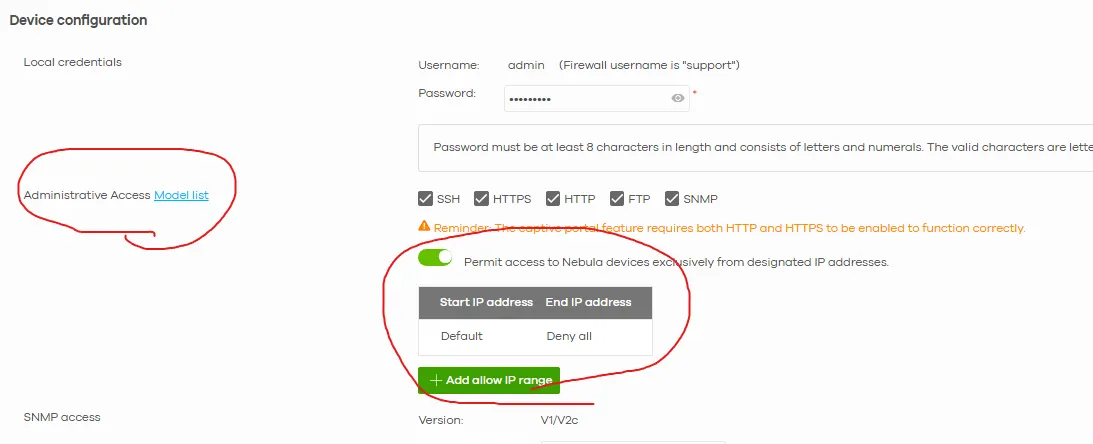
Please note this setting applies site-wide to all devices in the same Nebula site.
Zyxel Tina
0

 Guru Member




 Zyxel Employee



Categories
- All Categories
- 442 Beta Program
- 3K Nebula
- 222 Nebula Ideas
- 129 Nebula Status and Incidents
- 6.5K Security
- 619 USG FLEX H Series
- 348 Security Ideas
- 1.7K Switch
- 84 Switch Ideas
- 1.4K Wireless
- 53 Wireless Ideas
- 7K Consumer Product
- 298 Service & License
- 485 News and Release
- 92 Security Advisories
- 31 Education Center
- 10 [Campaign] Zyxel Network Detective
- 4.8K FAQ
- 34 Documents
- 88 About Community
- 105 Security Highlight


