BWM feature rule to bypass interface Egress rate limit

 Guru Member



How this would work and be useful if you don't have a L3 switch
On a FLEX 200 (non H) you limit on the interface LAN1 egress to 204800kbps but you have LAN2 and you want LAN1 to receive at full speed from LAN2 thats where this rule comes in to bypass the interface Egress rate limit by a rule LAN2 to LAN1.
Now you might think why not just not set a interface Egress rate limit and use BWM rules? Does not work the more rules you have like
rule 1 from LAN1 to WAN max inbound to 204800kbps
That on its own would work but if you did
rule 1 from LAN1 to WAN TCP_any Guaranteed inbound 102400kbps max inbound to 204800kbps
rule 2 from LAN1 to WAN UDP_any Guaranteed inbound 102400kbps max inbound to 204800kbps
Now you have a problem you want max speed at any given time but the max of 200Mb but with the above its 400Mb if both protocols are used where as with interface Egress rate limit at 204800kbps the two protocols stay under 200Mb and BWM does what it can to deliver so if TCP is only used 200Mb if UDP is only use 200Mb if both 200Mb
Comments
-
Hi @PeterUK
So, you need:
- From LAN 1 to any egress to 204800kbps (inbound 204800kbps).
- From LAN 1 to LAN 2 without the limit above.
For this purpose, if you use:
- rule 1 from LAN1 to WAN max inbound to 204800kbps.
- rule 1 from LAN1 to WAN TCP_any Guaranteed inbound 102400kbps max inbound to 204800kbps
- rule 2 from LAN1 to WAN UDP_any Guaranteed inbound 102400kbps max inbound to 204800kbps
With these three rules (what's the priority of these rule?), the maximum speed will not reach 400M but share with in 200M?
Zyxel Melen0 -
So Melen
Its more from LAN2 to LAN1 where LAN1 is receiving
That not how BWM rules(but I with test to be sure) works priority is 7 (on all rules as the way priority works is unforgiven unless used correctly with the current way it works) if the rules follow in order the 1st rule will only happen for all protocols rule 2 and 3 will not happen?
Edit after testing here yes rule 1 is used the other rules are not used
Then the other problem is what if you have traffic from WAN to LAN1 which will push over the 200Mb if both sides LAN1 to WAN and WAN to LAN1 happen at the same time.
0 -
Hi @PeterUK
Thank you update the test result. However, I still can't get the picture of the first request. Could you have a configuration screenshot with us, so we can better understand the current issue?
Zyxel Melen0 -
I really don't get why this is hard to understand?
You have clients on two different subnet LAN's you want that to be fast but you want a total egress when clients download from internet with rules per given services you simplify can't do that currently. You WANT to set the LAN interface to a fixed speed and we can do any number here but then LAN to LAN is slow due to that interface limit SO you need a way to bypass the interface rate egress limit. Should be just a case if sending packets out of the interface rate egress limit.
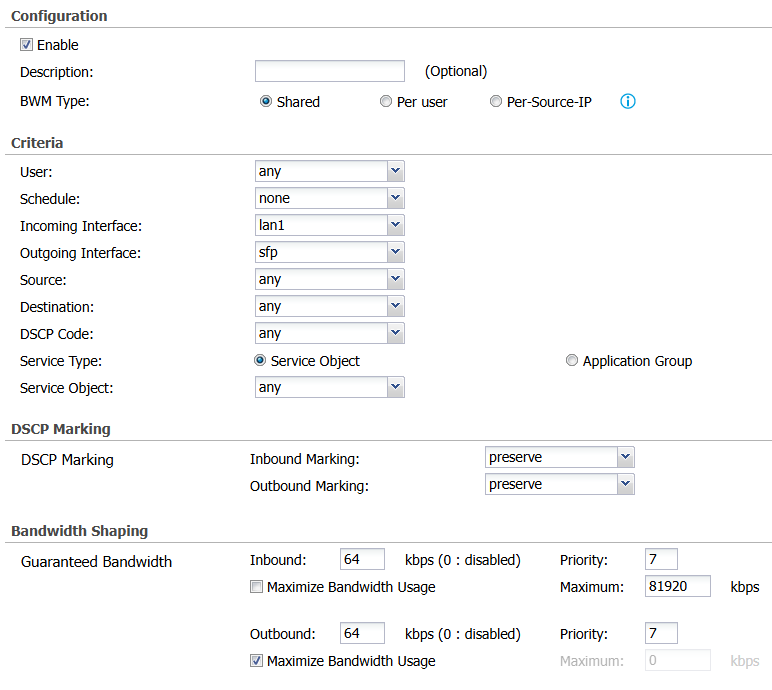
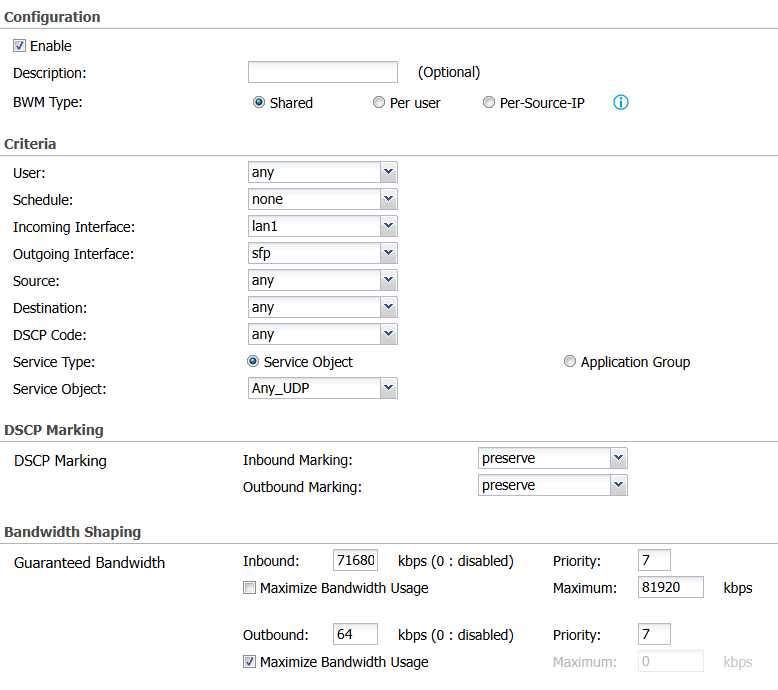
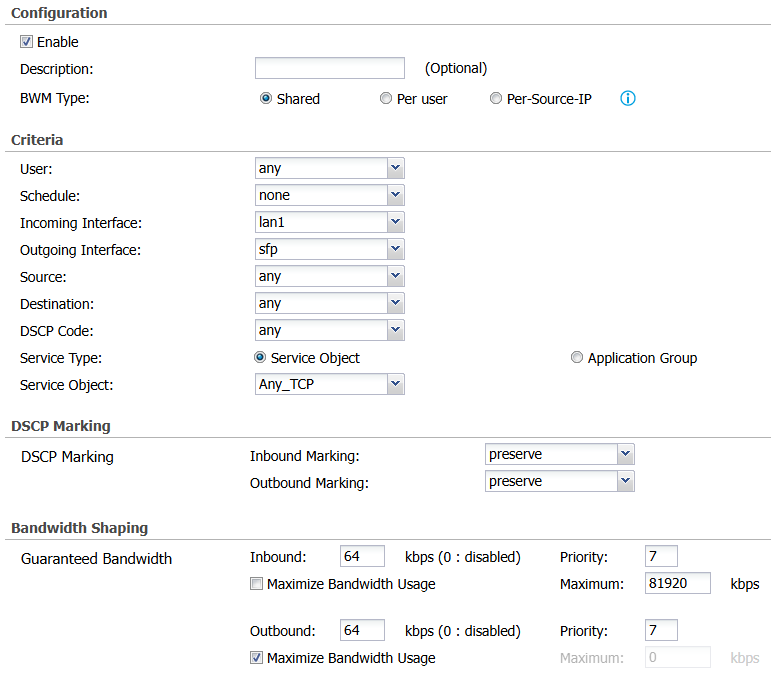
In a simple test I limit to 80Mb with rule 1 all services rule two UDP with a Guaranteed of 70Mb and rule 3 TCP at 80Mb
rule 2 and 3 don't get used how do I know this I run a YouTube 4K Video by UDP (QUIC) then with a download Manager to a big file by 8 threads the Video will buffer using rule 1 but if the remove the 1st rule put a Egress rate of 80Mb on the interface then Video and download run fine but LAN to LAN is slow.

 0
0 -
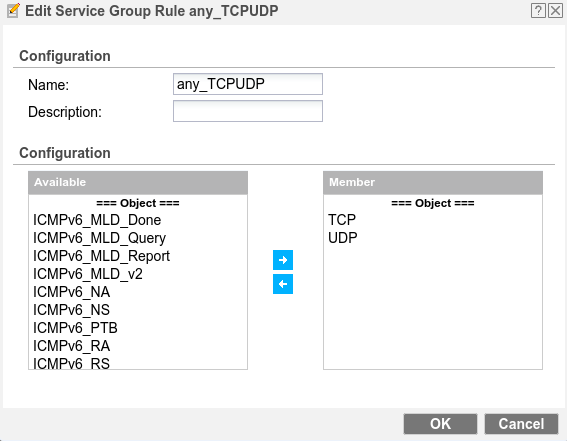
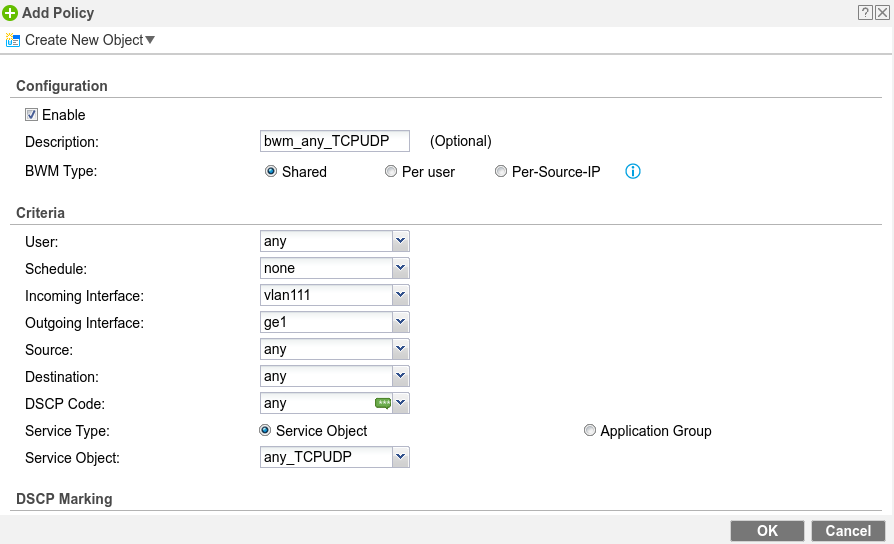
Can you try merging rule 2&3 with my example, and swapping resulting rule 1&2 position ?
Keep the interface bandwidth to the maximum the physical port allows for this.
0 -
Lets go into detail with more advanced thinking of the problem.
Let say ISP rate limits at 100Mb now when you hit that limit your ISP is in control of how they limit all your traffic that may cause problems for you low buffering or lag.
Now we want to do BWM for the following types of traffic ANY_UDP, HTTPS and HTTP and we want to Priority this traffic too and we want max speed but not at the same time.
So due to how rate limiting work when you set a egress rate sending out the interface is a smooth rate limit but the way in which happens is your ingress will be more in then you egress so if you don't limit under your ISP limit you buffer back at their rate limiting control. So let say 80Mb
rule1
incoming interface lan1
outgoing interface sfp
service ANY_UDP
inbound maximun 81920
Priority 1
rule2
incoming interface lan1
outgoing interface sfp
service HTTPS
inbound maximun 81920
Priority 2
rule3
incoming interface lan1
outgoing interface sfp
service HTTP
inbound maximun 81920
Priority 3The following dose not work when all rules are in play meaning 240Mb to which your ISP will be in control of your limiting.
The solution to this problem is Interface egress rate limit on LAN1 at 81920kbps the interface rate limit works with your BWM rules so that all rules can max out there speed at any given time at 80Mb and if all rules are in play they will all by controlled by and rate limited your end.
So that leaves us with this feature bypass interface Egress rate limit because if we now want to send a file from LAN2 to LAN1 we will be limited at 80Mb
0

 Zyxel Employee



 Freshman Member


Categories
- All Categories
- 442 Beta Program
- 2.9K Nebula
- 221 Nebula Ideas
- 128 Nebula Status and Incidents
- 6.5K Security
- 610 USG FLEX H Series
- 347 Security Ideas
- 1.7K Switch
- 84 Switch Ideas
- 1.4K Wireless
- 53 Wireless Ideas
- 7K Consumer Product
- 299 Service & License
- 483 News and Release
- 92 Security Advisories
- 31 Education Center
- 10 [Campaign] Zyxel Network Detective
- 4.8K FAQ
- 34 Documents
- 88 About Community
- 105 Security Highlight


