Access to the GS2220 switch with radius authentication

 Freshman Member



Hi.
Product Model : GS2220-10
Initial download version : V1.00 from 09/20/2019
ZyNOS F/W Version : V5.00 (ADB.2) | 09/01/2025
Hardware version: V1.0
I am trying to establish access to the switch through the Windows nps radius.
Authorization is successful, but the privilege level is 0.
I can't find any vendor-specific settings that will be used for Level 15 privileges.
I tried to use the settings, but they don't work.
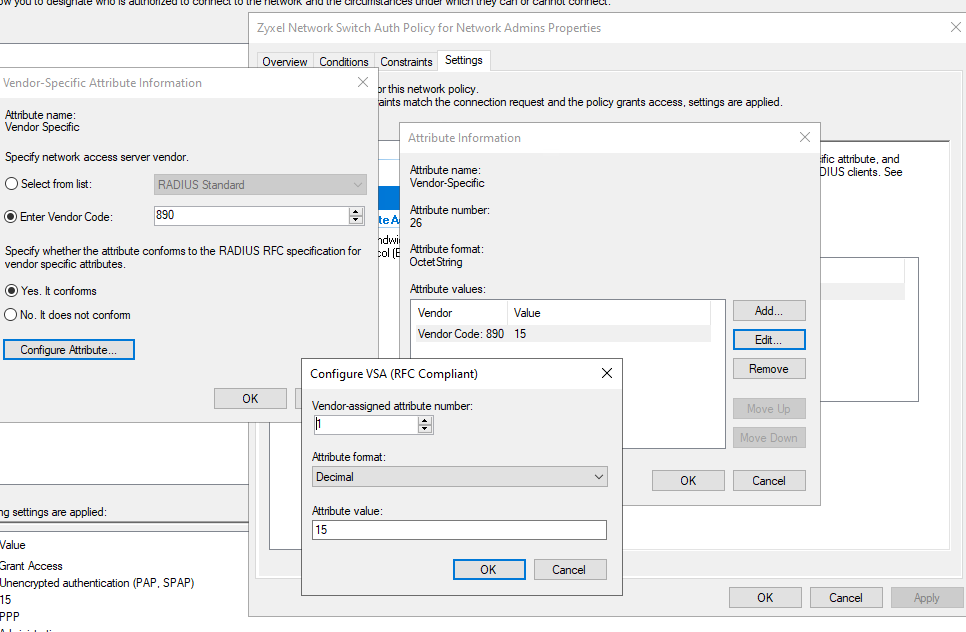
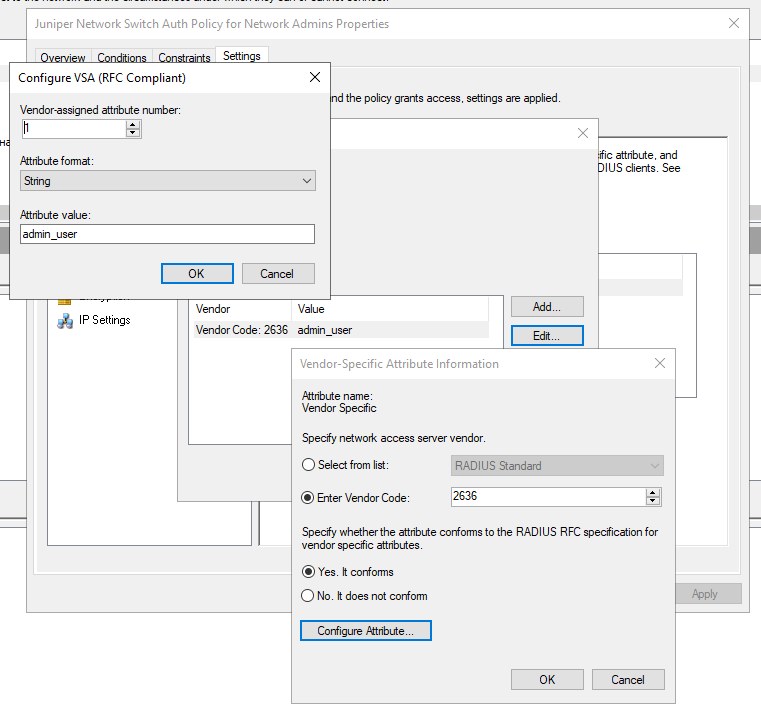
For example, on the juniper ex2200, the settings are as follows
Best Answers
-
I don't have a GS2220, but I checked the help page from other switches describing that the login privilege is up to 14.
This post also mentions privilege 14, so apparently there is no 15.
How to allow RADIUS admin to login the switch? (by Windows Server) — Zyxel Community1 -
Hi @XiLeiHaLo
Thank you very much, your answer helped me!
0

All Replies
-
Hi @Slava,
Thank you for reaching out to the Zyxel Community regarding RADIUS authentication for your GS2220-10 switch. I understand you're encountering an issue where authorization is successful, but the privilege level is showing as 0, and you're looking for the correct vendor-specific settings to achieve Level 15 privileges.
To assign the correct privilege level for RADIUS authenticated users on your Zyxel GS2220 switch (running ZyNOS F/W Version V5.00), you need to use a specific Zyxel Vendor-Specific Attribute (VSA).
Here's a step-by-step guide to configure this on your Windows NPS server:
- Zyxel Vendor ID: The vendor ID for Zyxel is 890.
- Attribute String: You need to create a new attribute string named "Zyxel-Privilege-AVPair".
- Attribute ID: The attribute ID for "Zyxel-Privilege-AVPair" is 3.
- Attribute Value: To set the privilege level to 15, the value for this attribute should be
shell:priv-lvl=15.
Here are the general steps to apply this within your Windows NPS configuration:
- In your Network Policy, under "Vendor Specific" attributes, select "Vendor Specific" and then "Add".
- Choose "Enter Vendor Code" and input
890. - Select "Yes. It conforms" and then "Configure Attribute".
- Add a new Vendor-assigned attribute. Set the attribute number to
3. - Set the Attribute format to "String".
- In the Attribute value field, enter
shell:priv-lvl=15.
If you continue to experience issues after applying these settings, please provide the following information to help us further diagnose the problem:
- A screenshot of your complete RADIUS server network policy settings for the Zyxel switch, specifically showing the Vendor Specific attributes.
- The full configuration file of your GS2220-10 switch.
- Packet captures of the RADIUS authentication process from your NPS server to verify the attributes being sent and received.
This AI response aims to provide initial troubleshooting steps and identify information needed for further diagnosis. Feel free to share additional details based on the suggestions above — this will help community members offer more targeted assistance.
If you have feedback or idea about this AI assistant, share them in Community Feedback.0 -
Thanks for the answer.
But with these settings, authentication does not work, and I get an incorrect username or password on the switch.
0 -
Attribute Value Pairs
AVP: t=Message-Authenticator(80) l=18 val=2b90ce7337ebb2896f7ab1b26c88b650
Type: 80
Length: 18
Message-Authenticator: 2b90ce7337ebb2896f7ab1b26c88b650
AVP: t=Vendor-Specific(26) l=25 vnd=ZyXEL Communications Corp.(890)
Type: 26
Length: 25
Vendor ID: ZyXEL Communications Corp. (890)
VSA: t=Zyxel-Privilege-AVPair(3) l=19 val=shell:priv-lvl=15
Type: 3
Length: 19
Zyxel-Privilege-AVPair: shell:priv-lvl=15
AVP: t=Service-Type(6) l=6 val=Administrative-User(6)
Type: 6
Length: 6
Service-Type: Administrative-User (6)
AVP: t=Class(25) l=46 val=a62c084d0000013700010200c0a86e2a00000000b76a02503946cd0601dc8732411bf711…
Type: 25
Length: 46
Class: a62c084d0000013700010200c0a86e2a00000000b76a02503946cd0601dc8732411bf7110000000000000052Message: 2026-01-19T16:15:29+03:00 GS2220-10 authentication: Privilege out of range: USER [ ]
0 -
I don't have a GS2220, but I checked the help page from other switches describing that the login privilege is up to 14.
This post also mentions privilege 14, so apparently there is no 15.
How to allow RADIUS admin to login the switch? (by Windows Server) — Zyxel Community1 -
Hi @XiLeiHaLo
Thank you very much, your answer helped me!
0

 Zyxel Community Virtual Assistant
Categories
- All Categories
- 442 Beta Program
- 3K Nebula
- 222 Nebula Ideas
- 129 Nebula Status and Incidents
- 6.5K Security
- 619 USG FLEX H Series
- 349 Security Ideas
- 1.7K Switch
- 84 Switch Ideas
- 1.4K Wireless
- 53 Wireless Ideas
- 7K Consumer Product
- 298 Service & License
- 485 News and Release
- 92 Security Advisories
- 31 Education Center
- 10 [Campaign] Zyxel Network Detective
- 4.8K FAQ
- 34 Documents
- 88 About Community
- 105 Security Highlight


