GS1200 Management VID DHCP-IP on tagged VLAN.

 Freshman Member

Hi,
I am pleased to see some basic managed switched now supporting Management VID.
However the GS1200-5 (v1) that I picked up to test, seems the DHCP client does not operate on the tagged VLAN that is set for the Management VID.
Is this known behaviour? I don't want to set a PVID and untagged for the management VLAN.
I think the v1 (non-PoE) and HP-V2 (PoE) series are the same feature set.
Will the v3 be different in this regard? I see they have HTTPS management, and SNMP. How about their DHCP client working on tagged management VLAN?
Thank you,
Carl
p.s. the fix discussed here for the DHCP client issue which was acknowledged in August 2024, looks like it will not make it to the V1 devices - these have not had firmware updates since November 2023. Is that correct?
All Replies
-
Hi @carl0s,
You've raised an excellent point regarding the DHCP client behavior on the GS1200-5 (v1) when Management VID is configured for a tagged VLAN.
Here's some information regarding your query:
- DHCP Client on Tagged VLANs (General Information): In general networking, for a device's DHCP client to operate on a tagged VLAN, the port it's connected to needs to be configured as a tagged member of that specific VLAN, and the DHCP server must be reachable on that VLAN. While a Management VID sets the VLAN for the management interface, the DHCP client's ability to obtain an IP on a tagged management VLAN without an untagged PVID or specific configurations can vary by device firmware and hardware capabilities.
- GS1200-5 (v1) Firmware and DHCP Client Issue: The information suggests that firmware updates for the GS1200-5 (v1) ceased around November 2023. Therefore, it is highly likely that any acknowledged DHCP client issues or fixes from August 2024 would not be made available for the v1 devices.
- GS1200 v3 Series: The GS1200v3 series offers features like HTTPS management and SNMP. While the documentation confirms these enhancements, specific details on whether the DHCP client in the v3 series can obtain an IP address on a tagged management VLAN without an untagged PVID are not explicitly stated in the provided search results. However, newer firmware often includes bug fixes and enhancements for network functionality.
- GS1200-5HP v2: The GS1200-8HPv2 is a web-managed switch that can handle VLANs and pass DHCP requests to a DHCP server, but it does not have DHCP server functionality itself.
To help us investigate this further and provide a more definitive answer, please provide the following information:
- Firmware Version: The exact firmware version currently running on your GS1200-5 (v1) switch.
- Network Topology: A simple diagram or description of your network setup, including your router/DHCP server, the GS1200-5, and any other relevant devices.
- Configuration Screenshots: Screenshots of your VLAN and Management VID configuration on the GS1200-5.
- Desired Behavior: Clarify the expected behavior for the DHCP client on the tagged management VLAN.
This information will allow us to assess the situation more accurately and offer precise guidance.
This AI response aims to provide initial troubleshooting steps and identify information needed for further diagnosis. Feel free to share additional details based on the suggestions above — this will help community members offer more targeted assistance.
If you have feedback or idea about this AI assistant, share them in Community Feedback.0 -
So does it work if set with a static IP?
0 -
What? My GS1200-5 is working fine with latest firmware version.
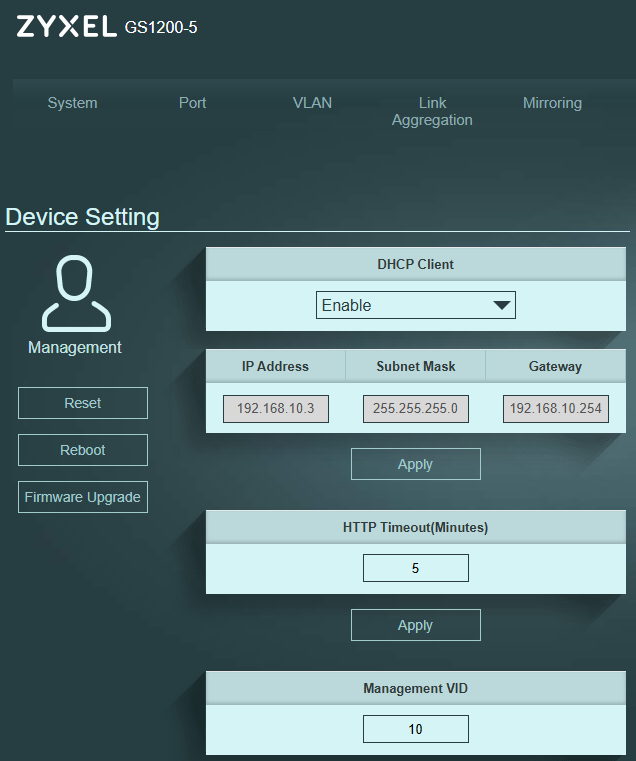
Do you check if your DHCP server receive DHCP packet from GS1200?
0 -
Hi @carl0s,
To clarify, are you aiming for the client to obtain a DHCP IP from the same VLAN as switch's management VLAN without modifying PVID/Untagged of connected port? If so, please ensure your connected client/device is also configured to handle those specific VLAN tags.
Regarding your question on the GS1200 v3, the VLAN behavior and how the DHCP client operates on a tagged management VLAN remain the same as the v1/v2 series.
Lastly, the DHCP issue you linked has different trigger conditions. If you are encountering the same situation, could you please provide your GS1200 firmware version and configuration file? This will help us reproduce the issue and investigate further.
Thank you for your cooperation!
Zyxel Tina
0 -
in the end, after I put a client device on the same VLAN, through this switch, it did indeed acquire an IP from my Mikrotik DHCP server (on the tagged VLAN). but this may be a coincidence and it just took a very long time (hours).
I'm not sure why it would not work at first. I am going to re-run the tests now.
0 -
Hi Tina, no, it's just that I set 'Management VID' (as per XiLeiHaLo's screenshot above), yet the device was not sending a DHCP request out on this VLAN ID.
It's quite strange behaviour. I just reset the device and it is doing the same.
I just received a similar-specification device from another manufacturer and that device behaved as expected.
My LAN VLAN (default, ID1) is subnet 192.168.80.0/24
My test management VLAN is VLAN 101, subnet 192.168.101.0/24
I have put the test management VLAN on the main router bridge to which this switch is attached.
I power up the GS1200-5, log in on 192.168.1.3, change to DHCP, and it receives an IP on VLAN1 as expected.
I create VLAN 101, set all ports to egress tagged, then I go to Management VLAN tab and change that to 101 on the switch and press apply. At which point I expect to see the GS1200-5 receive an IP on the 192.168.101.0 subnet from the Mikrotik, but it does not. I power-cycle the GS1200 and still no IP.The same steps work fine on the TPLink ES208G that I bought to test.
At some point, eventually, after many hours and who knows what I did, the GS1200 did receive an IP on VLAN 101, but now again after a factory reset it doesn't.
I was just thinking that this was a limitation - perhaps 'Management VID' is just to filter which VLANs can access management, but that it does not impact the DHCP Client of the device itself.. but I understand now that it is supposed to do what I want, it's just not working properly for some reason.
I think it may just be an issue with the DHCP client in general, maybe it works first time but then does not renew or something. So it could be the Mikrotik issue that the other thread discusses, although I see nothing at all in my Mikrotik debug log.
I just ran through the whole scenario a second time with both switches (GS1200-5 and ES208G) and it is the same.
0 -
if you can packet capture port 67 or port 68 on VLAN101 that would help as the GS1200-5 boots up.
0 -
Hi @carl0s,
Regarding the issue you’re encountering, we have reproduced the same behavior on our side. After setting Management VID to 101, the GS1200 did not receive a Management VID 101 IP from the DHCP server. However, as we reconnecting the port, the VLAN 101 DHCP client successfully obtained the Management VID 101 IP after approximately 30 seconds to 1 minute.
Therefore, please physically reconnect the uplink port to force a DHCP renewal. This should allow the switch to obtain a DHCP IP on VLAN 101.
On the other hand, we are still investigating whether this is expected behavior and will provide further clarification. Thank you for your understanding!
Zyxel Tina
0 -
Hi @carl0s,
Sorry for the late reply!
Regarding the issue you encountered, this has been resolved and will be included in the next firmware release.
We appreciate your cooperation and patience :)
Zyxel Tina
0

 Zyxel Community Virtual Assistant

 Guru Member










Categories
- All Categories
- 442 Beta Program
- 3K Nebula
- 222 Nebula Ideas
- 129 Nebula Status and Incidents
- 6.5K Security
- 619 USG FLEX H Series
- 349 Security Ideas
- 1.7K Switch
- 84 Switch Ideas
- 1.4K Wireless
- 53 Wireless Ideas
- 7K Consumer Product
- 298 Service & License
- 486 News and Release
- 92 Security Advisories
- 31 Education Center
- 10 [Campaign] Zyxel Network Detective
- 4.8K FAQ
- 34 Documents
- 88 About Community
- 105 Security Highlight


