Why TF does every firmware update screw up?!

 Ally Member


Seriously, defaulted another device!?
Pull you heads out.
These devices arent next door, arent "default" installs. Yet every other firmware update defaults or locks a device!
All Replies
-
USG FLEX 100
5.41 to 5.42 update.
was automatic
0 -
I did a firmware upgrade test and my firewall didn't encounter any issue.
Is it possible to share this device's configuration with us? Please collect "startup config", "startup-config-bad", "last good config", and etc., so we can use to replicate this issue. I will send you a private message so you can share the config files there.
Zyxel Melen0 -
Hi @MikeForshock
To avoid service impact, you can switch the firmware partition by going to
“MAINTENANCE > File Manager > Firmware Management”
We are checking this issue and will keep the community updated on the status.Web GUI:
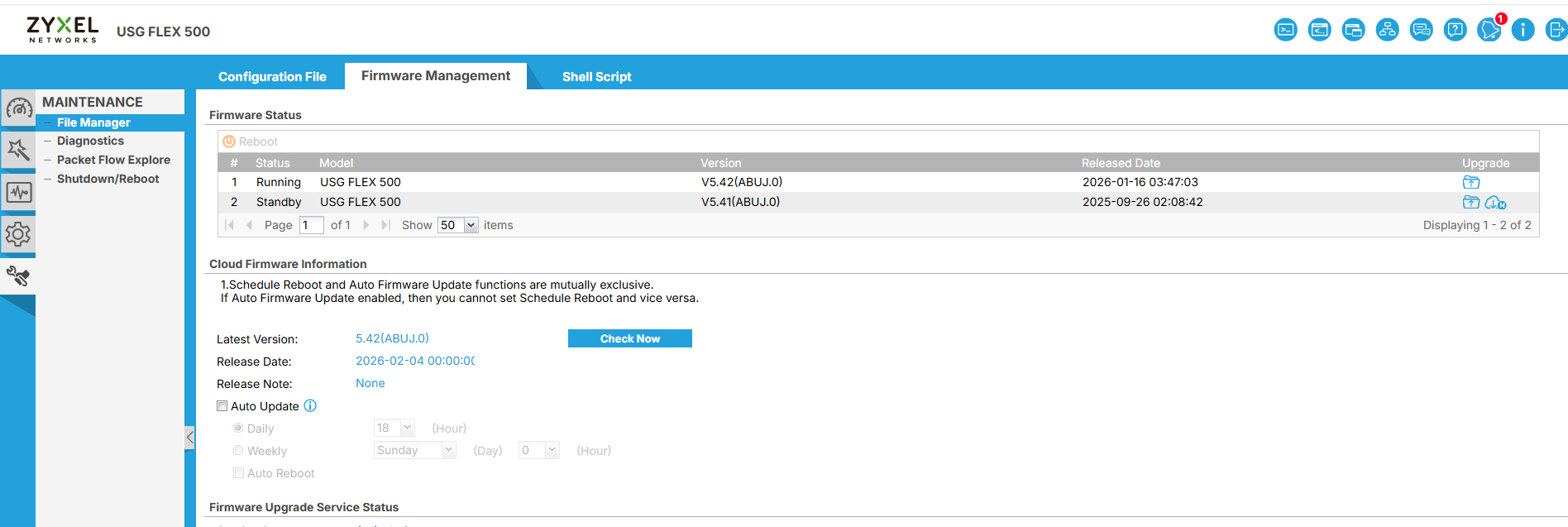
CLI:
https://community.zyxel.com/en/discussion/25856
0 -
Typica
Typical developer response: "It worked on my machine"
Literally all we had to do was tell it to use the pre-upgrade backup file and it restarted just fine.
How does that make sense?0 -
The unfortunate part of these setups is that they are static WAN and WAN2 becomes useless as well.
The LAN side is also non-typical, so the only computer that can connect, cannot as the head router/firewall is not allowed to connect to the DHCP LAN on the USG.This means a truck roll. In this case, the router is 2 hours away.
It has now happened in excess of 6 times of the years. Always when it does a firmware update, and across multiple units (USG FLEX 100, USG40)
0 -
5.42P1 introduces another issue…
Just a glutton for punishment as I stick with ZYxel it seems:
Poor updates, low cost or go with big name and get Big Cost (large attack surface for 0-day…)0 -
I have dozens of firewalls and routers in production (Nebula and not), I don’t see all of these issues when upgrading. Sometimes I see some bugs, fixable.
I’m curious to see your @MikeForshock config
0 -
I applied the configuration, change all certificate setting to default, you provided and upgrade from 5.41P0 to 5.42 P1 and there's no issue. The configuration still exists.
What other issue did you encounter? Please share more details so we can help to check.
Zyxel Melen0
 Zyxel Employee






 Guru Member

Categories
- All Categories
- 442 Beta Program
- 3K Nebula
- 222 Nebula Ideas
- 129 Nebula Status and Incidents
- 6.5K Security
- 619 USG FLEX H Series
- 349 Security Ideas
- 1.7K Switch
- 84 Switch Ideas
- 1.4K Wireless
- 53 Wireless Ideas
- 7K Consumer Product
- 298 Service & License
- 486 News and Release
- 92 Security Advisories
- 31 Education Center
- 10 [Campaign] Zyxel Network Detective
- 4.8K FAQ
- 34 Documents
- 88 About Community
- 105 Security Highlight


