GS1900-24EP get MAC of device connected to switch port

 Freshman Member
Accepted Solution
-
Hi @IronKalli
Thanks for sharing the screenshot.
May I check some details?
- What device is connecting on this port?
- Since MAC address entry has an aging time, 300 seconds, could you help to check if the device has any traffic when you can't find the MAC address on the MAC table?
- Can you find any MAC address for this port without filter?
About the firmware upgrade, since the later firmware versions (after V2.80 patch 1) didn't encounter this issue, I'm unsure if the issue been fixed after firmware upgrade. You may give it a try.
Zyxel Melen0

 Zyxel Employee



All Replies
-
Use any third party SNMP tool to query your GS1900 with this standard OID .1.3.6.1.2.1.2.2.1.6, so you don't need to calculate the MAC address range by yourself.
0 -
Hi @IronKalli
I check my GS1900 with latest firmware version, and I can check the MAC table by all and specific port. Path: Menu > Monitor > Mac table.
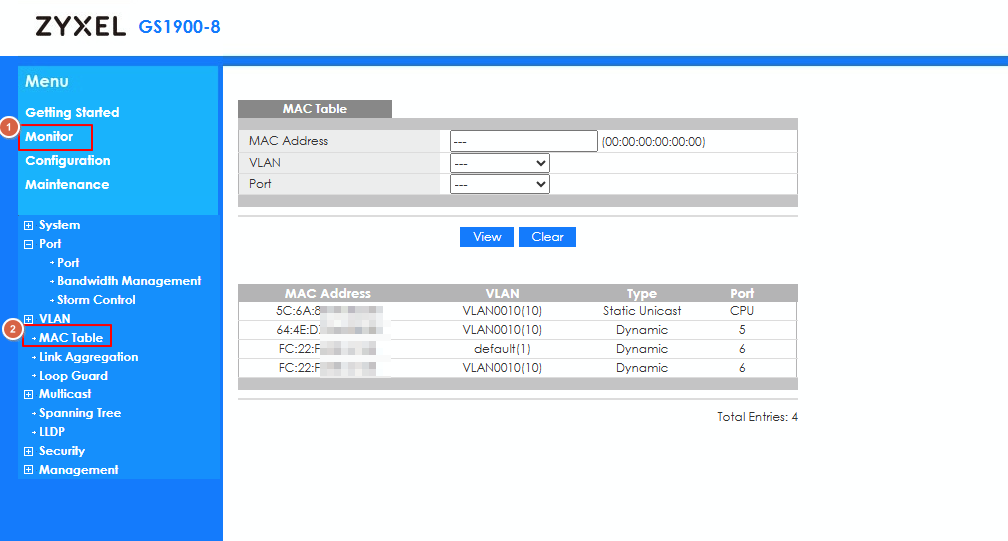
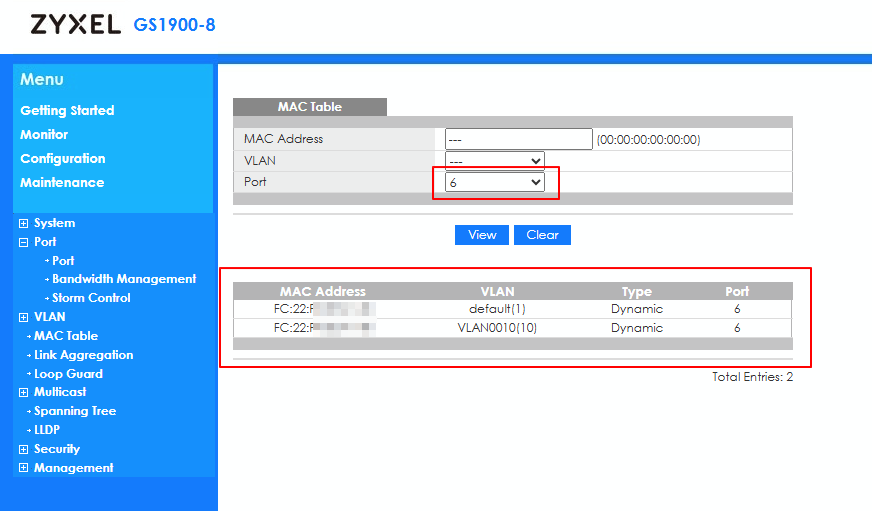
Could you share how did you filter? If possible, please record a video. Also, what's your device's firmware version?
Zyxel Melen0 -
Hi
thanks for your answer.
My problem seems to be device related.
It normally wokrs to see the MAC of any port as you described.
But with some (a bit special) devices the MAC is not shown, even though the port is up
Here is the firmware and port 9 shown
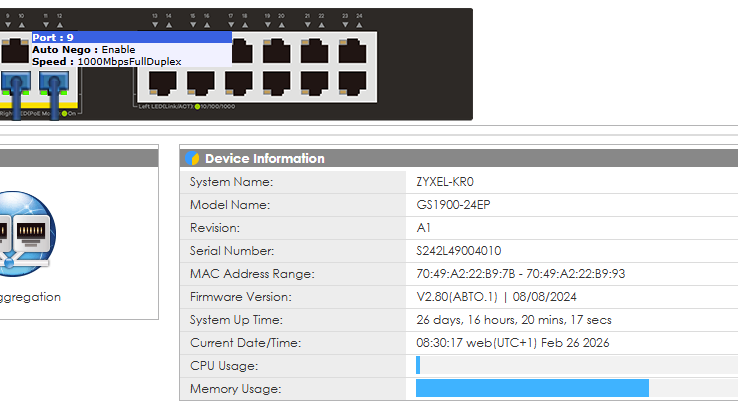
But the MAC filter definitely does not show any entry
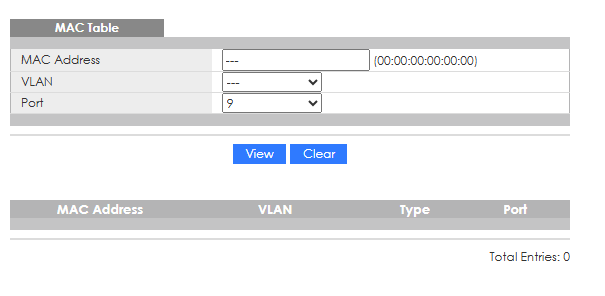
I don't know what's happening here, but it is a phenomen which only shows with my special devices
Do you think there is a firmware update I should try?
Thanks and regards
Kalli
0 -
Hi @IronKalli
Thanks for sharing the screenshot.
May I check some details?
- What device is connecting on this port?
- Since MAC address entry has an aging time, 300 seconds, could you help to check if the device has any traffic when you can't find the MAC address on the MAC table?
- Can you find any MAC address for this port without filter?
About the firmware upgrade, since the later firmware versions (after V2.80 patch 1) didn't encounter this issue, I'm unsure if the issue been fixed after firmware upgrade. You may give it a try.
Zyxel Melen0 -
The connecting device is a Laser Line Triangulation scanner 'scanCONTROL 2900' manufactured by company microepsilon
And you are right again, it is related to the traffic (the scanner had no traffic for quite a long period)
When I connect to the device and produce some traffic, I am able to see it in the MAC table of the GS1900
It disappears after a while, but is coming back when I produce traffic againSorry, I had no knowledge of the aging time
But now I know how to handle and have everything I needThanks a lot for your help
Kalli1



Categories
- All Categories
- 442 Beta Program
- 3K Nebula
- 222 Nebula Ideas
- 129 Nebula Status and Incidents
- 6.5K Security
- 619 USG FLEX H Series
- 349 Security Ideas
- 1.7K Switch
- 84 Switch Ideas
- 1.4K Wireless
- 53 Wireless Ideas
- 7K Consumer Product
- 298 Service & License
- 486 News and Release
- 92 Security Advisories
- 31 Education Center
- 10 [Campaign] Zyxel Network Detective
- 4.8K FAQ
- 34 Documents
- 88 About Community
- 105 Security Highlight


