GS1920-8HP V5.00(ABKZ.2) - LACP NOT working

 Guru Member



Hello everyone,
I installed a GS1920-8HP to communicate with a XGS1930-52HP.
On the big one I setup a LACP link on these ports (45-48):

While on the small one I setup a LACP link on these ports (1-4):
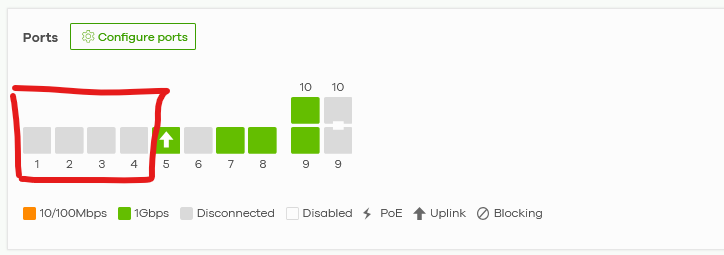
There is no way that I can use these ports (1-4) when I attach a cable from port 45 to port1, neither port2 and so on.
As you can see the GS1920-8HP is working only using port5 as uplink.
I tried to use Reprovision, no change.
I tried to split and relink the LACP group, no change.
Just to let you know, when I split the LACP the link 45<>1 was working, also the link 45<>2 was working so the cables are OK, there is an issue with LACP link on this switch.
Please let me know how to solve this issue.
Accepted Solution
-
Hi @GiuseppeR
After reviewing via remote SSH, we found that the LACP configuration was not properly synchronized in the running configuration of the neighboring switch (XGS1930).
Please try the following steps:- On NCC, disable LACP on ports 45–48 on the XGS1930 and save the configuration.
- On NCC, enable LACP again on ports 45–48 on the XGS1930 and save the configuration.
- Use "Reprovision" for the XGS1930
- Reconnect the cable between the switches(1920 and 1930) with the correct ports and check whether the LACP link establishes correctly.
In addition, the GS1920 will have a short disconnection after configure LACP on XGS1930 since its uplink is correctly connecting to XGS1930 port 45, which will be the LACP member port. It will be online after step 4.
Please let us know the result after performing the above steps. Thank you for your cooperation.
Zyxel Melen0
 Zyxel Employee


All Replies
-
Hi @GiuseppeR
After reviewing via remote SSH, we found that the LACP configuration was not properly synchronized in the running configuration of the neighboring switch (XGS1930).
Please try the following steps:- On NCC, disable LACP on ports 45–48 on the XGS1930 and save the configuration.
- On NCC, enable LACP again on ports 45–48 on the XGS1930 and save the configuration.
- Use "Reprovision" for the XGS1930
- Reconnect the cable between the switches(1920 and 1930) with the correct ports and check whether the LACP link establishes correctly.
In addition, the GS1920 will have a short disconnection after configure LACP on XGS1930 since its uplink is correctly connecting to XGS1930 port 45, which will be the LACP member port. It will be online after step 4.
Please let us know the result after performing the above steps. Thank you for your cooperation.
Zyxel Melen0 -
HI @Zyxel_Melen
everything works perfect right now with your procedure.
So next time that LACP will not work properly do you suggest to rebuild both LACP?
Is there something that I can check like you have done to see a misalignment in setup betweeen Nebula and onsite hardware?
Thanks
0 -
Hi @GiuseppeR
You may access the switch local GUI to check if the configuration is set. GS1920 and XGS1930 are able to access device's local GUI to check LACP settings on V5.00 firmware (and after).
For other models which firmware version aren't V5.00, you need to SSH to the device and use command "show running-config"
The LACP configuration is like:
lacp

trunk T1

trunk T1 lacp

trunk T1 interface 7

trunk T1 interface 8
Zyxel Melen0
Categories
- All Categories
- 442 Beta Program
- 3K Nebula
- 222 Nebula Ideas
- 129 Nebula Status and Incidents
- 6.5K Security
- 619 USG FLEX H Series
- 349 Security Ideas
- 1.7K Switch
- 84 Switch Ideas
- 1.4K Wireless
- 53 Wireless Ideas
- 7K Consumer Product
- 298 Service & License
- 486 News and Release
- 92 Security Advisories
- 31 Education Center
- 10 [Campaign] Zyxel Network Detective
- 4.8K FAQ
- 34 Documents
- 88 About Community
- 105 Security Highlight


