IKEv2 connection with Windows 11 native client



 Freshman Member
Dear Community,
I tried several settings derived from several articles in this forum, but nothing worked.
In the end, this is the state:
I created a dial-in connection for IKEv2-Clients using the wizard built into our ATP500.
Whenever I try to connect, I receive "server not responding".
Using the same setup to establish a L2TP-connection works fine, so we can widely exclude firewalls blocking IKE, I guess.
Any ideas?
All Replies
-
It would help to see the settings but really the wizard should of made this easy and work.
when you receive "server not responding" do you know if it connecting to your WAN IP?
Do you have other IKEv2 tunnels?
0 -
Hi @Seabob,
To further investigate the issue, could you please help check the following:
- First, confirm whether your firewall is deployed behind NAT. If yes, please verify that the uplink device has the required ports correctly forwarded (e.g., UDP 500 and UDP 4500 for IKEv2)
- The detailed configuration of your IKEv2 VPN settings
- If possible, please try to establish the VPN connection again and check whether there are any related error messages or log entries on the firewall at the time of failure. If so, kindly share them with us for further analysis
If any of the information contains sensitive data, please feel free to share it via private message.
Zyxel Tina
0 -
Depending on the levels of Phase 1 & 2 , you may need to do some PowerShell work to make the Windows client match the security requirements.
0 -
Thanks for your thoughts and I apologize for my silence, but in the meantime I tried to resolve the problem by opening a support-ticket. The result of the ticket and tweaking wizard-generated scripts is:
one site (Vienna) works fine now, but in our site BSU the IKE-Client gets connected to the wrong tunnel, which fails, of course. "Set SplitTunneling=false" didn't help.Maybe, we pick this issues up from here.
0 -
Hi @Seabob,
To help us investigate the issue, could you please provide and confirm:
- Support ticket number
- IKEv2 VPN configuration details
- Firewall logs/error messages when the connection fails
- NAT status and port forwarding settings (UDP 500/4500) on the uplink device
Feel free to share sensitive info via private message. This will help us understand the ticket progress and resolve the issue efficiently.
Thanks for your cooperation!
Zyxel Tina
0 -
Gateway:
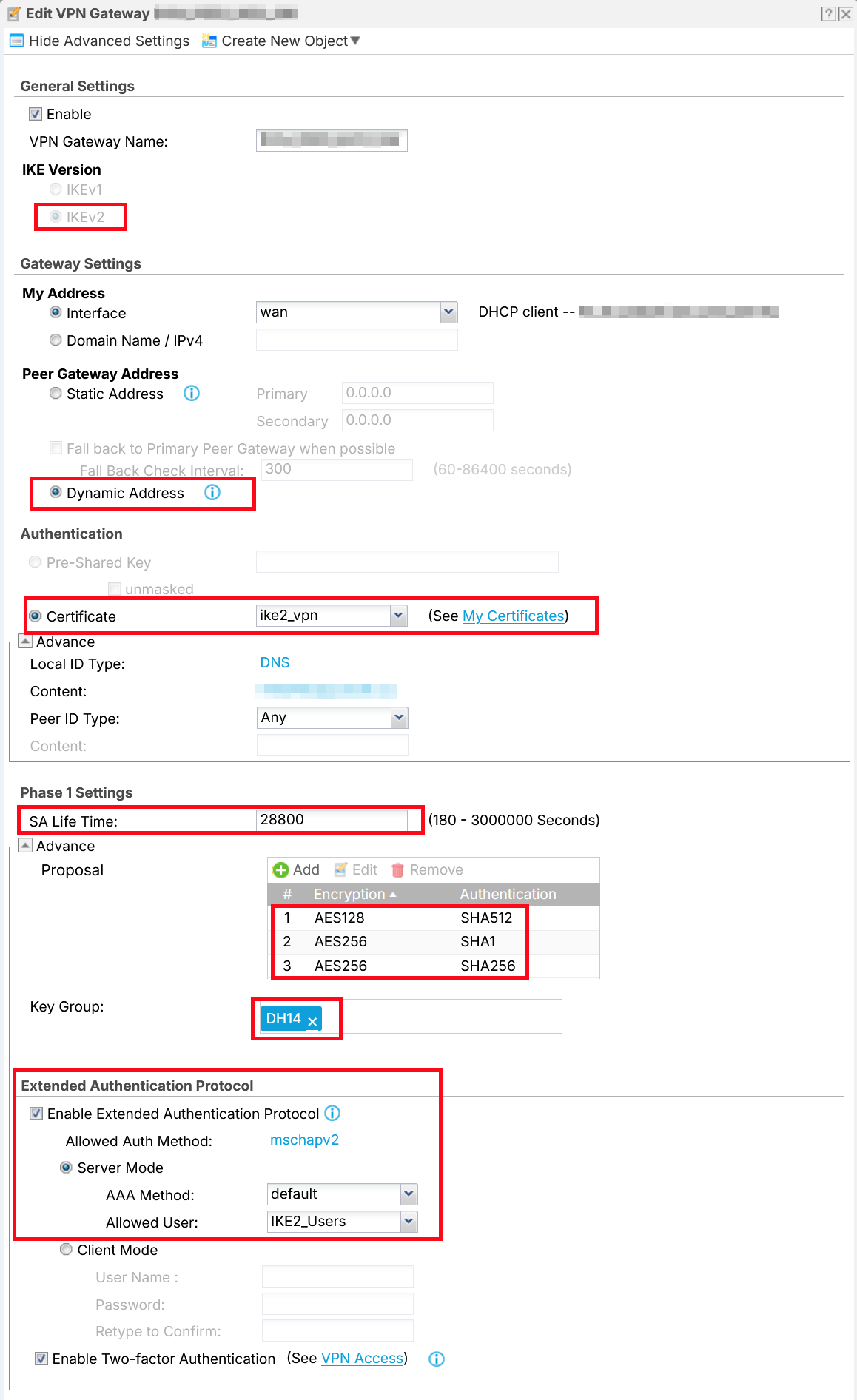
VPN:
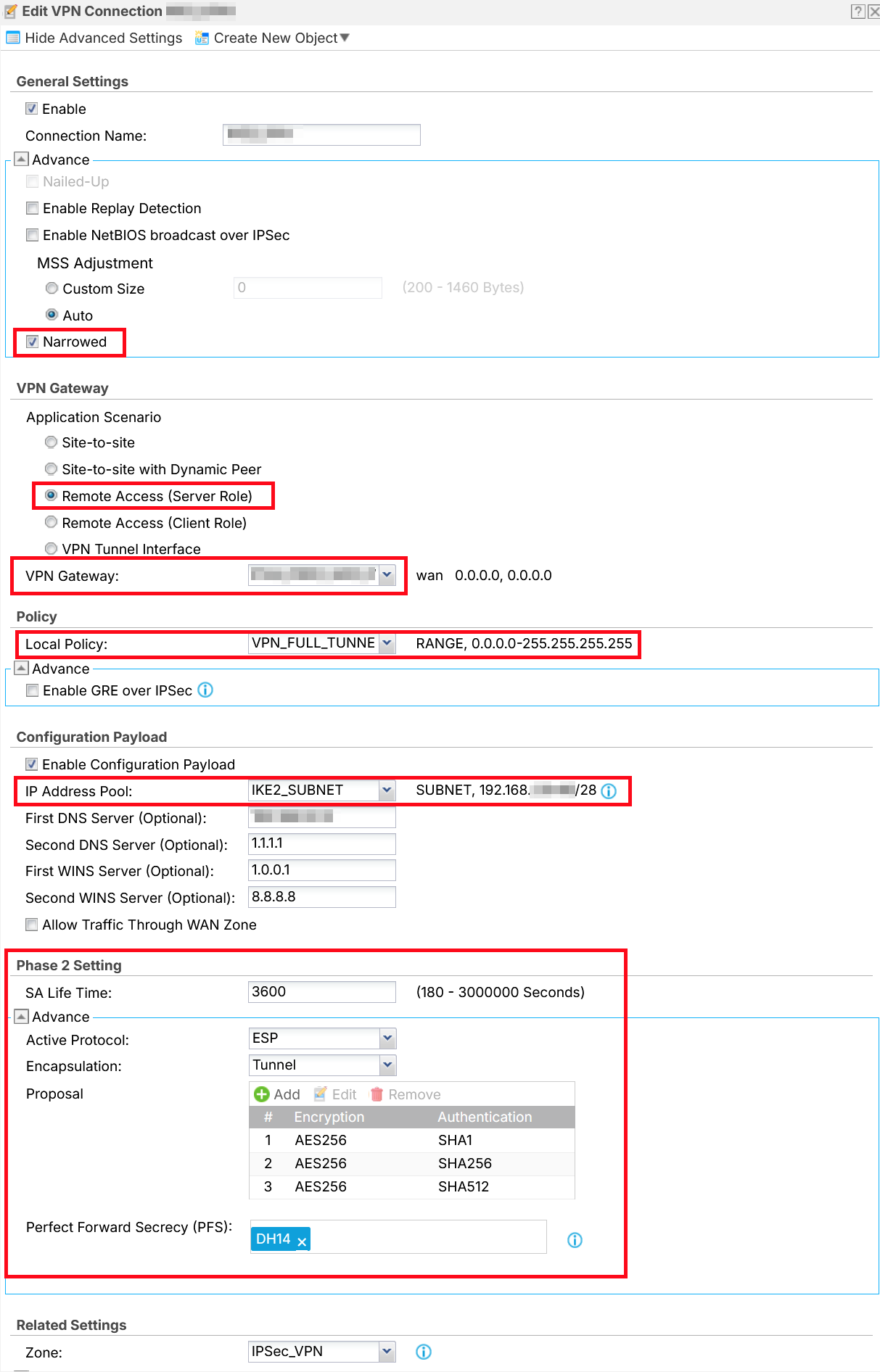
On the client device, the VPN certificate from the router must be installed (Trusted CAs store, Computer account context; this also applies to iPhone and Android), and the following must be added to the Windows registry (then restart the computer):
[HKEY_LOCAL_MACHINE\SYSTEM\CurrentControlSet\Services\RasMan\Parameters]
"NegotiateDH2048_AES256"=dword:00000001
Then configure the native Windows VPN client and set the VPN type to IKEv2.
If anything is unclear, any modern AI chatbot will be able to help you.
0 -
Has anyone managed to get this working over IPv6?
0




 Guru Member



 Zyxel Employee
 Ally Member


Categories
- All Categories
- 442 Beta Program
- 3.1K Nebula
- 243 Nebula Ideas
- 6.8K Security
- 783 USG FLEX H Series
- 389 Security Ideas
- 1.8K Switch
- 87 Switch Ideas
- 1.5K Wireless
- 58 Wireless Ideas
- 7.2K Consumer Product
- 325 Service & License
- 527 News and Release
- 101 Security Advisories
- 31 Education Center
- 10 [Campaign] Zyxel Network Detective
- 5.3K FAQ
- 34 Documents
- 91 About Community
- 122 Security Highlight


