XMG1915-EP10 does not send syslog messages




 Freshman Member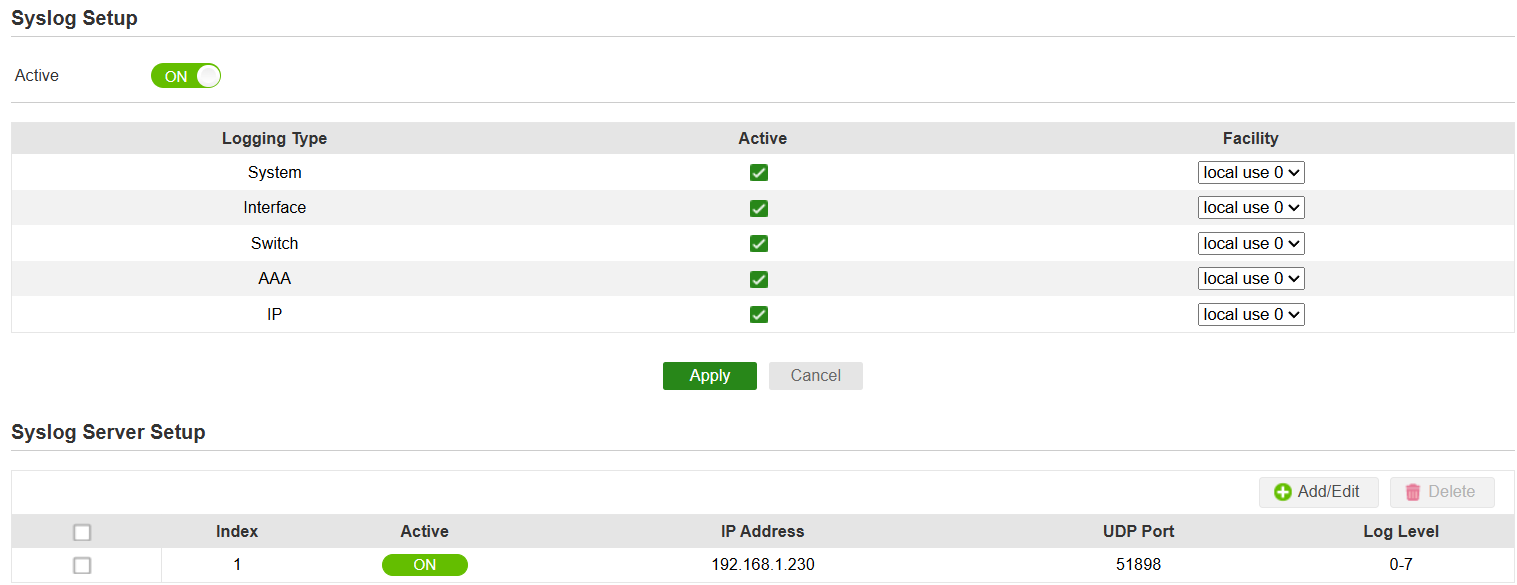
Accepted Solution
-
Hi @grip ,
Based on your screenshot, the Syslog configuration on your XMG1915-10EP appears correct. To help us identify why the messages aren't reaching your server, please try the following troubleshooting steps:
- Test Connectivity: Navigate to Maintenance > Diagnostic in the web GUI and attempt to ping the Linux server IP (192.168.1.230) directly from the switch to confirm there is a valid path.
- Check Local Firewall: Confirm that the Linux system's firewall is explicitly allowing incoming traffic on UDP port 51898. Since this is a non-standard port (default is usually 514), the host firewall or the syslog daemon configuration (e.g., rsyslog or syslog-ng) must be specifically set to listen on this port.
- Trigger a Log Event: To force a log generation for testing, try logging out and back into the switch or toggling a physical port (plug/unplug a cable) and check if any packets are captured on the server via tcpdump or wireshark.
To narrow down the issue, could you share:
- The current firmware version of your switch (found on the Dashboard)?
- Is the switch in the same subnet with other systems and the linux syslog server?
Additionally, we replicate this case, and our syslog server receives the log from XMG1915-10EP (latest firmware version).
Zyxel Melen0




 Zyxel Employee
All Replies
-
Hi @grip ,
Based on your screenshot, the Syslog configuration on your XMG1915-10EP appears correct. To help us identify why the messages aren't reaching your server, please try the following troubleshooting steps:
- Test Connectivity: Navigate to Maintenance > Diagnostic in the web GUI and attempt to ping the Linux server IP (192.168.1.230) directly from the switch to confirm there is a valid path.
- Check Local Firewall: Confirm that the Linux system's firewall is explicitly allowing incoming traffic on UDP port 51898. Since this is a non-standard port (default is usually 514), the host firewall or the syslog daemon configuration (e.g., rsyslog or syslog-ng) must be specifically set to listen on this port.
- Trigger a Log Event: To force a log generation for testing, try logging out and back into the switch or toggling a physical port (plug/unplug a cable) and check if any packets are captured on the server via tcpdump or wireshark.
To narrow down the issue, could you share:
- The current firmware version of your switch (found on the Dashboard)?
- Is the switch in the same subnet with other systems and the linux syslog server?
Additionally, we replicate this case, and our syslog server receives the log from XMG1915-10EP (latest firmware version).
Zyxel Melen0 -
Hi,
sorry for the late reply; the switch did send the syslog messages correctly as configured, the problem was that this messages have the old RFC3164 protocol format that Grafana Alloy does not understand.
I had to start a rsyslog server and forward the messages to the Alloy listener with this rsyslog configuration block:
Hope it will help someone with the same problem.
1
Categories
- All Categories
- 442 Beta Program
- 3.1K Nebula
- 243 Nebula Ideas
- 6.8K Security
- 783 USG FLEX H Series
- 389 Security Ideas
- 1.8K Switch
- 87 Switch Ideas
- 1.5K Wireless
- 58 Wireless Ideas
- 7.2K Consumer Product
- 325 Service & License
- 527 News and Release
- 101 Security Advisories
- 31 Education Center
- 10 [Campaign] Zyxel Network Detective
- 5.3K FAQ
- 34 Documents
- 91 About Community
- 122 Security Highlight


