[200 H, firmware 1.37] Is the device failing to send certain email notifications?




 Freshman Member
I'm testing email notifications and I get the impression that the 200H isn't sending some of them.
Part 1. "Log Alert" - "DoS Prevention" notifications.
I defined a "Log Alert" that includes all "Authenticate" events and all "Security" events.
This was the only notification defined in this test.
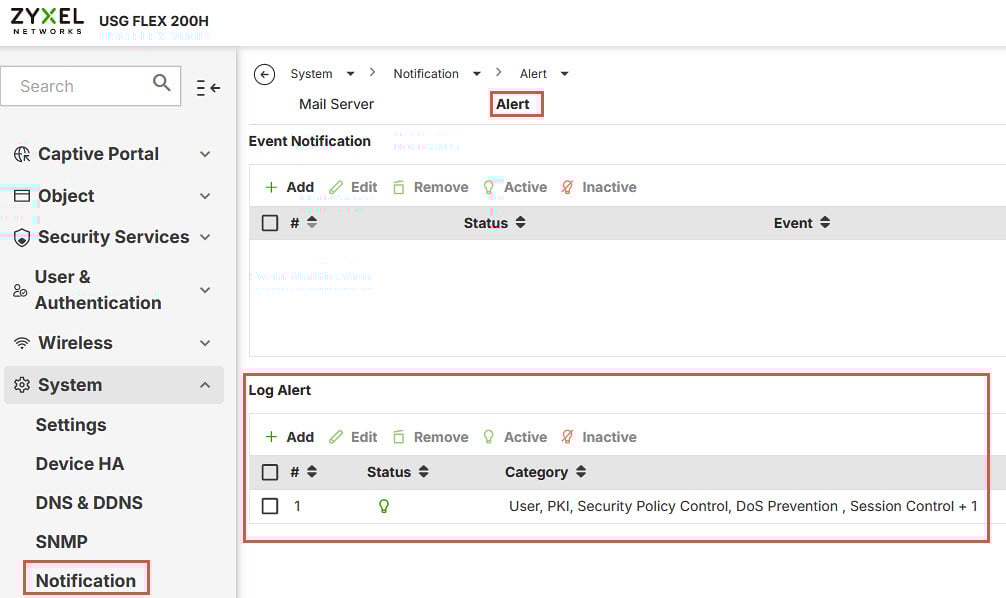
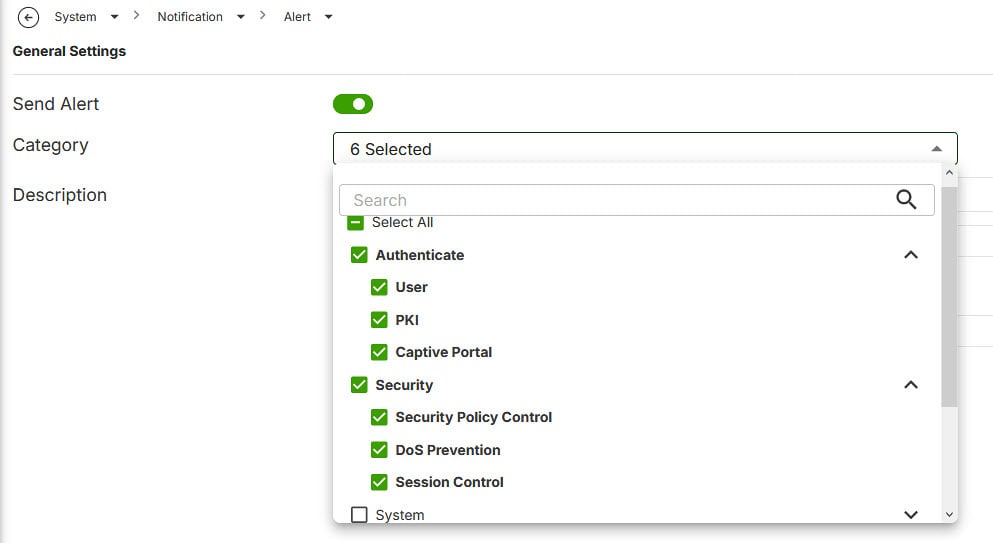
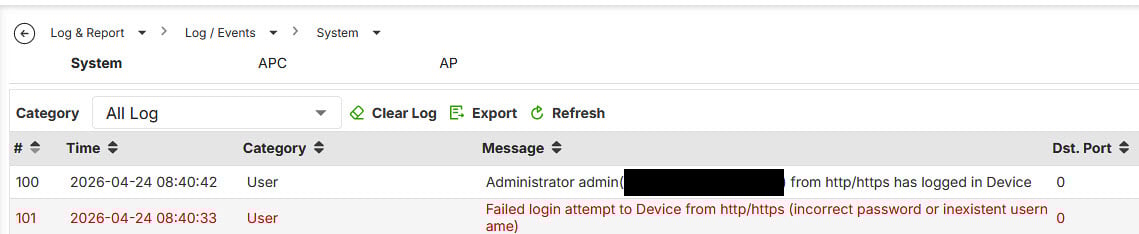
Next, I intentionally entered incorrect login credentials into the device. Next, after logging in successfully (as an administrator), I checked the event log and the login error was indeed recorded there.
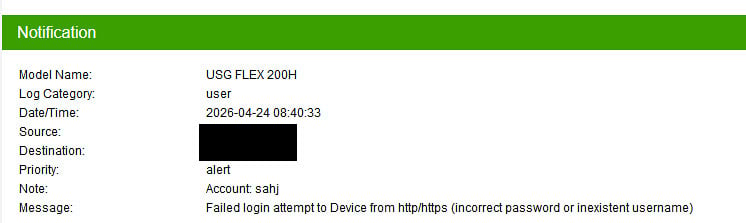
I also received an email notification about the failed login.
I did not receive a notification about a successful login (as an administrator).
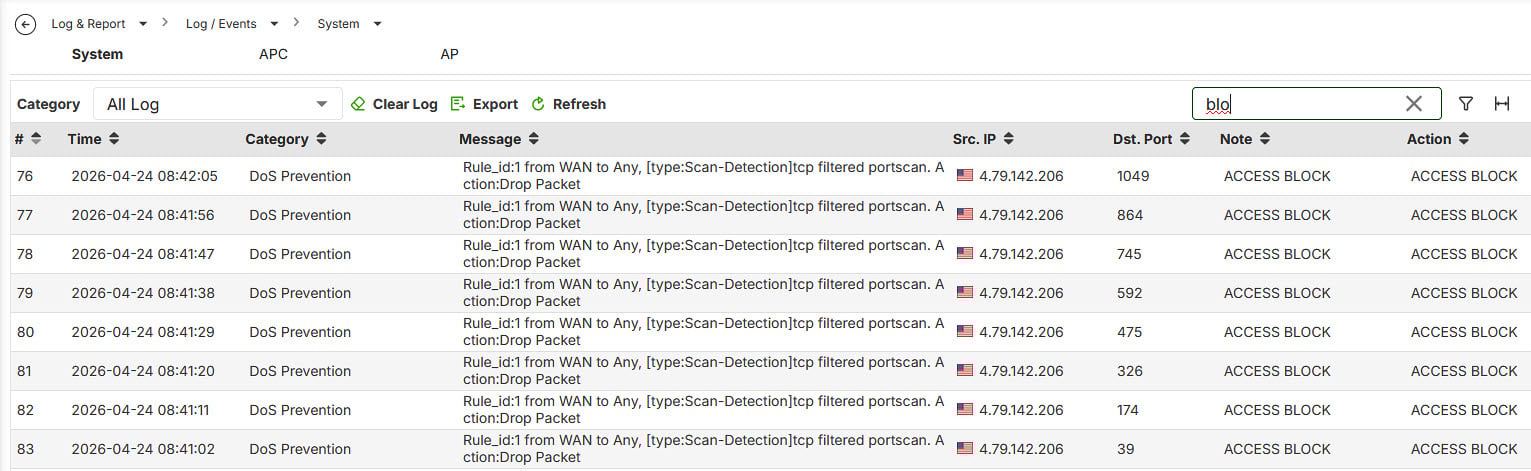
Next, I performed a port scan using the "ShieldsUP!" service. The test was successful, and the port scan was logged in the event log.
However, I did not receive an email notification.
Questions:
1.1. Why didn’t I receive an email notification about a successful login as an administrator?
1.2. Why didn’t I receive an email notification about the "DoS Prevention" event?
______________________________________________________________________
Edit:
I deleted the second part of the post - it was my mistake.
And one more general question: why can only 4 "Event Notification" alerts and only 4 "Log Alert" alerts be defined?
This limitation forces me to group alerts for different events, which I would prefer to have defined separately.
Best regards,
Wojtek
Best Answers
-
Hi @Wojtek,
Thank you for your information!
Regarding your two questions:
1. Missing email notification for "DoS Prevention"
We would like to investigate this further by connecting remotely to your device. Could you please allow HTTPS Web GUI access from the WAN side so our team can take a look? You may follow the steps in this FAQ for guidance.
Once that is set up, please share the access details with us via private message by clicking My Account > Message.
2. The 4-alert limit for "Event Notification" and "Log Alert"
To help us better understand your needs, could you please tell us a bit more about the following?
- What is your specific use case?
- At minimum, how many alert entries would be sufficient for your use case?
In the meantime, please note that alert notifications can also be configured on Nebula, and these settings work independently from the local GUI.
(Site-wide > Configure > Alert settings)
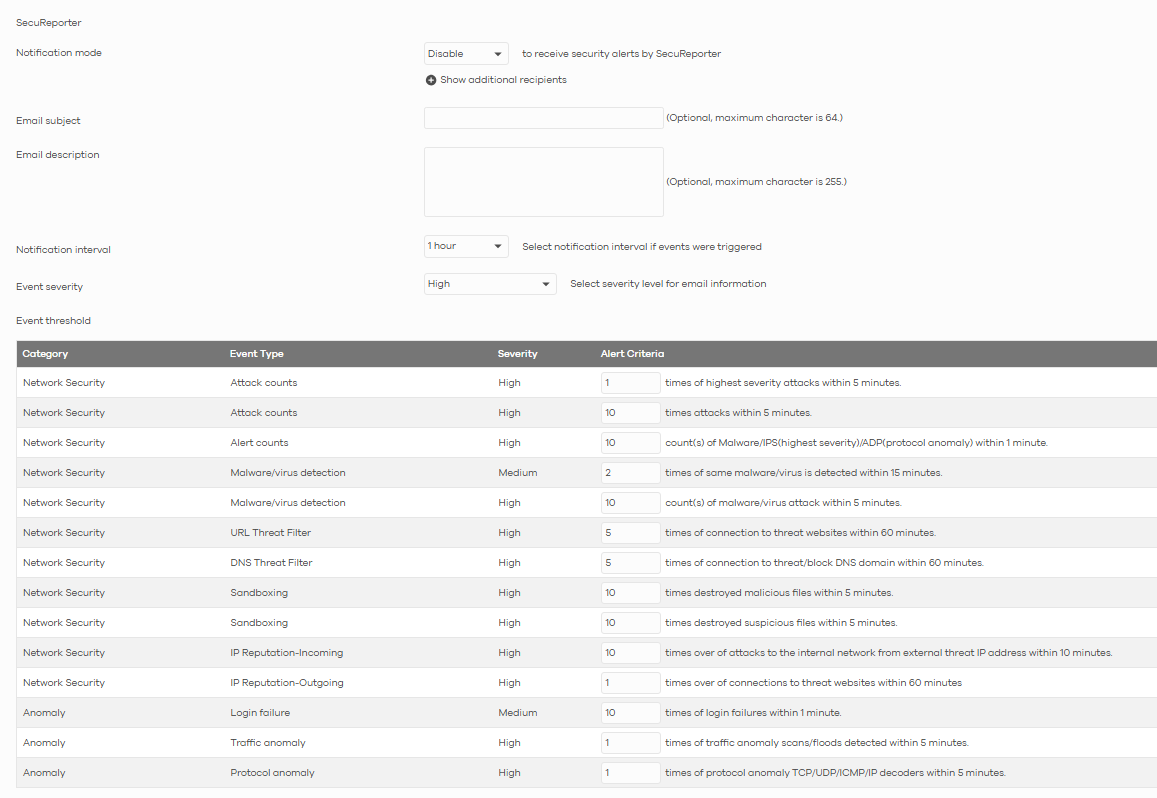
Therefore, if certain alert types are already available on NCC, we would recommend configuring them there instead. This way, you can save your four local GUI slots for events and categories that are only configurable locally, effectively giving you broader coverage overall.
Hope this helps, and we look forward to your reply!
Zyxel Tina
0 -
Hi @Wojtek,
Thank you for your feedback.
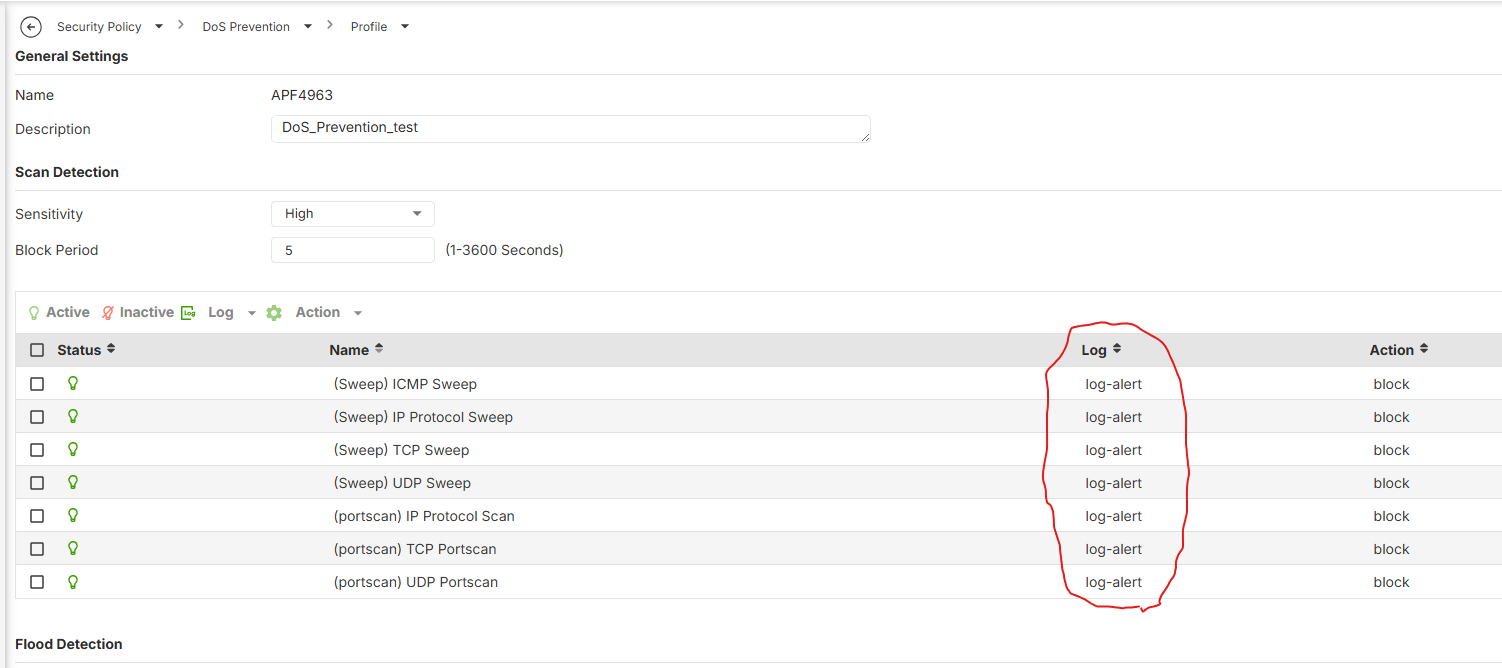
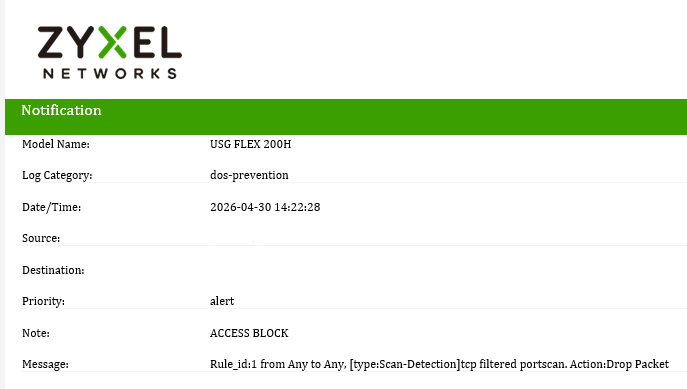
Our testing shows DoS Prevention notifications are sent successfully. Could you please double-check your configuration, especially the Log field in the DoS Prevention profile?
It should be set to "Log Alert". If only "Log" is selected, events will be recorded locally but won't trigger email alerts.
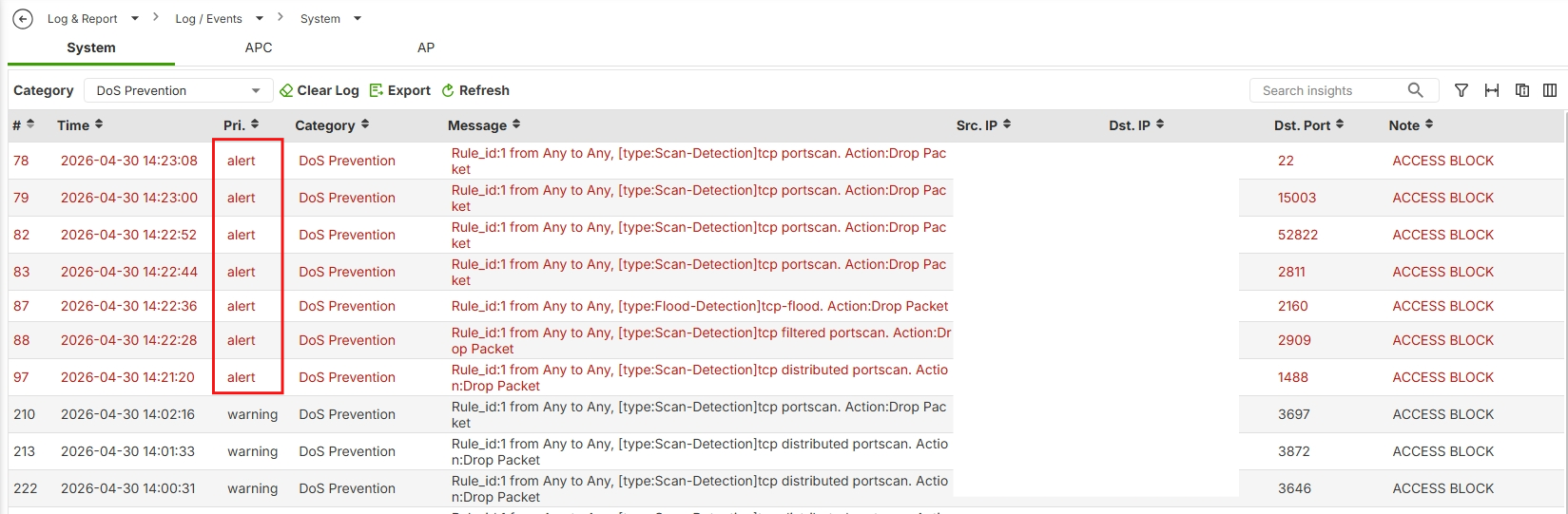
Additional verification: In the logs, when Log Alert is correctly configured, the priority field will show "alert" (not just "warning").
Please refer to the example image below showing a successful email notification.
Zyxel Tina
0





 Zyxel Employee
All Replies
-
I think I know the answer to question 1.1.
The login error was related to the user account (I entered random letters).
I received an email notification because "Log Alert" - "Authenticate" applies to users.
However, I did not receive an email notification about a successful login as an administrator, because notifications regarding administrator logins must be configured in "Event Notification".
I apologize for the confusion regarding this matter.
However, I am still curious about question 1.2 and the limit of only four email notifications.Best regards,
Wojtek0 -
Hi @Wojtek,
Thank you for your information!
Regarding your two questions:
1. Missing email notification for "DoS Prevention"
We would like to investigate this further by connecting remotely to your device. Could you please allow HTTPS Web GUI access from the WAN side so our team can take a look? You may follow the steps in this FAQ for guidance.
Once that is set up, please share the access details with us via private message by clicking My Account > Message.
2. The 4-alert limit for "Event Notification" and "Log Alert"
To help us better understand your needs, could you please tell us a bit more about the following?
- What is your specific use case?
- At minimum, how many alert entries would be sufficient for your use case?
In the meantime, please note that alert notifications can also be configured on Nebula, and these settings work independently from the local GUI.
(Site-wide > Configure > Alert settings)
Therefore, if certain alert types are already available on NCC, we would recommend configuring them there instead. This way, you can save your four local GUI slots for events and categories that are only configurable locally, effectively giving you broader coverage overall.
Hope this helps, and we look forward to your reply!
Zyxel Tina
0 -
Thank you very much for your response.
1. I’m sorry, but I do not consent to remote access to the device.
If this issue cannot be investigated without remote access, I will work without email notifications.Edit
I ran another test: I reset the device to its default settings (firmware 1.37).
Then I performed the same test as the one described in my first post.
The result was the same: I received an email notification about a failed login, but I did not receive an email notification about the port scan.
So it seems that the problem is not related to my device’s configuration.2. Ideally (in my opinion), it would be best if we could define as many alerts as there are event types (i.e., 7).
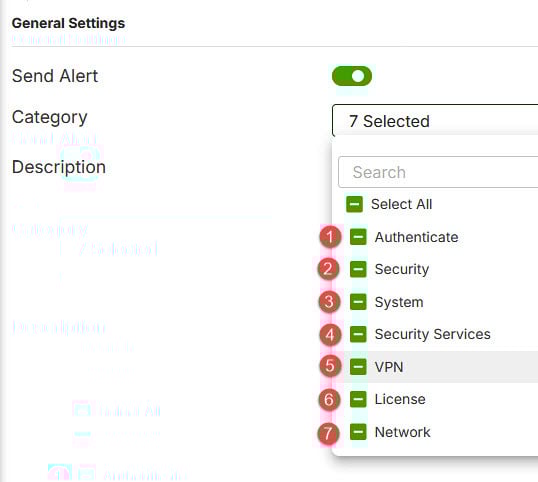
This would allow us to define alerts where the email notification title itself would indicate what the notification is about.
With a limit of 4 and the grouping of alerts from different categories, it is difficult to define an unambiguous email notification title.
But the information about the possibility of configuring additional alerts in NCC is sufficient for me.Thank you again and best regards,
Wojtek0 -
Hi @Wojtek,
Thank you for your feedback.
Our testing shows DoS Prevention notifications are sent successfully. Could you please double-check your configuration, especially the Log field in the DoS Prevention profile?
It should be set to "Log Alert". If only "Log" is selected, events will be recorded locally but won't trigger email alerts.
Additional verification: In the logs, when Log Alert is correctly configured, the priority field will show "alert" (not just "warning").
Please refer to the example image below showing a successful email notification.
Zyxel Tina
0 -
Of course, you were right: I had the “log” option selected instead of “log-alert.” After changing these settings, I'm now receiving email notifications.
Thank you for your help, and I'm very sorry for taking up your time over such a trivial matter.
Best regards
Wojtek0
Categories
- All Categories
- 442 Beta Program
- 3.1K Nebula
- 241 Nebula Ideas
- 6.8K Security
- 755 USG FLEX H Series
- 379 Security Ideas
- 1.8K Switch
- 87 Switch Ideas
- 1.5K Wireless
- 58 Wireless Ideas
- 7.2K Consumer Product
- 320 Service & License
- 512 News and Release
- 99 Security Advisories
- 31 Education Center
- 10 [Campaign] Zyxel Network Detective
- 5.3K FAQ
- 34 Documents
- 90 About Community
- 119 Security Highlight


