10G SFP+ link flapping between Zyxel XS1930-10 and MikroTik CSS610-8G-2S+IN — MM SR unstable but 1G

 Freshman Member
Hi
I have a question on transceiver, which I bought from a OEM compatible supplier,
I’m facing a strange issue when trying to establish a stable 10G link between a Zyxel XS1930-10 and a MikroTik CSS610-8G-2S+IN using SFP+ ports.
Setup:
- Transceivers: 10G SR SFP+ modules (850nm, multimode)
- Fiber: LC-LC OM3 multimode patch cord
- Distance: ~5 meters (very short run)
Problem:
On the MikroTik side, the link shows as 10G Full Duplex and stable, but on the Zyxel XS1930, the port continuously flaps:
link up 10G/F
link down
link up 10G/F
link down
This happens every few seconds.
What I’ve tried:
- Replaced fiber patch cords → same issue
- Swapped SFP+ modules → same issue
- Changed SFP+ ports on both switches → no improvement
- Forced 10G Full Duplex on Zyxel (MikroTik remains Auto)
- Tested with a DAC cable → same flapping behavior
Interesting finding:
If I downgrade both sides to 1G Full Duplex, the link becomes perfectly stable.
Can you tell me or anyone who tried these:
- Has anyone experienced 10G link flapping specifically with SR optics on the XS1930?
- Does Zyxel require vendor-coded SFP+ modules for stable 10G operation?
- Would switching to single-mode (LR optics) be a more reliable solution in this case?
- Are there recommended SFP+ modules that are 100% compatible with the XS1930?
Any insights would be greatly appreciated!
All Replies
-
Try forcing 10G/Full Duplex on both XS1930 and CSS610?
What DAC cable you used?
0 -
Hi @yang995,
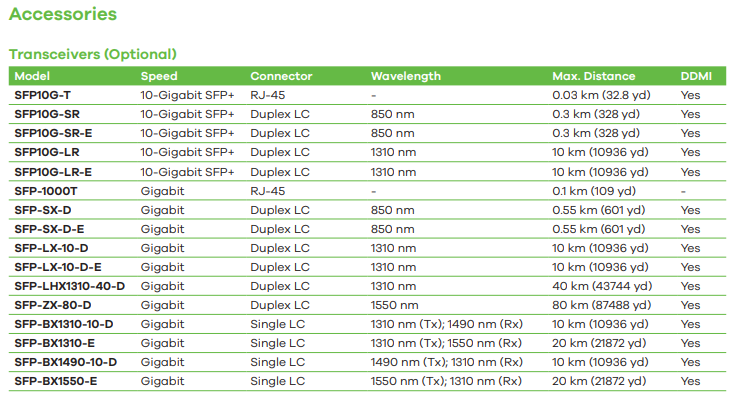
Please note that since you're using third-party transceivers, our support is limited. As XiLeiHaLo suggested, we also recommend manually setting both switches to 10G full duplex to check if it improves link stability.
You can also check Monitor > Port Status > DDMI > DDMI Details to review the DDMI thresholds. If any parameter exceeds the high/low thresholds, an alarm or warning will report, indicating a potential issue with the transceiver or cable.
Please ensure that the SFP transceivers on both ends are the same type (e.g., both SFP-LR or both SFP-SR). Mismatched transceiver types between the two switches can cause link instability.
Since you mentioned testing with a DAC, ensure the correct media type is configured as DAC on the XS1930 switch. If the issue persists after the above troubleshooting, please consider using Zyxel-certified transceivers for optimal performance and full support coverage.
Thank you for your understanding!
Zyxel Tina
0 -
Hi @yang995 in my experience I used OM3 cable for 1 Gbps connections, even OM3 should be certified for 10 Gbps up to 300 mt length. Could you try with OM4 or OM5 cables?
Did you tried to specify media-type, like Tina suggested you?I never had issues with third party transceivers and Zyxel switches. I buy it on fs.com when they are not available from Zyxel.
0










 Zyxel Employee
Categories
- All Categories
- 442 Beta Program
- 3.1K Nebula
- 243 Nebula Ideas
- 6.8K Security
- 783 USG FLEX H Series
- 389 Security Ideas
- 1.8K Switch
- 87 Switch Ideas
- 1.5K Wireless
- 58 Wireless Ideas
- 7.2K Consumer Product
- 325 Service & License
- 527 News and Release
- 101 Security Advisories
- 31 Education Center
- 10 [Campaign] Zyxel Network Detective
- 5.3K FAQ
- 34 Documents
- 91 About Community
- 122 Security Highlight


