USG FLEX H - Session monitor - "No data"



 Freshman Member
Hi, I noticed that when I enter Traffic Statistics - Session Monitor, and select "View: sessions by source IP" for example, I get the list of session grouped by source IP and the counter in the last column.
If I click the counter, I get always "No data" as response.
Javascript console reports
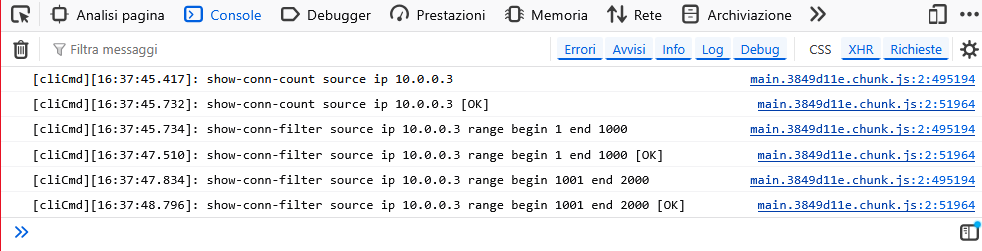
Firmware 1.38.
Thank you for your support.
Federico
Best Answers
-
Hi @fedebros ,
Thank you for the information. We have confirmed the reported symptom on your "BO Interporto 9.2" site and are currently investigating the issue. We will keep you informed as soon as we have any findings.
Zyxel_Judy
0 -
Hi @fedebros ,
The root cause was an incorrect data retrieval method that caused the Session Monitor display to fail, resulting in empty session count data. This has been resolved in the latest DF firmware, where the data retrieval logic has been corrected. We recommend upgrading to the latest DF firmware to prevent this issue from recurring.
Zyxel_Judy
0





 Zyxel Employee
All Replies
-
Hi @fedebros ,
We attempted to reproduce the issue you reported; however, the data is displaying as expected on our end.
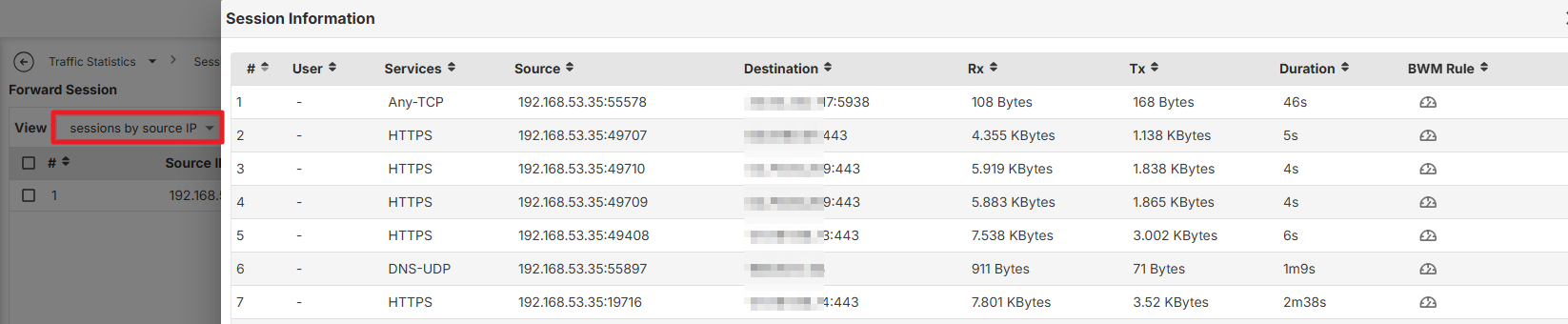
The console report shows that the CLI response appears to be worked well. To better assist you the GUI issue, please provide the Nebula Organization and site name, and enable Zyxel support access.
Zyxel_Judy
0 -
Hi Judy, the issue is on the Organization "Due Torri s.p.a." Site "BO Interporto 9.2".
I tried the same on another site, for example "BO Interporto 2.2" and on the 2.2 it works fine.
Both the configuration are very similar, but on 9.2 the WAN intereface is a LAG interface, and on 2.2 the WAN is an Ethernet-type Interface. Don't know if it could affect the session monitor, but I'm having a lot of trouble with LAG interfaces…
Thank you
Federico
0 -
Hi @fedebros ,
Thank you for the information. We have confirmed the reported symptom on your "BO Interporto 9.2" site and are currently investigating the issue. We will keep you informed as soon as we have any findings.
Zyxel_Judy
0 -
Hi @fedebros ,
The solution has been sent to your inbox. Please review it and let us know whether the issue has been resolved.
This will be addressed in the next official firmware release.
Zyxel_Judy
0 -
Hi @Zyxel_Judy, I had the opportunity to reconnect to the firewall that was causing the problem to update the firmware with the 26WK20 you sent me, but when I connected again, I noticed that the problem was no longer there, even though I hadn't updated the firmware since I reported it. Unfortunately, I can't tell you whether the new firmware would have solved the problem...
Thanks anyway.
Bye
0 -
Hi @fedebros ,
The root cause was an incorrect data retrieval method that caused the Session Monitor display to fail, resulting in empty session count data. This has been resolved in the latest DF firmware, where the data retrieval logic has been corrected. We recommend upgrading to the latest DF firmware to prevent this issue from recurring.
Zyxel_Judy
0
Categories
- All Categories
- 442 Beta Program
- 3.1K Nebula
- 243 Nebula Ideas
- 6.8K Security
- 783 USG FLEX H Series
- 389 Security Ideas
- 1.8K Switch
- 87 Switch Ideas
- 1.5K Wireless
- 58 Wireless Ideas
- 7.2K Consumer Product
- 325 Service & License
- 527 News and Release
- 101 Security Advisories
- 31 Education Center
- 10 [Campaign] Zyxel Network Detective
- 5.3K FAQ
- 34 Documents
- 91 About Community
- 122 Security Highlight


