Zyxel Newbie - Basic Network configuration
All Replies
-
@Kave sorry…. Bergamo province is too far from Rome :D
I've the NWA130BE, it's a triple-band active AP and it's very high-performance and very interesting productFor a new AP, I think the NWA50AX is sufficient; is dual band 2.4 and 5Ghz and support the VLANs.
But, for this, I leave to speak @Zyxel_Tina
0 -
Hi @Kave,
Sorry for the late reply!
Here are our recommendations regarding the access points:
AP Model Recommendations (*Please note that device availability may vary by region)
As you mentioned you don't currently have Wi-Fi 7 capable end devices, and based on your setup, we'd suggest starting with the NWA50AX Pro as the primary option. Your XMG1915-18EP supports 2.5G ports and 802.3bt PoE, which means it can take full advantage of the Pro's 2.5G uplink and power requirements. On top of that, the Pro's 3x3 antenna configuration and 160MHz channel support deliver better coverage and throughput.
That said, if budget is a priority, the NWA50AX is still a capable Wi-Fi 6 option that covers the basics and supports VLAN segmentation.
Yet, if you'd like to future-proof your setup, it's worth considering our Wi-Fi 7 options—the NWA50BE or NWA50BE Pro. The headline upgrade is MLO (Multi-Link Operation), which allows simultaneous data transmission across multiple bands. Even before you upgrade your client devices, you'd already benefit from MLO in the Mesh backhaul, resulting in more stable connections and lower latency between APs. The NWA50BE Pro adds BandFlex on top of that, letting you configure the second radio as either 5GHz or 6GHz for when you're ready to step into 6GHz down the line.
Coverage Considerations
Please note that even though your space is around 100 square meters, real-world performance can vary depending on environmental factors such as wall thickness, physical obstacles, and interference from other electronics. As a general guideline for Mesh deployments, please ensure the Mesh link signal between APs stays above -65 dBm, and try to keep the distance between APs roughly within 10–15 meters.
Zyxel Tina
0 -
Thanks @Zyxel_Tina! Finally I bought WBE530 AP and It's really good! Now I need to setup everything to permit also the Guest access without configuring a Network Accounts. Just a Guest wireless that using WPA3 WLAN Security access, that doesn't have access to my LAN (But this be can setup in the future using policies).
So I have:
USG FLEX 50H —> I have added GUEST-20 VLAN 20 for Guest WiFi access with DHCP enabled that offer 192.168.20.1/24 network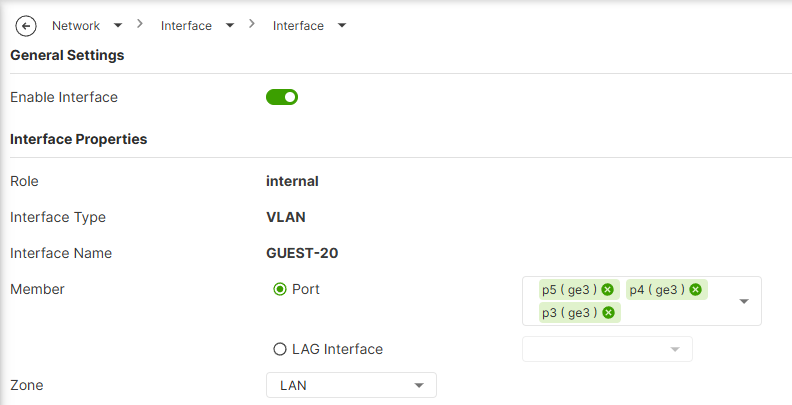
On XMG1915 VLAN configured as:
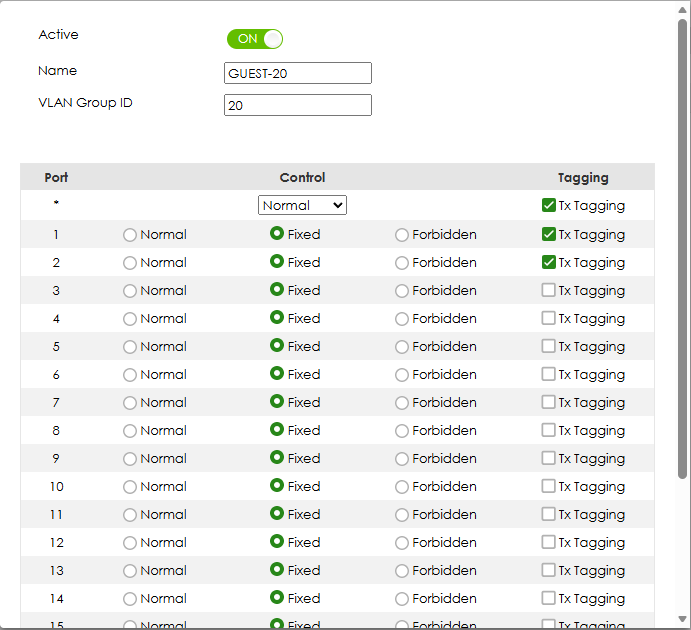
WBE530 AP —> Attached to port 1 of XMG1915 (using POE functionality) and Guest network configured:
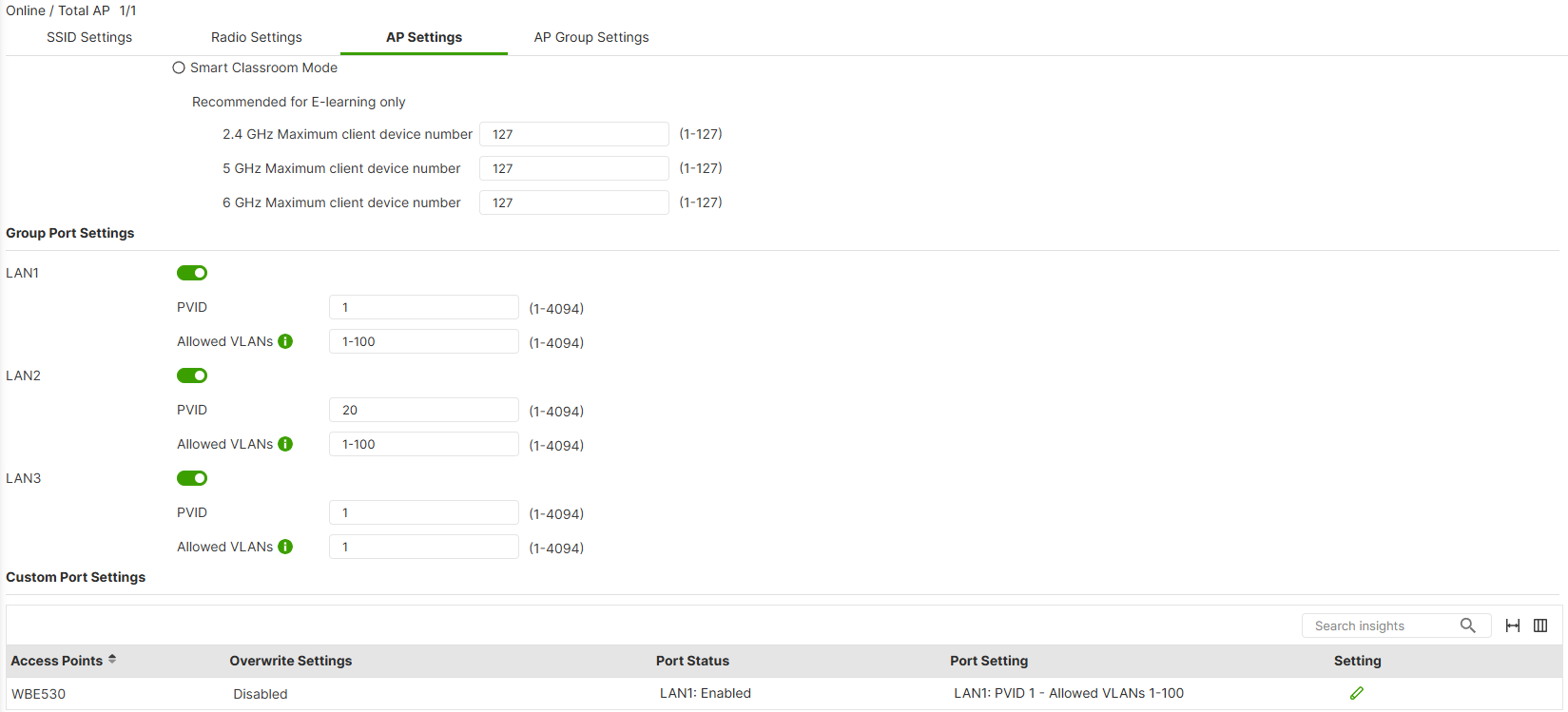
But Still I can't connect to Guest WiFi.
And also, I don't know if the configuration of the 2nd port of the WBE530 is correct (not the uplink on WBE530, the other one), because actually is used to connect a PC.
As per my first request, my goal is to setup some VLANS like:
VLAN 10 —> Home/PC/Tvs devices
VLAN 20 —> Guest access devices
VLAN 30 —> IoT/Home automation devices
VLAN 100 —> Management VLAN devices0 -
So are devices connected to the Guest WiFi getting a IP 192.168.20.1/24 ? or can you not even connect to the Guest WiFi? is the device WPA3 compatible?
0 -
Hi @Kave,
To help troubleshoot further, could you clarify what “Still I can't connect to Guest WiFi” means in your case?
- Cannot see the Guest SSID at all on your device?
- Can see it but fail to connect, or connect but have no internet access? If so, what IP address did your device receive?
Also, a couple of things need to be clarified:
- Which port on the USG FLEX 50H is connected to the XMG1915? The GUEST-20 interface currently has p3/p4/p5 as members, so if your uplink to the switch is connected to different ports, VLAN 20 tagged traffic will not pass through.
- WPA3 device compatibility — some older devices do not support WPA3, which means the Guest SSID may not be visible to them. Please make sure the device you are testing with supports WPA3-Personal.
Zyxel Tina
0 -
Ciao,
Sorry for the delay in reply @PeterUK and @Zyxel_Tina !
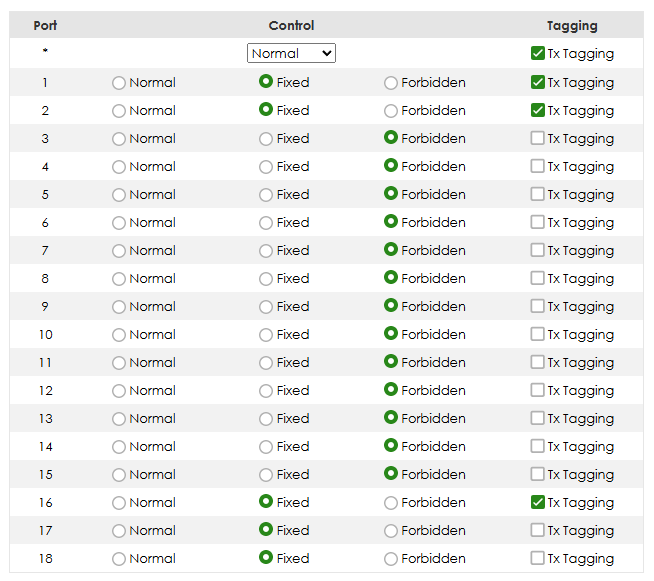
I made it work by settings on the switch the VLAN 20 with Trunk on uplink (P16) and port where the AP in connected (P1, P2):
Tagged on port 1 and 2 (where the AP is connected) and 16 (uplink)
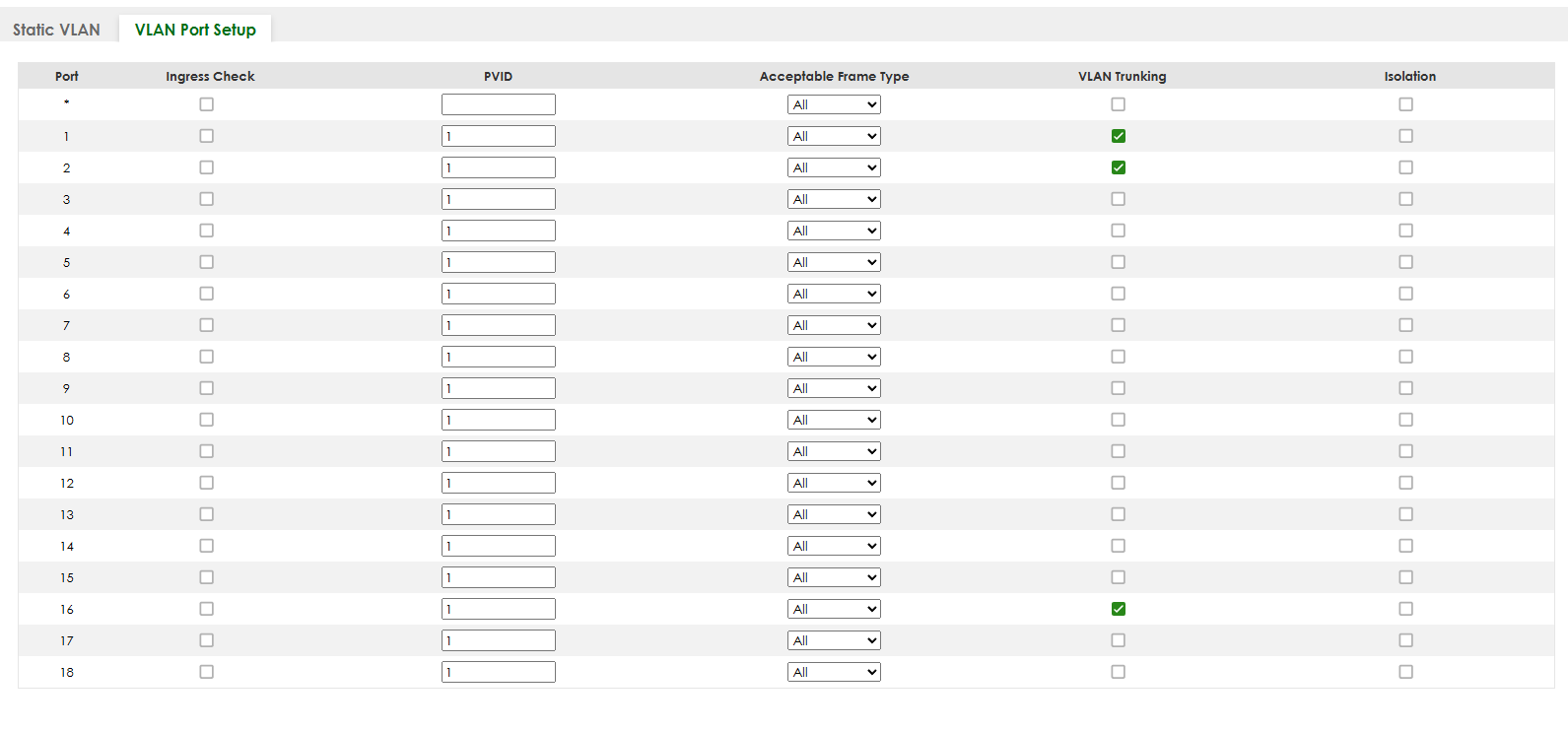
Now the issue is that I want to get and expand only guest wifi network on VLAN 20 from WBE530 using FritzRepeater 3000 AX, I can't connect to guest wifi network and from WLAN Client settings I see:

Basically, when I activate the FritzRepeater 3000 AX using wifi (guest network available from WBE530), automatically the FritzRepeater release a new network with ip 192.168.178.1/24.
The only way to make it work is to connect on the switch using LAN cable on an untagged port in VLAN 1?0





 Master Member



 Zyxel Employee


 Freshman Member


 Guru Member
Categories
- All Categories
- 442 Beta Program
- 3.1K Nebula
- 243 Nebula Ideas
- 6.8K Security
- 783 USG FLEX H Series
- 389 Security Ideas
- 1.8K Switch
- 87 Switch Ideas
- 1.5K Wireless
- 58 Wireless Ideas
- 7.2K Consumer Product
- 325 Service & License
- 527 News and Release
- 101 Security Advisories
- 31 Education Center
- 10 [Campaign] Zyxel Network Detective
- 5.3K FAQ
- 34 Documents
- 91 About Community
- 122 Security Highlight


