Slow speeds on ports


 Freshman Member
I am currently using two GS1900-24EP switches and they both seem to give some strange effects.
On several ports the speed seems to be limited to around 100M while others remain at 1000M. I have not been able to find any setting which could explain this issue. Help is very appreciated.
Kind regards, Arjan
Accepted Solution
-
Hi @ArjanCE ,
Thank you for the update and for sharing your test results. We're glad to hear that all ports are now providing 1G connections. It appears the unexpected speed readings were caused by the quality of the patch cable rather than the switch itself.
Zyxel_Judy
1





 Zyxel Employee
All Replies
-
In addition to the opening post, it appears that the switch is indeed limiting multiple ports to 100M instead of 1000M. I've checked with my phone connected directly to the ports, with the same hardware to each port and it is within the switch. With one the switches only a couple of ports still work on 1000M. When changing the port speed within the switch to 1000M instead of Auto, the phone connected cannot get a connection.
The issue seems to be within the switch where speed is auto limited to 100M on many ports. Any suggestions?
Updating to the latest firmware (V2.90(ABTO.1) did not resolve the issue.
0 -
Hi @ArjanCE ,
Please log in to the web interface and navigate to Configuration > Port > Port, then select the port showing 100M. Ensure the Speed/Duplex setting is configured to Auto. If a port is manually set to 100M, it will not negotiate to a higher speed.
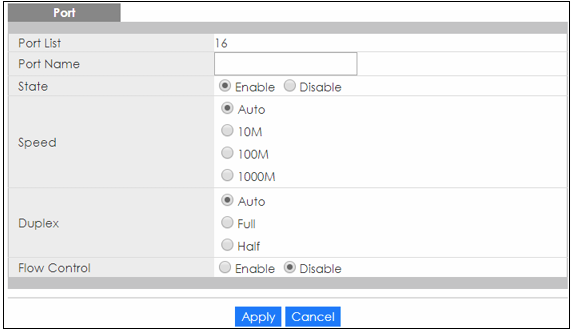
Could you also share how you tested the port speed on the GS1900-24EP by connecting your phone directly to the port? Did you use a USB-C to RJ45 adapter, or did you use another method? Which app to check the speed? ...
Zyxel_Judy
0 -
Hi Judy,
Thanks for your quick reply. I use a USB-C to RJ45 adapter from HP (model RTL8153-03) and patch cable to connect directly to the switch. Speedtesting is performed with Ookla app on Iphone. The repeatability with the test method is very good, replugging results in identical results on each port. In other words port x always provides ~100M and port Y always ~1G.
I have used a different testmethod with the installed cat6 cables, a patch cable and laptop. The results are similar, but with my phone I can test more ports quicker with less components and therefore higher reliability.
All ports are set to speed/duplex auto. If I change port x (delivering 100M) from auto to 1G, the connection is dropped entirely.
Any other suggestions?
0 -
So after endless testing and retesting and getting reliable results, I noticed that I got better speeds through LAN to my desktop compared to the patch cable and my phone. After testing that on a couple of ports I switched the patch cable between my phone to 3 other standard one and one I made myself.
Conclusion: the prefabricated patch cables were giving repeating results on the ports (so on a single port always the same speed), where only some ports provided 1G connections. The patch cable I made myself also gave repeating results, one big difference: all ports are providing 1G connections. 🤯🤯🤯Solution: test the patch cable, if it limits the speed on a port use a wire cutter wisely to destroy it!
0 -
Hi @ArjanCE ,
Thank you for the update and for sharing your test results. We're glad to hear that all ports are now providing 1G connections. It appears the unexpected speed readings were caused by the quality of the patch cable rather than the switch itself.
Zyxel_Judy
1
Categories
- All Categories
- 442 Beta Program
- 3.1K Nebula
- 243 Nebula Ideas
- 6.8K Security
- 783 USG FLEX H Series
- 389 Security Ideas
- 1.8K Switch
- 87 Switch Ideas
- 1.5K Wireless
- 58 Wireless Ideas
- 7.2K Consumer Product
- 325 Service & License
- 527 News and Release
- 101 Security Advisories
- 31 Education Center
- 10 [Campaign] Zyxel Network Detective
- 5.3K FAQ
- 34 Documents
- 91 About Community
- 122 Security Highlight


