Log Switch GS 2210




 Freshman Member
Accepted Solution
-
Hi @Gel ,
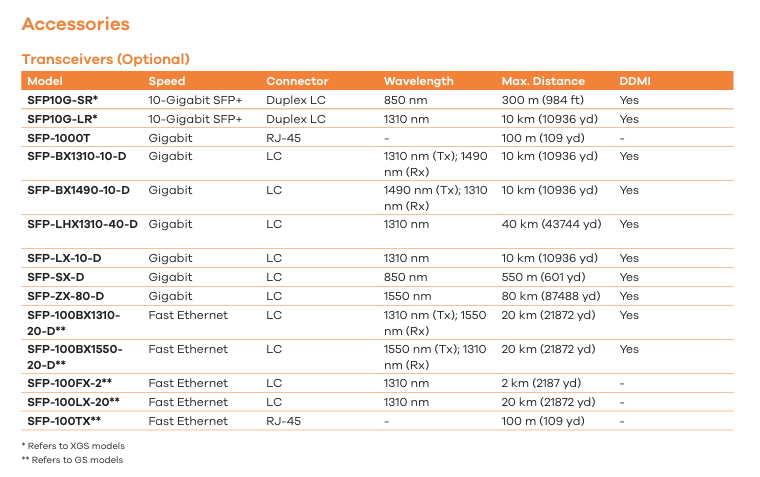
This log message indicates that the incoming optical signal (Rx Power) on Port 28 is too strong. In detail, the transceiver has an alarm threshold of -2 dBm, and the current incoming signal is -2 dBm, is meeting this maximum limit. This commonly happens on short cable runs using long-range optics, SFP transceiver issue. Here is what you can do to resolve this issue:
- Verify Transceiver Compatibility: Ensure that a Zyxel-certified transceiver is installed in the device.
- Please be aware that the GS2210 series has reached its End of Life (EOL) status, which means our support for this model will be limited. For information on alternative options, you also can refer to the available models: Switch | Zyxel Networks
Zyxel_Judy
0




 Zyxel Employee
All Replies
-
Hi @Gel ,
This log message indicates that the incoming optical signal (Rx Power) on Port 28 is too strong. In detail, the transceiver has an alarm threshold of -2 dBm, and the current incoming signal is -2 dBm, is meeting this maximum limit. This commonly happens on short cable runs using long-range optics, SFP transceiver issue. Here is what you can do to resolve this issue:
- Verify Transceiver Compatibility: Ensure that a Zyxel-certified transceiver is installed in the device.
- Please be aware that the GS2210 series has reached its End of Life (EOL) status, which means our support for this model will be limited. For information on alternative options, you also can refer to the available models: Switch | Zyxel Networks
Zyxel_Judy
0
Categories
- All Categories
- 442 Beta Program
- 3.1K Nebula
- 243 Nebula Ideas
- 6.8K Security
- 783 USG FLEX H Series
- 389 Security Ideas
- 1.8K Switch
- 87 Switch Ideas
- 1.5K Wireless
- 58 Wireless Ideas
- 7.2K Consumer Product
- 325 Service & License
- 527 News and Release
- 101 Security Advisories
- 31 Education Center
- 10 [Campaign] Zyxel Network Detective
- 5.3K FAQ
- 34 Documents
- 91 About Community
- 122 Security Highlight


