How to prevent traffic to directly connected subnets being sent through IPSec VPN tunnel ?



 Freshman Member
Hi !
I'm using a Zywall 50H
I set 3 local networks like this:
Name Zone IP/Netmask Type Members
ge3 LAN3 192.168.105.1/24 (Static) Ethernet p3
ge4 LAN4 192.168.107.1/24 (Static) Ethernet p4
ge5 LAN5 192.168.109.1/24 (Static) Ethernet p5
I have "Computer #1" on ge3 with IP address 192.168.105.34
I have "Computer #2" on ge4 with IP address 192.168.107.34
ge5 is not used here.
On computer #1 I ping computer #2. It answers.
So IP address, routing, policy control, all is fine.
Now I set up an IPSec VPN tunnel between ge3 and a remote network:
Local subnet is 192.168.105.0/24, Remote subnet is set to 0.0.0.0/0
What I want to do is that all traffic from ge3, INCLUDING INTERNET, goes through this tunnel, except the traffic to the other local, directly connected networks.
It works ... but the traffic to the other local networks seems to be also sent through the tunnel.
If the tunnel is up, I cannot ping computer 2 from computer 1, if I bring it down, I can ping again.
I tried many things.
I tried adding static routes, policy routes to force local traffic to be sent to the directly connected interfaces, but it changes nothing.
If I change the remote subnet of the IPSec VPN tunnel for a more specific one, I can ping with the tunnel up, but logically only traffic to that specific subnet is sent through the tunnel, nothing else, not the internet traffic. I tried, with this setting, to add static or policy routes to force all traffic though the tunnel, but again, it changes nothing.
How can I do what I want to do ?
Accepted Solution
-
I think USG FLEX H not support this case with policy-based IPSec VPN tunnel.
It not support add bypass rules on the first VPN routing table.
So only both peers use route-based IPSec VPN tunnel can works on USG FLEX H.
0



 Master Member
All Replies
-
What firmware are you on
Might have to do some testing just checking
This routing rule was at the top of the list
incoming ge3
source IP 192.168.105.0/24
destination IP 192.168.107.0/24
next hop ge4
SNAT noneIf the above don't work save your config and find and edit
/ vrf "main" routing policy-route "override-direct-route" "false"
to
/ vrf "main" routing policy-route "override-direct-route" "true"
can be done by SSH
How to override-direct-route — Zyxel Community
and upload to FLEX H and apply
0 -
Ok update I can now confirm this is a problem neither what I said will work (unless a reboot was needed)
It seems with the routing rule as you ping to a subnet on the same FLEX H the count for that rule goes up but is still going down the tunnel.
update2
also tested on the ZLD (UDP60W) and is fine so is a problem with the uOS
0 -
Hi @dsi_blois_fr,
To ensure a proper VPN connection on your USG FLEX 50H, we recommend adjusting the IPSec VPN settings and using policy routes.
Setting the Remote Subnet to
0.0.0.0/0in the IPSec VPN may override local routing. Instead, please specify the actual remote subnet and use policy routes to direct other traffic (including Internet traffic) through the tunnel.Please first modify the remote subnet in the IPSec VPN settings, then follow the steps below:
Create an Address Group for your Local Subnets
- Go to Object > Address > Address Group.
- Click Add to create an Address Group (for example, named
Local_Exclusion_Subnets). - Add the subnets you want to bypass the VPN (e.g.,
192.168.107.0/24for LAN4 and192.168.109.0/24for LAN5).
Create the Bypass Policy Route (Rule 1)
- Navigate to Network > Routing > Policy Route.
- Click Add to create a new rule at the top of your policy routing table:
- Source Address:
192.168.105.0/24(LAN3) - Destination Address:
Local_Exclusion_Subnets(the group you created in Step 1) - Next Hop > Type:
ge4/ge5 (The interface of your destination address)
- Source Address:
Configure/Verify the VPN Policy Route (Rule 2)
Make sure your VPN policy route is positioned below the bypass rule you created in Step 2.
- Source Address:
192.168.105.0/24(LAN3) - Destination Address:
Any(0.0.0.0/0) - Next Hop > Type:
IPSec VPN Tunnel - IPSec VPN Tunnel:
[Select your VPN Tunnel]
With this configuration, any packet originating from LAN3 heading to LAN4 or LAN5 will hit the first rule and bypass the tunnel. All other traffic (including Internet traffic) will miss the first rule, hit the second rule, and successfully route through your IPSec VPN tunnel.
Hope this helps!
Zyxel Tina
0 -
Unfortunately this will not work for this case Tina
the Local_Exclusion_Subnets need to happen by the VPN Policy remote 0.0.0.0/0
What should happen which I think is happening on ZLD is the USG sees 0.0.0.0/0 and auto excludes subnets thats on the USG unless there is a routing rule saying other wise
0 -
I think USG FLEX H not support this case with policy-based IPSec VPN tunnel.
It not support add bypass rules on the first VPN routing table.
So only both peers use route-based IPSec VPN tunnel can works on USG FLEX H.
0 -
Hi,
Thank you very much for those quick and detailed answers.
The OS Version is V1.38(ACLO.0)
@PeterUK :
I tried override-direct-route true. I rebooted the Zywall to be sure.
Sorry, no change.
I put it back to false.
I did as you explained, except in the Policy Route (Rule 1) I put directly LAN4_SUBNET (192.168.107.0/24) for the Destination Address (and ge4 interface for Next Hop)
I'm afraid this Zywall doesn't seem to work like that.
Computer 1 gets answers from computer 2 whether Rule 1 is active or not.
If Rule 2 is inactive I have internet (from local internet connection according to whatsmyip - which is logical)
If Rule 2 is active ... I don't have internet access anymore.
Note: If I put back 0.0.0.0/0 as the remote subnet for the IPSec VPN, I have internet, and whatsmyip gives the ip address of the remote site - which is what I want.
I'll try what you suggest and keep you informed.
0 -
So there is a way round this but not pretty by doing this
exclude 10.0.0.0/8 and 192.168.0.0/16
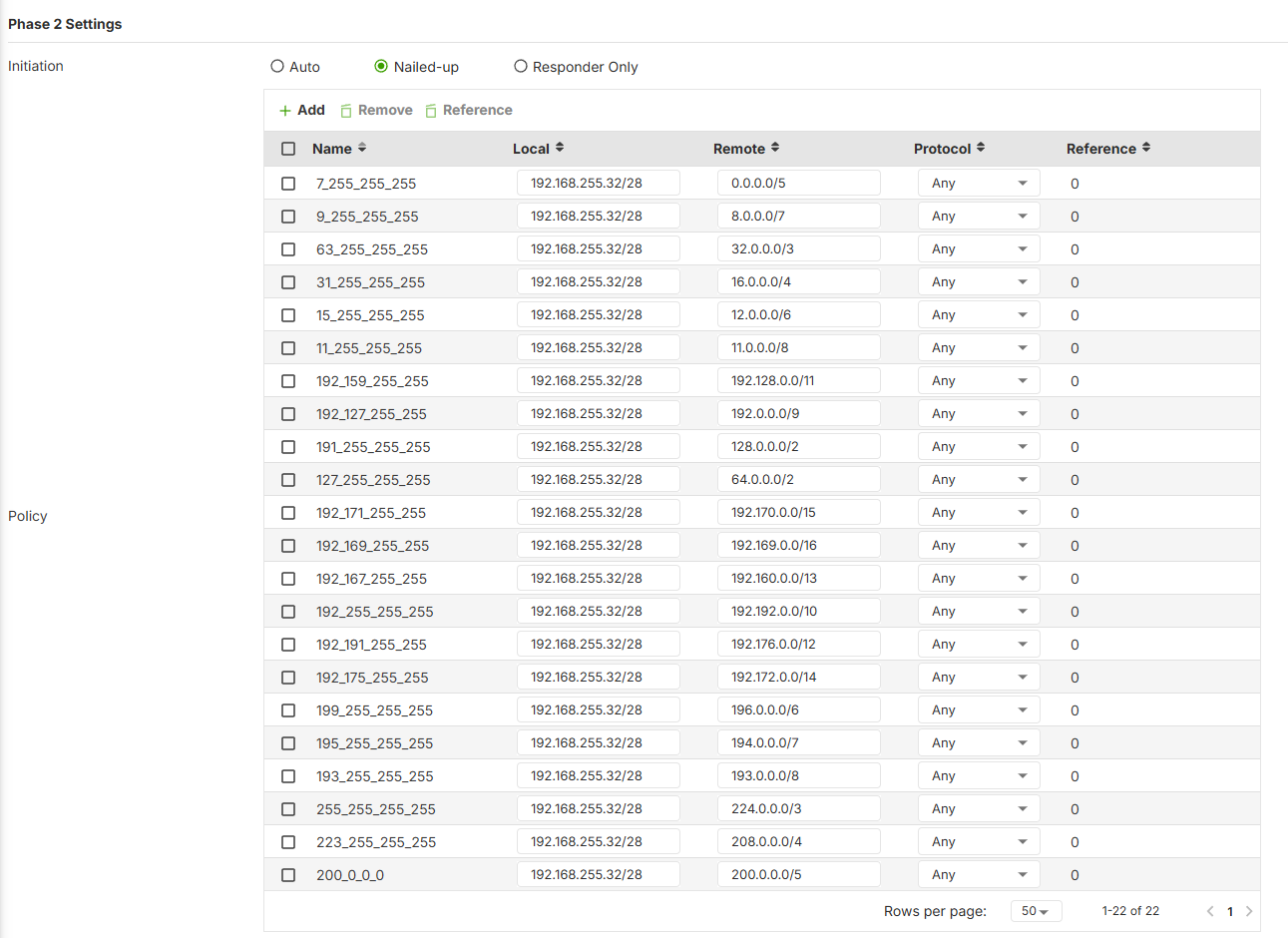
problem is both ends need to support many subnet PolicySo you don't have to have the other end do all these policies but the FLEX 200H has a limit of 10 where as the FLEX700H can do many more as shown.
/ vrf "main" ike vpn "testvpn" security-policy "7_255_255_255"

/ vrf "main" ike vpn "testvpn" security-policy "7_255_255_255" local-ts "subnet" "192.168.255.32/28"

/ vrf "main" ike vpn "testvpn" security-policy "7_255_255_255" remote-ts "subnet" "0.0.0.0/5"

/ vrf "main" ike vpn "testvpn" security-policy "7_255_255_255" "action" "esp"

/ vrf "main" ike vpn "testvpn" security-policy "7_255_255_255" "mode" "tunnel"

/ vrf "main" ike vpn "testvpn" security-policy "7_255_255_255" "priority" "0"

/ vrf "main" ike vpn "testvpn" security-policy "7_255_255_255" "vti-mark-in" "0"

/ vrf "main" ike vpn "testvpn" security-policy "7_255_255_255" "vti-mark-out" "0"

/ vrf "main" ike vpn "testvpn" security-policy "9_255_255_255"

/ vrf "main" ike vpn "testvpn" security-policy "9_255_255_255" local-ts "subnet" "192.168.255.32/28"

/ vrf "main" ike vpn "testvpn" security-policy "9_255_255_255" remote-ts "subnet" "8.0.0.0/7"

/ vrf "main" ike vpn "testvpn" security-policy "9_255_255_255" "action" "esp"

/ vrf "main" ike vpn "testvpn" security-policy "9_255_255_255" "mode" "tunnel"

/ vrf "main" ike vpn "testvpn" security-policy "9_255_255_255" "priority" "0"

/ vrf "main" ike vpn "testvpn" security-policy "9_255_255_255" "vti-mark-in" "0"

/ vrf "main" ike vpn "testvpn" security-policy "9_255_255_255" "vti-mark-out" "0"

/ vrf "main" ike vpn "testvpn" security-policy "63_255_255_255"

/ vrf "main" ike vpn "testvpn" security-policy "63_255_255_255" local-ts "subnet" "192.168.255.32/28"

/ vrf "main" ike vpn "testvpn" security-policy "63_255_255_255" remote-ts "subnet" "32.0.0.0/3"

/ vrf "main" ike vpn "testvpn" security-policy "63_255_255_255" "action" "esp"

/ vrf "main" ike vpn "testvpn" security-policy "63_255_255_255" "mode" "tunnel"

/ vrf "main" ike vpn "testvpn" security-policy "63_255_255_255" "priority" "0"

/ vrf "main" ike vpn "testvpn" security-policy "63_255_255_255" "vti-mark-in" "0"

/ vrf "main" ike vpn "testvpn" security-policy "63_255_255_255" "vti-mark-out" "0"

/ vrf "main" ike vpn "testvpn" security-policy "31_255_255_255"

/ vrf "main" ike vpn "testvpn" security-policy "31_255_255_255" local-ts "subnet" "192.168.255.32/28"

/ vrf "main" ike vpn "testvpn" security-policy "31_255_255_255" remote-ts "subnet" "16.0.0.0/4"

/ vrf "main" ike vpn "testvpn" security-policy "31_255_255_255" "action" "esp"

/ vrf "main" ike vpn "testvpn" security-policy "31_255_255_255" "mode" "tunnel"

/ vrf "main" ike vpn "testvpn" security-policy "31_255_255_255" "priority" "0"

/ vrf "main" ike vpn "testvpn" security-policy "31_255_255_255" "vti-mark-in" "0"

/ vrf "main" ike vpn "testvpn" security-policy "31_255_255_255" "vti-mark-out" "0"

/ vrf "main" ike vpn "testvpn" security-policy "15_255_255_255"

/ vrf "main" ike vpn "testvpn" security-policy "15_255_255_255" local-ts "subnet" "192.168.255.32/28"

/ vrf "main" ike vpn "testvpn" security-policy "15_255_255_255" remote-ts "subnet" "12.0.0.0/6"

/ vrf "main" ike vpn "testvpn" security-policy "15_255_255_255" "action" "esp"

/ vrf "main" ike vpn "testvpn" security-policy "15_255_255_255" "mode" "tunnel"

/ vrf "main" ike vpn "testvpn" security-policy "15_255_255_255" "priority" "0"

/ vrf "main" ike vpn "testvpn" security-policy "15_255_255_255" "vti-mark-in" "0"

/ vrf "main" ike vpn "testvpn" security-policy "15_255_255_255" "vti-mark-out" "0"

/ vrf "main" ike vpn "testvpn" security-policy "11_255_255_255"

/ vrf "main" ike vpn "testvpn" security-policy "11_255_255_255" local-ts "subnet" "192.168.255.32/28"

/ vrf "main" ike vpn "testvpn" security-policy "11_255_255_255" remote-ts "subnet" "11.0.0.0/8"

/ vrf "main" ike vpn "testvpn" security-policy "11_255_255_255" "action" "esp"

/ vrf "main" ike vpn "testvpn" security-policy "11_255_255_255" "mode" "tunnel"

/ vrf "main" ike vpn "testvpn" security-policy "11_255_255_255" "priority" "0"

/ vrf "main" ike vpn "testvpn" security-policy "11_255_255_255" "vti-mark-in" "0"

/ vrf "main" ike vpn "testvpn" security-policy "11_255_255_255" "vti-mark-out" "0"

/ vrf "main" ike vpn "testvpn" security-policy "192_159_255_255"

/ vrf "main" ike vpn "testvpn" security-policy "192_159_255_255" local-ts "subnet" "192.168.255.32/28"

/ vrf "main" ike vpn "testvpn" security-policy "192_159_255_255" remote-ts "subnet" "192.128.0.0/11"

/ vrf "main" ike vpn "testvpn" security-policy "192_159_255_255" "action" "esp"

/ vrf "main" ike vpn "testvpn" security-policy "192_159_255_255" "mode" "tunnel"

/ vrf "main" ike vpn "testvpn" security-policy "192_159_255_255" "priority" "0"

/ vrf "main" ike vpn "testvpn" security-policy "192_159_255_255" "vti-mark-in" "0"

/ vrf "main" ike vpn "testvpn" security-policy "192_159_255_255" "vti-mark-out" "0"

/ vrf "main" ike vpn "testvpn" security-policy "192_127_255_255"

/ vrf "main" ike vpn "testvpn" security-policy "192_127_255_255" local-ts "subnet" "192.168.255.32/28"

/ vrf "main" ike vpn "testvpn" security-policy "192_127_255_255" remote-ts "subnet" "192.0.0.0/9"

/ vrf "main" ike vpn "testvpn" security-policy "192_127_255_255" "action" "esp"

/ vrf "main" ike vpn "testvpn" security-policy "192_127_255_255" "mode" "tunnel"

/ vrf "main" ike vpn "testvpn" security-policy "192_127_255_255" "priority" "0"

/ vrf "main" ike vpn "testvpn" security-policy "192_127_255_255" "vti-mark-in" "0"

/ vrf "main" ike vpn "testvpn" security-policy "192_127_255_255" "vti-mark-out" "0"

/ vrf "main" ike vpn "testvpn" security-policy "191_255_255_255"

/ vrf "main" ike vpn "testvpn" security-policy "191_255_255_255" local-ts "subnet" "192.168.255.32/28"

/ vrf "main" ike vpn "testvpn" security-policy "191_255_255_255" remote-ts "subnet" "128.0.0.0/2"

/ vrf "main" ike vpn "testvpn" security-policy "191_255_255_255" "action" "esp"

/ vrf "main" ike vpn "testvpn" security-policy "191_255_255_255" "mode" "tunnel"

/ vrf "main" ike vpn "testvpn" security-policy "191_255_255_255" "priority" "0"

/ vrf "main" ike vpn "testvpn" security-policy "191_255_255_255" "vti-mark-in" "0"

/ vrf "main" ike vpn "testvpn" security-policy "191_255_255_255" "vti-mark-out" "0"

/ vrf "main" ike vpn "testvpn" security-policy "127_255_255_255"

/ vrf "main" ike vpn "testvpn" security-policy "127_255_255_255" local-ts "subnet" "192.168.255.32/28"

/ vrf "main" ike vpn "testvpn" security-policy "127_255_255_255" remote-ts "subnet" "64.0.0.0/2"

/ vrf "main" ike vpn "testvpn" security-policy "127_255_255_255" "action" "esp"

/ vrf "main" ike vpn "testvpn" security-policy "127_255_255_255" "mode" "tunnel"

/ vrf "main" ike vpn "testvpn" security-policy "127_255_255_255" "priority" "0"

/ vrf "main" ike vpn "testvpn" security-policy "127_255_255_255" "vti-mark-in" "0"

/ vrf "main" ike vpn "testvpn" security-policy "127_255_255_255" "vti-mark-out" "0"

/ vrf "main" ike vpn "testvpn" security-policy "192_171_255_255"

/ vrf "main" ike vpn "testvpn" security-policy "192_171_255_255" local-ts "subnet" "192.168.255.32/28"

/ vrf "main" ike vpn "testvpn" security-policy "192_171_255_255" remote-ts "subnet" "192.170.0.0/15"

/ vrf "main" ike vpn "testvpn" security-policy "192_171_255_255" "action" "esp"

/ vrf "main" ike vpn "testvpn" security-policy "192_171_255_255" "mode" "tunnel"

/ vrf "main" ike vpn "testvpn" security-policy "192_171_255_255" "priority" "0"

/ vrf "main" ike vpn "testvpn" security-policy "192_171_255_255" "vti-mark-in" "0"

/ vrf "main" ike vpn "testvpn" security-policy "192_171_255_255" "vti-mark-out" "0"

/ vrf "main" ike vpn "testvpn" security-policy "192_169_255_255"

/ vrf "main" ike vpn "testvpn" security-policy "192_169_255_255" local-ts "subnet" "192.168.255.32/28"

/ vrf "main" ike vpn "testvpn" security-policy "192_169_255_255" remote-ts "subnet" "192.169.0.0/16"

/ vrf "main" ike vpn "testvpn" security-policy "192_169_255_255" "action" "esp"

/ vrf "main" ike vpn "testvpn" security-policy "192_169_255_255" "mode" "tunnel"

/ vrf "main" ike vpn "testvpn" security-policy "192_169_255_255" "priority" "0"

/ vrf "main" ike vpn "testvpn" security-policy "192_169_255_255" "vti-mark-in" "0"

/ vrf "main" ike vpn "testvpn" security-policy "192_169_255_255" "vti-mark-out" "0"

/ vrf "main" ike vpn "testvpn" security-policy "192_167_255_255"

/ vrf "main" ike vpn "testvpn" security-policy "192_167_255_255" local-ts "subnet" "192.168.255.32/28"

/ vrf "main" ike vpn "testvpn" security-policy "192_167_255_255" remote-ts "subnet" "192.160.0.0/13"

/ vrf "main" ike vpn "testvpn" security-policy "192_167_255_255" "action" "esp"

/ vrf "main" ike vpn "testvpn" security-policy "192_167_255_255" "mode" "tunnel"

/ vrf "main" ike vpn "testvpn" security-policy "192_167_255_255" "priority" "0"

/ vrf "main" ike vpn "testvpn" security-policy "192_167_255_255" "vti-mark-in" "0"

/ vrf "main" ike vpn "testvpn" security-policy "192_167_255_255" "vti-mark-out" "0"

/ vrf "main" ike vpn "testvpn" security-policy "192_255_255_255"

/ vrf "main" ike vpn "testvpn" security-policy "192_255_255_255" local-ts "subnet" "192.168.255.32/28"

/ vrf "main" ike vpn "testvpn" security-policy "192_255_255_255" remote-ts "subnet" "192.192.0.0/10"

/ vrf "main" ike vpn "testvpn" security-policy "192_255_255_255" "action" "esp"

/ vrf "main" ike vpn "testvpn" security-policy "192_255_255_255" "mode" "tunnel"

/ vrf "main" ike vpn "testvpn" security-policy "192_255_255_255" "priority" "0"

/ vrf "main" ike vpn "testvpn" security-policy "192_255_255_255" "vti-mark-in" "0"

/ vrf "main" ike vpn "testvpn" security-policy "192_255_255_255" "vti-mark-out" "0"

/ vrf "main" ike vpn "testvpn" security-policy "192_191_255_255"

/ vrf "main" ike vpn "testvpn" security-policy "192_191_255_255" local-ts "subnet" "192.168.255.32/28"

/ vrf "main" ike vpn "testvpn" security-policy "192_191_255_255" remote-ts "subnet" "192.176.0.0/12"

/ vrf "main" ike vpn "testvpn" security-policy "192_191_255_255" "action" "esp"

/ vrf "main" ike vpn "testvpn" security-policy "192_191_255_255" "mode" "tunnel"

/ vrf "main" ike vpn "testvpn" security-policy "192_191_255_255" "priority" "0"

/ vrf "main" ike vpn "testvpn" security-policy "192_191_255_255" "vti-mark-in" "0"

/ vrf "main" ike vpn "testvpn" security-policy "192_191_255_255" "vti-mark-out" "0"

/ vrf "main" ike vpn "testvpn" security-policy "192_175_255_255"

/ vrf "main" ike vpn "testvpn" security-policy "192_175_255_255" local-ts "subnet" "192.168.255.32/28"

/ vrf "main" ike vpn "testvpn" security-policy "192_175_255_255" remote-ts "subnet" "192.172.0.0/14"

/ vrf "main" ike vpn "testvpn" security-policy "192_175_255_255" "action" "esp"

/ vrf "main" ike vpn "testvpn" security-policy "192_175_255_255" "mode" "tunnel"

/ vrf "main" ike vpn "testvpn" security-policy "192_175_255_255" "priority" "0"

/ vrf "main" ike vpn "testvpn" security-policy "192_175_255_255" "vti-mark-in" "0"

/ vrf "main" ike vpn "testvpn" security-policy "192_175_255_255" "vti-mark-out" "0"

/ vrf "main" ike vpn "testvpn" security-policy "199_255_255_255"

/ vrf "main" ike vpn "testvpn" security-policy "199_255_255_255" local-ts "subnet" "192.168.255.32/28"

/ vrf "main" ike vpn "testvpn" security-policy "199_255_255_255" remote-ts "subnet" "196.0.0.0/6"

/ vrf "main" ike vpn "testvpn" security-policy "199_255_255_255" "action" "esp"

/ vrf "main" ike vpn "testvpn" security-policy "199_255_255_255" "mode" "tunnel"

/ vrf "main" ike vpn "testvpn" security-policy "199_255_255_255" "priority" "0"

/ vrf "main" ike vpn "testvpn" security-policy "199_255_255_255" "vti-mark-in" "0"

/ vrf "main" ike vpn "testvpn" security-policy "199_255_255_255" "vti-mark-out" "0"

/ vrf "main" ike vpn "testvpn" security-policy "195_255_255_255"

/ vrf "main" ike vpn "testvpn" security-policy "195_255_255_255" local-ts "subnet" "192.168.255.32/28"

/ vrf "main" ike vpn "testvpn" security-policy "195_255_255_255" remote-ts "subnet" "194.0.0.0/7"

/ vrf "main" ike vpn "testvpn" security-policy "195_255_255_255" "action" "esp"

/ vrf "main" ike vpn "testvpn" security-policy "195_255_255_255" "mode" "tunnel"

/ vrf "main" ike vpn "testvpn" security-policy "195_255_255_255" "priority" "0"

/ vrf "main" ike vpn "testvpn" security-policy "195_255_255_255" "vti-mark-in" "0"

/ vrf "main" ike vpn "testvpn" security-policy "195_255_255_255" "vti-mark-out" "0"

/ vrf "main" ike vpn "testvpn" security-policy "193_255_255_255"

/ vrf "main" ike vpn "testvpn" security-policy "193_255_255_255" local-ts "subnet" "192.168.255.32/28"

/ vrf "main" ike vpn "testvpn" security-policy "193_255_255_255" remote-ts "subnet" "193.0.0.0/8"

/ vrf "main" ike vpn "testvpn" security-policy "193_255_255_255" "action" "esp"

/ vrf "main" ike vpn "testvpn" security-policy "193_255_255_255" "mode" "tunnel"

/ vrf "main" ike vpn "testvpn" security-policy "193_255_255_255" "priority" "0"

/ vrf "main" ike vpn "testvpn" security-policy "193_255_255_255" "vti-mark-in" "0"

/ vrf "main" ike vpn "testvpn" security-policy "193_255_255_255" "vti-mark-out" "0"

/ vrf "main" ike vpn "testvpn" security-policy "255_255_255_255"

/ vrf "main" ike vpn "testvpn" security-policy "255_255_255_255" local-ts "subnet" "192.168.255.32/28"

/ vrf "main" ike vpn "testvpn" security-policy "255_255_255_255" remote-ts "subnet" "224.0.0.0/3"

/ vrf "main" ike vpn "testvpn" security-policy "255_255_255_255" "action" "esp"

/ vrf "main" ike vpn "testvpn" security-policy "255_255_255_255" "mode" "tunnel"

/ vrf "main" ike vpn "testvpn" security-policy "255_255_255_255" "priority" "0"

/ vrf "main" ike vpn "testvpn" security-policy "255_255_255_255" "vti-mark-in" "0"

/ vrf "main" ike vpn "testvpn" security-policy "255_255_255_255" "vti-mark-out" "0"

/ vrf "main" ike vpn "testvpn" security-policy "223_255_255_255"

/ vrf "main" ike vpn "testvpn" security-policy "223_255_255_255" local-ts "subnet" "192.168.255.32/28"

/ vrf "main" ike vpn "testvpn" security-policy "223_255_255_255" remote-ts "subnet" "208.0.0.0/4"

/ vrf "main" ike vpn "testvpn" security-policy "223_255_255_255" "action" "esp"

/ vrf "main" ike vpn "testvpn" security-policy "223_255_255_255" "mode" "tunnel"

/ vrf "main" ike vpn "testvpn" security-policy "223_255_255_255" "priority" "0"

/ vrf "main" ike vpn "testvpn" security-policy "223_255_255_255" "vti-mark-in" "0"

/ vrf "main" ike vpn "testvpn" security-policy "223_255_255_255" "vti-mark-out" "0"

/ vrf "main" ike vpn "testvpn" security-policy "200_0_0_0"

/ vrf "main" ike vpn "testvpn" security-policy "200_0_0_0" local-ts "subnet" "192.168.255.32/28"

/ vrf "main" ike vpn "testvpn" security-policy "200_0_0_0" remote-ts "subnet" "200.0.0.0/5"

/ vrf "main" ike vpn "testvpn" security-policy "200_0_0_0" "action" "esp"

/ vrf "main" ike vpn "testvpn" security-policy "200_0_0_0" "mode" "tunnel"

/ vrf "main" ike vpn "testvpn" security-policy "200_0_0_0" "priority" "0"

/ vrf "main" ike vpn "testvpn" security-policy "200_0_0_0" "vti-mark-in" "0"

/ vrf "main" ike vpn "testvpn" security-policy "200_0_0_0" "vti-mark-out" "0"
I really do think zyxel can support this again in the uOS it should be a simple case of auto excludes subnets thats on the USG
0 -
Thank you for this answer.
I have a FLEX 50H so if a FLEX 200H is already too limited…
And to be honest I don't understand why excluding 10.0.0.0/8 and 192.168.0.0/16 and all these policies would make it work but I'm not a firewall specialist ...
I tried the route-based vpn tunnel you suggested .
This time the Zywall used the static routes I defined.
I tried creating static routes with destination on the remote network, with the vti_wizard_xxx interface as next hop, it worked, I got answers. Internet works. Computer 2 replies to computer 1.
If I do a tracert from computer 1 to a remote ip address, it shows the remote vti adress in the path so I guess it's configured correctly.
So there is progress.
Except that as soon as I create a static route with a destination 0.0.0.0/0 (to send all traffic through the vpn tunnel, including internet, as I want), the zywall stops routing anything. I don't get any reply anymore, not even the one I got so far with the other still present static routes (which are, btw, of higher priority). I don't even have internet access anymore. Computer 2 doesn't even ping its GW ! So not even local routing !
If I remove this route, everything works again. Except it's NOT how I want it.
So, I'm sorry, it still doesn't work ...
0 -
Yes what I said works but its a silly way due to the FLEX H strict routeing when it comes to VPN policies like I said the old ZLD models don't have this limitation logic as I believe they auto exclude all subnets on the USG when using 0.0.0.0/0.
so really Zyxel does need to look into this, the uOS is still new and Zyxel may make changes for the better but cause a limitation I get their target is security with the uOS hardware its also performance but I see no issue with auto exclude all subnets on the USG when using 0.0.0.0/0 for policy routes for VPN.
The only other thing that can be done due to Zyxel putting a limit on number of policy routes on lower models is IP ranges
edit
In fact ranges on ZLD models is a supported thing so Zyxel could look to add it to uOS you would just do like:
local 192.168.255.32/28 remote 0.0.00-9.255.255.255
local 192.168.255.32/28 remote 11.0.0.0-192.167.255.255
local 192.168.255.32/28 remote 192.169.0.0-255.255.255.255
plus any other routes you need to add
not sure of the FLEX 50H has lower limits on policy routes adding for VPN
0 -
A minor correction to what I said previously: with a static route destination 0.0.0.0/0, Computer 2 still pings its GW and even replies to computer 1 so local routing is still working (I had forgotten the security policy). But it's the only thing still working (I checked again) and it doesn't change the problem.
@PeterUK :
I agree with you about local subnets being excluded when using 0.0.0.0/0. That's the initial problem I have. Frankly, I find silly to send away (through the VPN tunnel) traffic for local, directly connect subnets. I don't understand the reason.
To use a metaphor, it's like when you're in your living room and want to go to your bedroom, you don't go out of your house and in the street.
It's a good idea to use range … except the Zywall 50H doesn't accept ranges in static routes (only subnets and hosts).
And I want the private subnets (rfc 1918) to be sent through the tunnel too. Absolutely everything except the local directly connects ones.
0


 Guru Member



 Zyxel Employee
Categories
- All Categories
- 442 Beta Program
- 3.1K Nebula
- 243 Nebula Ideas
- 6.8K Security
- 783 USG FLEX H Series
- 389 Security Ideas
- 1.8K Switch
- 87 Switch Ideas
- 1.5K Wireless
- 58 Wireless Ideas
- 7.2K Consumer Product
- 325 Service & License
- 527 News and Release
- 101 Security Advisories
- 31 Education Center
- 10 [Campaign] Zyxel Network Detective
- 5.3K FAQ
- 34 Documents
- 91 About Community
- 122 Security Highlight


