[USG Flex 500H] - Group Port P1-P2 with P3 --> P12





 Master Member
Hello everyone,
While waiting to purchase this firewall, I'm doing some research on how to redo the configuration and transfer it between my current 200HP and the new 500H.
I read that ports P1 and P2 can't be grouped with other ports (the post is from May 2024; is this still the case?)
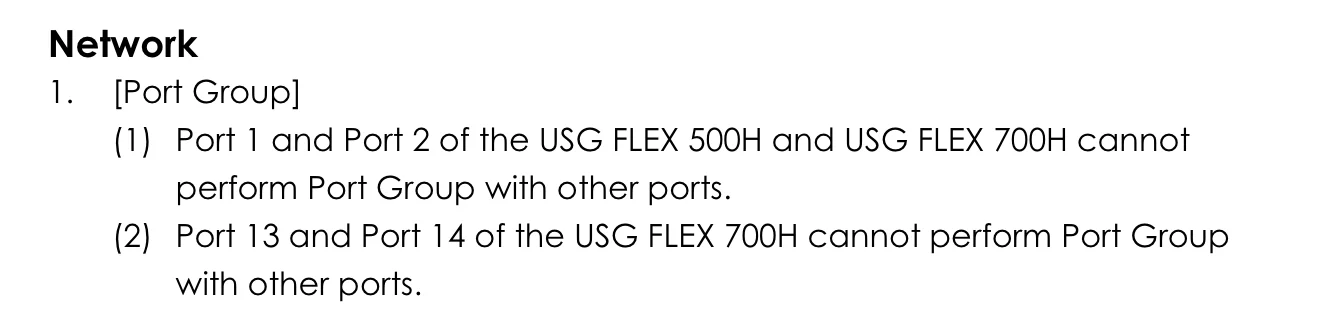
I'd like to implement this configuration:
P1: WAN
P2: Computer
P3: Wi-Fi
——
P5 --> P12 Other Devices
I'd like port P2 to use the same external Ethernet interface as ports P5->P12, so I'd like to configure an external Ethernet interface with members P2 + P5 -> P12.
However, if it's not possible to aggregate P2 with the others, how can this problem be solved?
I was thinking:
P2: subnet 192.168.2.1/24
P3->P12: subnet 192.168.1.1/24
But I assume that in this case the 500H will have to use internal routing.
Or:
P2: external eth interface without IP (BR_P2)
P3->P12: external eth interface without IP (BR_P3_P12)
and then create a bridge between BR_P2 and BR_P3_P12 and then assign the subnet directly to the bridge.
What do you recommend?
Performance/latency between the two approaches?
Pros/Cons between the two approach?
Thank you
PS: Why in 500H the P1 and P2 are "isolated" from the other ports? Is an hardware limitation?
Best Answers
-
Hi @Maverick87 ,
We confirm that you also can use Bridge method (P2 → lan1, P6-12 → ge3, then bridge the two interfaces into the same subnet). In your case, the zone of Interface, Bridge member and Bridge are LAN.
Option 1: Bridge (P2 → lan1, P6-12 → ge3, then bridge the two interfaces into the same subnet)
Pros
- No routing overhead, lowest latency when your end devices communicate with each other.
- Devices can communicate directly using L2 protocols (if you need broadcast-based discovery, WOL, etc., no extra helper config needed)
Cons
- All ports share the same broadcast domain: ARP/broadcast floods or a broadcast storm affect all these ports.
- If you later want to split/add segmentation, you'd have to redo everything
Option 2: P2 as one subnet, P6-12 as another, with inter routing
Pros
- Two separate broadcast domains — faults/storms don't spill over into each other
- You can apply firewall policies if needed (control who can talk to whom, which protocols are allowed)
- More flexibility for future expansion
Cons
- If you have protocols that rely on broadcast across subnets, you'll need extra config (e.g., DHCP relay, WOL broadcast relay)
Zyxel_Judy
0 -
Hi @Maverick87 ,
When P2 (2.5G) is bridged together with P6–P12 (1G) into one Layer 2 bridge interface, traffic crossing between these two ports will increase latency because it requires CPU resources for processing. Theoretically, latency is lowest when traffic stays within the same chipset group.
Under high-traffic transmission scenarios, this type of bridge configuration will significantly reduce throughput. When you have data traffic greater than 1G flowing into ports p6–12, physical limitations will constrain throughput and consume CPU resources, potentially slowing down the firewall's overall performance. If you expect heavy same-subnet traffic exceeding 1 Gbps between the 2.5G and 1G ports, or have strict latency and performance requirements, then direct software bridging is not the best solution.
We recommend that you use an external 2.5G switch to handle all internal Layer 2 switching traffic. This not only reduces the firewall's CPU load but also ensures that the firewall maintains its intended security and routing performance.Zyxel_Judy
1





 Zyxel Employee
All Replies
-
Hi @Maverick87 ,
Do you mean:
- You want the device to connect to the P2 can communicate to the devices connect to P5→P12?
- Only one WAN with the 500H?
Zyxel_Judy
0 -
Hi @Zyxel_Judy,
yes, only one WAN (P1) and the rest are "unique" LAN with the same subnet.0 -
I'm thinking you might of misunderstood the Port grouping limitation?
Its where you have like P1 with P4 on the same subnet as a switch group for them ports but its not a problem to have like P1 as WAN and P4 LAN subnet to route between them.
0 -
Hi @PeterUK,
it seems that it is not possible to "join" P2 with P3 → P12.
As from the posted link…When I try to add p4 to the interface properties automatically p2 is unchecked.
So it seems that when you try to add (flag) the port P2 and P3 during the creation of the interface, it seems that when you flag P2 and then flag P3, the P2 returns to unflagged.
In this way, it is not possible to flag P2 and P3, but only one of these, and, if not possible to flag these ports together, I cannot assign the same subnet on P2 and P3.
In the post, it also seems, that P1 and P2 are grouped together and P3 -> P12 are another group and it seems that it is not possible to join together natively these groups.0 -
Hi @Zyxel_Judy, @PeterUK,
from the manual, seems that P1 and P2 are "special/priority" individual port that is not possible group it with other "standard" ports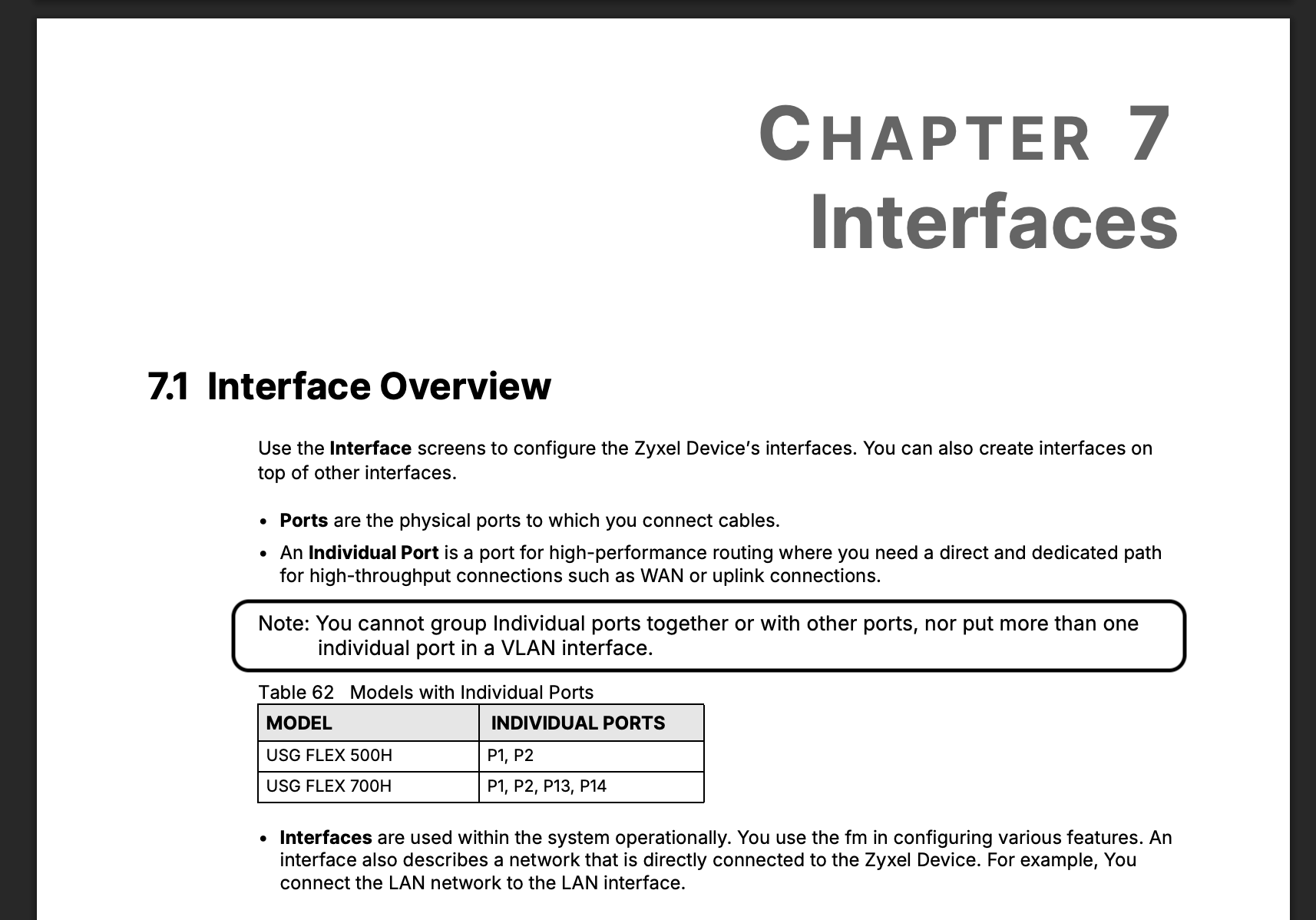
But I don't know if this limitation is still present and what I asking is eventually how to group the P2 (individual port) with the other standard ports.
So… in this case, I thought that:- Create an interface for P2 and an interface for P3 → P12, and then let internal routing establish the routes between the two interfaces (one interface with a subnet — 192.168.0.1/24, and the other with another subnet — 192.168.1.1/24); then the internal routing routes between those two interfaces.
- Create an interface for P2 and an interface for P3 → P12, and then bridge it togheter to create a single bridge interface with one single subnet — 192.168.1.1/24
What are the performances/advantages to use the first approach instead the second?
What are the pros and cons between those two approach?
There are real differences between those two approach?Why there is this limitation between the individual ports and "standard" ports?
Thank you
0 -
Well the first would work I guess the disadvantage is if you transfers high bandwidth between P2 and P3 → P12
Not sure about the bridge idea it should work? Likely have the same problem as above but it would allow you to have a flat one IP/subnet
of course one other way to go is a switch to P2
But really why do a one IP/subnet with a USG? seems pointless waste? the idea of a USG is Security unless you trust everything on one LAN a guess
0 -
Hi @PeterUK,
because I use the USG for personal use, so… I thinks:- P1 for WAN (single) —> 2.5Gbit
- P2 for PC (I've a PC with 2.5Gbit)
- P3 for AP PoE —> 2.5Gbit
- P4 for Security Camera PoE —> 2.5Gbit
- P5 —> P12 (1Gbit) — other devices (TVs, Xbox, Home Theater, TV Recorder)
In this way I can use fully my 2.5Gbit on the PC.
So…
- One interface for LAN devices
- Three interfaces for AP VLANs (IoT Devices, WLAN Main, WLAN Guest)
- One interface for VLAN Management
In my case:
- P3 is a VLAN Interface
- P5 is a VLAN Interface (Raspberry PI with Home Assistant that use a VLAN)
- P2 and P6 —> P12 for PC and the other devices than can use the same subnet
I've also an 8-port switch 2.5 PoE++ but the 12 ports on the USG 500H seems to be sufficient to cover also the 8 ports of this switch, so it is unnecessary for now.
0 -
Seems good
0 -
Hi @Maverick87 ,
In case you don't want to connect the LAN clients through a 2.5G switch to the USG FLEX 500H's port 2, the method is to configure P2 as a dedicated Internal interface with its own subnet (e.g., 192.168.2.1/24) and P6–P12 as another Internal interface (e.g., 192.168.1.1/24). By default, the firewall allows routing between internal zones.
The bridge approach is not an option, because P2 cannot be added as a bridge member.
Zyxel_Judy
0 -
Hi @Zyxel_Judy,
OK… probably in the next two weeks I will buy the firewall, and try it.
Also… if I use the 2.5G switch, also in this case, all the ports of the switch need to have a separate interface with its own subnet, right? So… have a single PC or have the switch is the same things, right?
Thank you
0




 Guru Member
Categories
- All Categories
- 442 Beta Program
- 3.1K Nebula
- 242 Nebula Ideas
- 6.8K Security
- 764 USG FLEX H Series
- 385 Security Ideas
- 1.8K Switch
- 87 Switch Ideas
- 1.5K Wireless
- 58 Wireless Ideas
- 7.2K Consumer Product
- 323 Service & License
- 522 News and Release
- 100 Security Advisories
- 31 Education Center
- 10 [Campaign] Zyxel Network Detective
- 5.3K FAQ
- 34 Documents
- 91 About Community
- 121 Security Highlight


