USG FLEX 500H stuck in boot loop



 Freshman Member
Hi,
My Zyxel USG FLEX 500H is stuck in a boot loop and I can't get it to boot normally.
So far I have tried:
- Performing a factory reset.
- Connecting through the serial console.
- Switching to the other boot partition using:
- atcd 2
atgo
(I also tried atcd 1 with the same result.)
Unfortunately, none of these methods solved the problem.
I have attached the complete boot log below.
Any help would be greatly appreciated.
Thank you.
boot log :
RAM test ........ done !
Loading kernel from FIT Image at 20000000 ...
Using 'conf@1' configuration
Verifying Hash Integrity ... sha1,rsa2048:dev+ OK
Trying 'kernel@0' kernel subimage
Description: Linux Kernel
Created: 2026-01-29 4:07:04 UTC
Type: Kernel Image
Compression: uncompressed
Data Start: 0x200000d8
Data Size: 24254976 Bytes = 23.1 MiB
Architecture: AArch64
OS: Linux
Load Address: 0x08080000
Entry Point: 0x08080000
Hash algo: sha1
Hash value: aebe71fb5b6d2df9cd6a779cf8bb2173e69ad2ed
Verifying Hash Integrity ... sha1+ OK
Loading fdt from FIT Image at 20000000 ...
Using 'conf@1' configuration
Verifying Hash Integrity ... sha1,rsa2048:dev+ OK
Trying 'fdt@0' fdt subimage
Description: Flattened Device Tree blob
Created: 2026-01-29 4:07:04 UTC
Type: Flat Device Tree
Compression: uncompressed
Data Start: 0x21721bd0
Data Size: 31395 Bytes = 30.7 KiB
Architecture: AArch64
Hash algo: sha1
Hash value: bdbc7c9667df66140a8ca6f84fae95a9b4de3472
Verifying Hash Integrity ... sha1+ OK
Loading Kernel Image
Starting kernel ...
Starting binary extension
mv_ddr: Marvell-devel (release) (Oct 11 2024 - 02:53:13)
SSCG_EN
dma memcmp pass
mv_ddr: completed successfully
Booting Trusted Firmware
BL1: Booting BL2
BL1: Booting BL31
▒
U-Boot 2019.10-10.3.4.0-4 (Oct 11 2024 - 02:52:20 +0000)
BootModule Version: V1.1.5 Oct 11 2024 02:52:20
DRAM: Size = 8192 Mbytes
Press any key to enter debug mode within 3 seconds.
................
Accepted Solution
-
Hi @ABIDAR ,
Thank you for the information you shared via private message.
As you mentioned, the firewall suddenly became stuck in a boot loop, and you're not sure whether this may have been caused by a power outage. We recommend connecting the firewall to a stable power source and attempting the firmware recovery again.
If the firewall remains stuck in the boot loop, please contact your reseller/ISP to arrange an RMA.
Zyxel_Judy
1





 Zyxel Employee
All Replies
-
Hi @ABIDAR ,
Please go to MyZyxel to download the latest official firmware, then extract the file. Use the resulting .bin file for the USG FLEX 500H to perform a firmware recovery. You can refer to the firmware recovery steps here:
Zyxel_Judy
0 -
hi @Zyxel_Judy
Thank you for your suggestion.
I tested the recovery procedure as follows:
atkz -f -l 192.168.1.1
The command returns:
OK
Then I executed:
atgof
However, the firewall does not enter FTP recovery mode. Instead, it immediately starts booting again and falls back into the same boot loop.
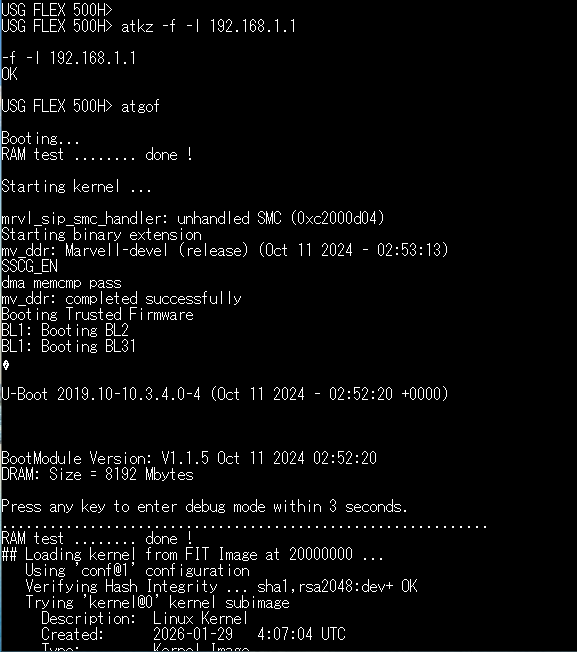 0
0 -
hi @Zyxel_Judy
I would also like to add that after running:
atkz -f -l 192.168.1.1
atgof
the message:
Connect a computer to port 1 and FTP to 192.168.1.1 to upload the new file.
never appears. The firewall immediately continues the normal boot sequence and enters the same boot loop.
As a result, I am unable to access the firewall through port 1 (or any Ethernet port) to perform the FTP recovery procedure.
0 -
Hi @ABIDAR
Please try this adjusted method:
STEP1.
Boot up the device and wait for the console message: 'Press any key to enter debug mode within 3 seconds. ..................' then enter the debug mode.STEP2.
Enteratkz -f -l 192.168.1.1This sets the FTP server IP address on the USG Flex 500H.STEP3.
Set a static IP address on the PC to192.168.1.XXX(e.g.,192.168.1.2).STEP4.
Connect the Ethernet cable from the PC to port 1 of the USG Flex H model. Open the Command Prompt on the PC and enter
ftp 192.168.1.1to connect the USG Flex 500H and login to the device using the accountadmin.STEP5.
On the PC, enter:
binSTEP6.
On the PC, enter:
put C:\131ABZHC0.binThis uploads the .bin file to the USG Flex 500H.C:\Users\employee>
ftp 192.168.1.1
Connected to 192.168.1.1.
220-=(<>)=-.:. (( Welcome to PureFTPd 1.0.11 )) .:.-=(<>)=-
220-You are user number 1 of 50 allowed
220-Local time is now 09:49 and the load is 0.04. Server port: 21.
220-Only anonymous FTP is allowed here
220 You will be disconnected after 15 minutes of inactivity.
530 You aren't logged in
User (192.168.1.1:(none)):admin230 Anonymous user logged in
ftp>bin
200 TYPE is now 8-bit binary
ftp>put C:\131ABZHC0.bin
200 PORT command successful
150 Connecting to port 1044
226-1786.8 Mbytes free disk space
226-File successfully transferred
226 1.605 seconds (measured here), 110.89 Mbytes per second
ftp: 186657587 bytes sent in 1.60Seconds 116807.00Kbytes/sec.
ftp>STEP7.
Once the firmware update is successfully applied to the USG Flex 500H, the device will reboot automatically.
Zyxel Melen0 -
Hi @Zyxel_Melen ,
I followed the procedure exactly as described:
- Entered Debug Mode.
- atkz -f -l 192.168.1.1The command returned OK.
- Configured my PC with the static IP address 192.168.1.2/24.
- Connected the PC directly to port 1 of the USG FLEX 500H.
However, I am unable to access the firewall via FTP. The message:
Connect a computer to port 1 and FTP to 192.168.1.1 to upload the new file.
never appears on the console, and I cannot establish an FTP connection to 192.168.1.1.
Is there any additional command required to enable the FTP recovery server ?
Thank you
0 -
Hi @ABIDAR
That's strange. Let me check with our engineer and update you next Monday.
Additionally, could you share some of device information? I will send you a private message since the question includes device's MAC address & S/N.
Thanks.
Zyxel Melen1 -
Hi @ABIDAR ,
Thank you for the information you shared via private message.
As you mentioned, the firewall suddenly became stuck in a boot loop, and you're not sure whether this may have been caused by a power outage. We recommend connecting the firewall to a stable power source and attempting the firmware recovery again.
If the firewall remains stuck in the boot loop, please contact your reseller/ISP to arrange an RMA.
Zyxel_Judy
1




Categories
- All Categories
- 442 Beta Program
- 3.1K Nebula
- 241 Nebula Ideas
- 6.8K Security
- 760 USG FLEX H Series
- 381 Security Ideas
- 1.8K Switch
- 87 Switch Ideas
- 1.5K Wireless
- 58 Wireless Ideas
- 7.2K Consumer Product
- 323 Service & License
- 521 News and Release
- 100 Security Advisories
- 31 Education Center
- 10 [Campaign] Zyxel Network Detective
- 5.3K FAQ
- 34 Documents
- 90 About Community
- 119 Security Highlight


