Strange Behaviour - IPSec VPN among USG Flex 50 H and USG Flex 100





 Guru Member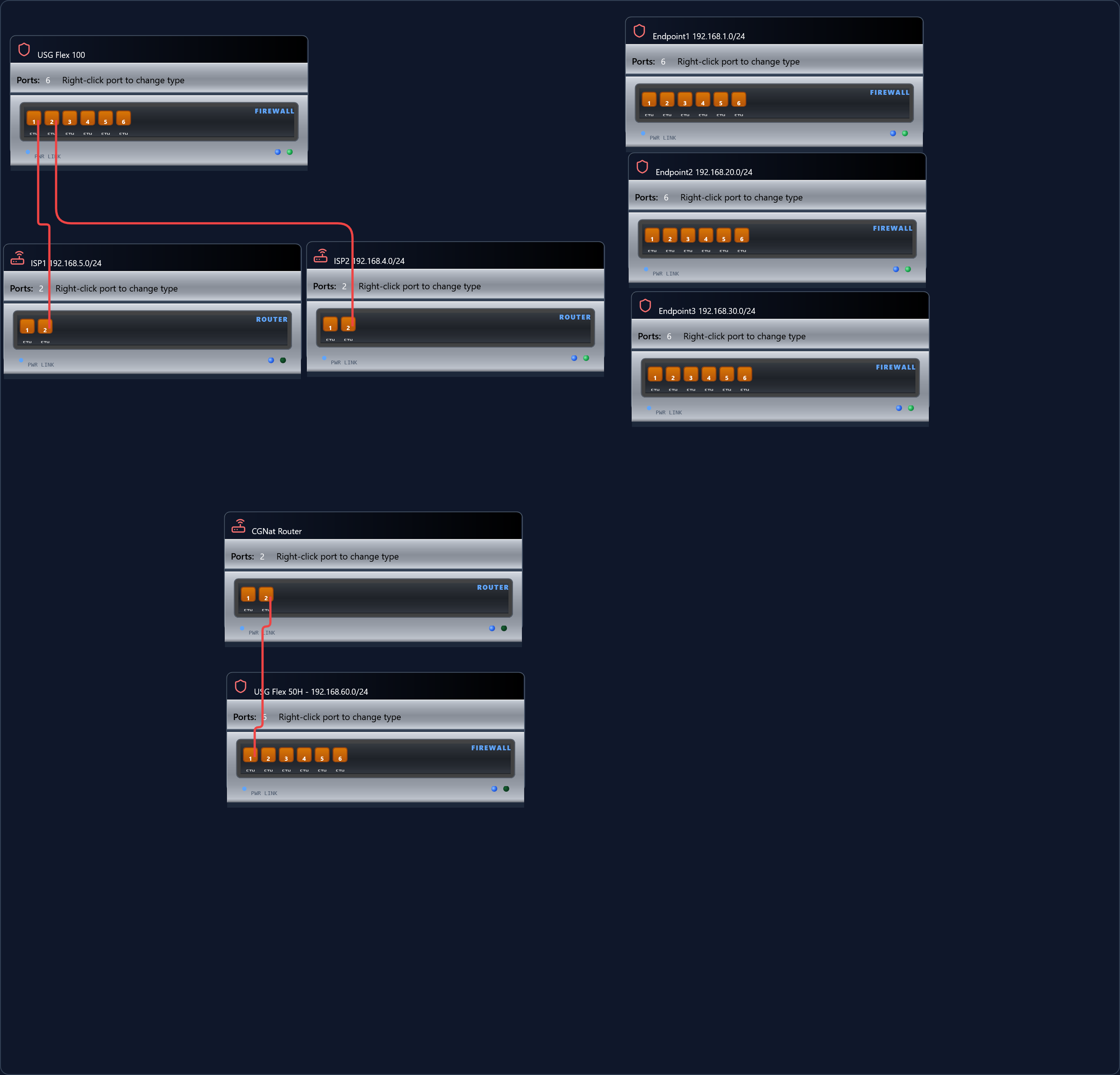
Thanks to @PeterUK and Base44 for allowing me to produce this network diagram. Take some time for have a look, then read the following experience.
USG Flex 100 have several IPSEC site-to-site VPNs working. Most of thems are ZLD 5.0 devices (USG Flex 50 and USG Flex 100) with one USG 20 ZLD 3.0 endpoint (behind a CGNAT connection, Site to Site with dynamic peer.
All devices have latest firmware (5.43 for ZLD 5.0 devices) or WK firmware (for ZLD 3.0).
I'm adding the first USG Flex H device. Current firmware version is 1.38.
The CGNAT router had LAN interface configured as 192.168.4.0 and IPSec VPN worked flawlessly.
I switched it to 194.168.1.0 and packages stop flowing between 192.168.10.0/24 subnet and 192.168.60.0/24 subnet.
Subnets 192.168.4.0 are mostly my "go-to" for connection between firewall and the CPE provided by ISP (mostly VDSL connections). However, the ISP delivers 192.168.1.0/24 as default network, so except endpoint 1 I'm trying to revert this situation, for allow a faster CPE replacemente in case of hardware fault.
Also, all non-CGNAT connections have static ip addresses, so I forward ports directly on the resident USG when i can.
So: the issue is "expected behavior"?
All Replies
-
Some things I noticed about network diagram your using router for ISP where I have a device listing Internet Source I guess you can use it any way you want if just simple layout also the export canvas is bigger then it should be I fix that at some point.🙃also did you know you can right click on the ports to configure?
I'm a bit unclear of your problem when you say
"The CGNAT router had LAN interface configured as 192.168.4.0 and IPSec VPN worked flawlessly.
I switched it to 194.168.1.0 and packages stop flowing between 192.168.10.0/24 subnet and 192.168.60.0/24 subnet."
you mean
"The CGNAT router had LAN interface configured as 192.168.4.0 and IPSec VPN worked flawlessly.
I switched it to 192.168.1.0 and packages stop flowing between 192.168.1.0/24 subnet and 192.168.60.0/24 subnet."
Not sure where the 192.168.10.0/24 is from….My guess is 194.168.1.0 is in use else where to cause this?
0 -
I did not reported all the endpoints having a site-to-site VPN using public static IP to USG Flex 100 on 192.168.10.0/24 , but I reported the one that's using 192.168.1.0/24 as remote network.
When USG Flex 50 H on 192.168.60.0/24 had wan configuration on 192.168.1.0/24 address, VPN could be established, but i was not able to ping gateways (192.168.60.1 on USG Flex H side, 192.168.10.1 on USG Flex 100 side) or devices on the subnet. Restoring 192.168.4.0 as wan subnet for USG Flex 50 H, VPN worked again as expected.
I have a couple of guesses, but I don't want to bias the analysys from zyxel or other posters willing to contribute.0 -
Hi,
How is the WAN failover configured on the USG Flex 100? Have you configured any static routes for 192.168.4.1 as a next hop for the site-to-site VPN for example?
It's a very strange issue you're having, that's all I can really think would cause anything similar!
0 -
No static routes are configured on any of the device of this setup.
Routes are "created" by the subnet configuration on every physical interface (currently no vLANs) or Site-to-site VPNs (also with dynamic IP) among the devices.
Wan failover is llf inbound + outbound, but VPNs are "wired" on specific ISP connection on USG Flex 100 side (due to different necessities and load expected: ISP are on different media and have quite different performance).
Most of them can be redirected manually (on the remote site both static public addresses are configured)0 -
Hi @mMontana,
We understand your goal. Since most devices default to the
192.168.1.0/24subnet, retaining this configuration would allow for a quicker, plug-and-play replacement if the CPE ever needs to be swapped out.Based on our understanding, all interfaces and local networks participating in a VPN must use unique, non-overlapping subnets. If a subnet is reused elsewhere in the network, it creates routing ambiguity. Even if the VPN tunnel is successfully established, the firewall cannot determine the correct path for the traffic, resulting in packets failing to reach their intended destination. Since your setup resulted in a ping failure, we would like to take a closer look at how the packets were routed in this scenario.
"When USG Flex 50 H on 192.168.60.0/24 had wan configuration on 192.168.1.0/24 address, VPN could be established, but I was not able to ping gateways (192.168.60.1 on USG Flex H side, 192.168.10.1 on USG Flex 100 side) or devices on the subnet."
To ensure we fully understand the topology and avoid any misunderstanding, could you please first clarify which device/clients (and IP address) initiated these pings, and what their specific destinations were?
Zyxel Tina
0 -
could you please first clarify which device/clients (and IP address)

initiated these pings, and what their specific destinations were?
Ping initiator was ip address 192.168.60.21 destinations were 192.168.10.1 (subnet gateway) and 192.168.10.12 (host).
Based on our understanding, all interfaces and local networks participating in a VPN must use unique, non-overlapping subnets. If a subnet is reused elsewhere in the network, it creates routing ambiguity.IMVHO what's ambiguos is the behavior of the different firmwares.

This is a working site-to-site endpoint, with public static ip address. 192.168.1.0/24 ad WAN subnet. ZLD 5.42
The same cannot be applied as a site-to-site endpoint with dynamic ip address, CGNAT ISP and uOS 1.38 software.
Probably Monday I will be able to have a different connection (FTTH, static public address), so i would be able to add more data.My current guess is that the current implementation of the IPSec protocol on uOS "sends" something to ZLD that messes the routing.
0 -
96 hours without any aknowledgment.
That's far what I was expecting.
0 -
I feel there is missing info of the complete setup as it is now to a change you make that stops it from working.
If you could list that in a way so like
firewall 1
Its WAN /CGNAT IP
all its LAN subnetsfirewall 2
Its WAN /CGNAT IP
all its LAN subnetswhere the tunnels link too like firewall 1 WAN /CGNAT IP to firewall 2 WAN /CGNAT IP
then the change you want this would show if there is a issue
0 -
Hi @mMontana,
Thanks for your update!
To make sure we're aligned before going further, could you please confirm whether the attached topology matches your current setup and the issue you're experiencing?
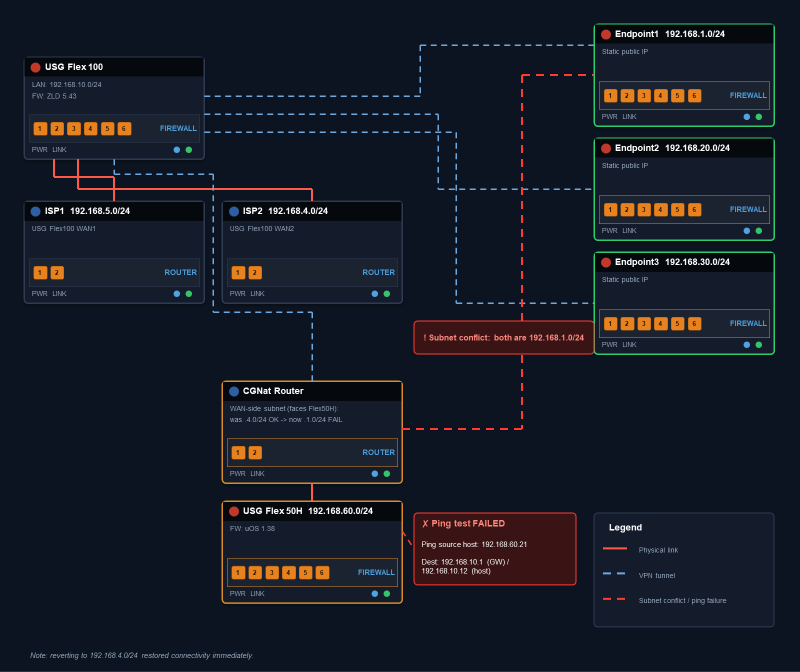
Regarding your comment — "IMVHO what's ambiguous is the behavior of the different firmwares" — along with the screenshot showing the static IPs 192.168.1.2 and 192.168.30.1: do you mean that, on a non-H (ZLD) setup, both addresses fall within subnets already used elsewhere in the network (192.168.1.0/24 and 192.168.30.0/24), yet no IP/subnet conflict or packet loss occurred there?
Lastly, you had mentioned: "Probably Monday I will be able to have a different connection (FTTH, static public address)…" may we know if you have had a chance to test this yet? If so, could you share the results?
We appreciate your patience and cooperation.
Zyxel Tina
0








 Freshman Member
 Zyxel Employee
Categories
- All Categories
- 442 Beta Program
- 3.1K Nebula
- 243 Nebula Ideas
- 6.8K Security
- 783 USG FLEX H Series
- 389 Security Ideas
- 1.8K Switch
- 87 Switch Ideas
- 1.5K Wireless
- 58 Wireless Ideas
- 7.2K Consumer Product
- 325 Service & License
- 527 News and Release
- 101 Security Advisories
- 31 Education Center
- 10 [Campaign] Zyxel Network Detective
- 5.3K FAQ
- 34 Documents
- 91 About Community
- 122 Security Highlight


