Having to restart an AP to get the bandwidth back up



 Ally Member
Bandwidth through a specific Access Point is great. 800Mpbs up/down.
A day or two later the same AP, the bandwidth drops to about 130Mpbs up and down.
When the bandwidth is poor, if I move to another area and connected to a different AP on the same SSID, the bandwidth is normal.
If I then restart the AP that has low bandwidth, once the AP is back online, the bandwidth is "normal" fast again.
I captured 2 apdiag files, one when it is slow, the other file just after restart when the bandwidth is correct.
What causes an AP to slowly get slow that only a reboot can fix it?
All Replies
-
Hi @jef,
To help us narrow down the issue, could you please provide the following details?
- What is the exact model of the affected AP, and which firmware version is it currently running?
- Is this AP managed via Nebula Cloud or in Standalone mode? (If managed via Nebula, you can also enable Zyxel Support Access under Help > Support Request to let us inspect the device directly.)
- What is your network topology, and how are the devices connected to each other?
- How do you perform the bandwidth test?
- Which frequency band does the AP mainly serve — 2.4 GHz, 5 GHz, or 6 GHz? Is auto channel selection enabled, or is the channel fixed?
- The approximate timestamp when the issue occurs
- Kindly share the two diagnostic files you mentioned, along with any screenshots of your test results or other relevant information, via PM so we can investigate further
Additionally, may I ask if this issue is related to the case you previously reported? If so, could you please provide us a remote PC so we can further investigate?
Zyxel Tina
0 -
WAX630S; Local / V7.10(ABZD.4); Standalone.
USG Flex 700 as the Controller
Couple switches between the AP and the Flex
Internet speed test (any usually give similar results, ookla, google, cloud flare, etc ) ; which is very consistent; 5Ghz, auto channel selection enabled (DCS see pic).
apdiaginfo-FC22F4D7E287-2026-07-28_21-36-51.tar.bz2 Time stamp when it was slow
apdiaginfo-FC22F4D7E287-2026-07-28_21-42-27.tar.bz2 After restart.. So. 9:36pm and 9:42pm.
Should not be related to any previous problems.
Not sure about a remote PC.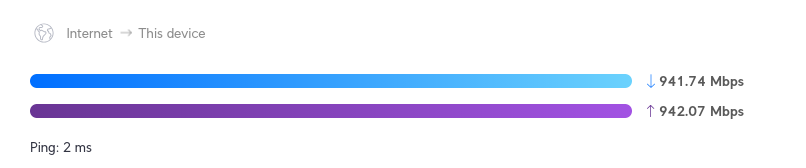
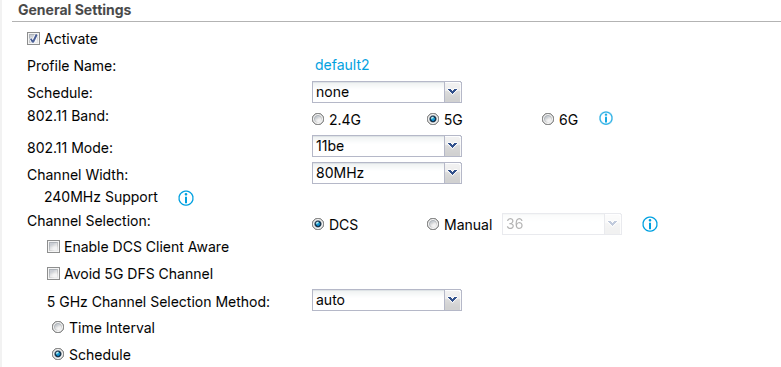 0
0 -
Hi @jef,
Regarding the throughput drop issue, from the logs, we found that your AP's 5GHz channel bandwidth dropped from 80MHz to 20MHz, which was triggered by Wireless Health. This typically indicates that the environment isn't ideal — for example, a noisy RF environment or signal interference.
[2026-07-2803:08:57] wlan: [21359:I:ANY] chan: 153, tbtt: 5, ch_width:80, band: 0, freq: 5765[2026-07-2803:09:07] wlan: [21575:I:ANY] chan: 153, tbtt: 5, ch_width:20, band: 0, freq: 5765As shown in the following screenshot, the AP did many attempts to recover the bandwidth. However, since there were clients connected and transmitting packets at the time, the AP held off on taking action to avoid impacting service, resulting in "no action."
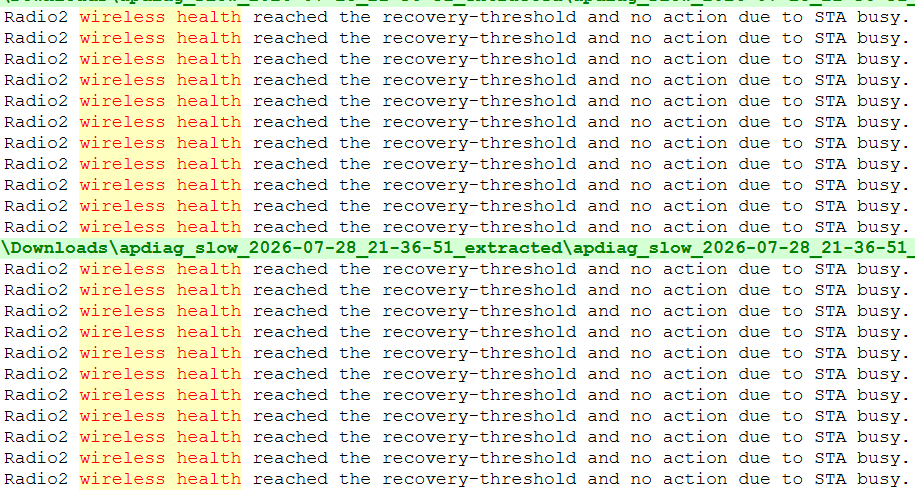
Based on this, we'd recommend switching to 40MHz first and testing to see whether the issue improves, or whether the bandwidth still drops down to 20MHz.
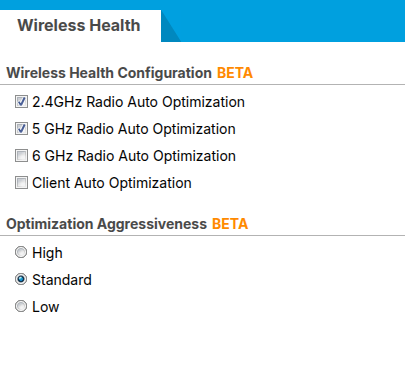
If the issue persists, please kindly share a screenshot of the Configuration > Wireless > Wireless Health settings page. This will help us check whether any further adjustments are needed.
Zyxel Tina
0





 Zyxel Employee
Categories
- All Categories
- 442 Beta Program
- 3.1K Nebula
- 243 Nebula Ideas
- 6.8K Security
- 783 USG FLEX H Series
- 389 Security Ideas
- 1.8K Switch
- 87 Switch Ideas
- 1.5K Wireless
- 58 Wireless Ideas
- 7.2K Consumer Product
- 325 Service & License
- 527 News and Release
- 101 Security Advisories
- 31 Education Center
- 10 [Campaign] Zyxel Network Detective
- 5.3K FAQ
- 34 Documents
- 91 About Community
- 122 Security Highlight


