uOS 1.39 - Flex 500H crashed AP Management





 Guru Member
Hello everyone,
I updated this 500H on premise from 1.38 to 1.39
So after the reboot I saw the AP red and then offline.
I tried to change the cable, zero difference.
I tried to change the port, zero difference.
Always blinking green and yellow, then red 3 times, then shut down.
I tried to link it to another switch inside another network, happily blinking green and yellow.
So I thought the issue was inside the primary network.
After checking everything I thought the issue was inside the firewall because everything worked properly until 1.39 update.
I went here to disable the AP management:
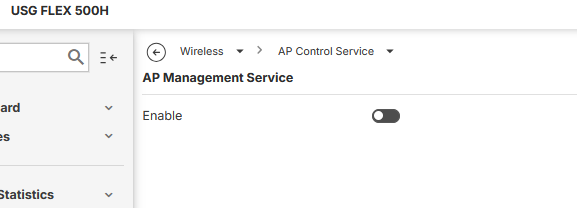
then I linked the AP is inside the primary network again and it was happily blinking green and yellow.
The issue is here.
As soon as I tried to switch AP Management on, then the AP locked in solid red.
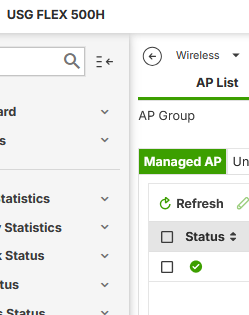
As you can see the green Status let you think everything is good but the AP is still red.
As soon as you select that AP and click Edit:
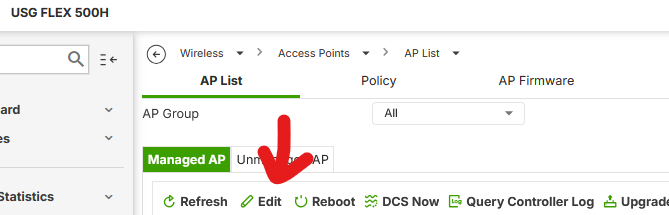
The page of the 500H turns blank and if you refresh it asks you again login credentials.
Of course I disabled AP Management again and gave the customer a temporary solution to have WiFi.
How can I solve this issue?
All Replies
-
Hi @GiuseppeR ,
We were unable to reproduce the symptom you described. On our test USG FLEX 500H, from 1.38 to 1.39, running uOS 1.39P0, the managed AP continues to work normally — the AP LED stays green and wireless clients can connect. The AP Edit function also works fine for us on Edge.
To help us investigate further, could you arrange a time to re-enable AP Management on your device again? Please also share your Nebula organization and site name, and enable Zyxel support access, so we can take a closer look.
Zyxel_Judy
0 -
I had the same problem yesterday. It was a brand-new “WBE630S” access point that hadn't been set up before.
The problem occurred after I enabled the access point management feature for the first time.
I was then shown a blank page, after which I had to log in again.
After restarting the access point, the setup in the web interface worked.
0 -
@Jenz I had a WBE660 under my hands but it was working properly with 1.38 uOS.
I restarted the AP multiple times under AP Managament then I used another path to give them WiFi.
@Zyxel_Judy the customer did not want Nebula management. Please tell me what do you wish that I try on premise
0 -
Hi @GiuseppeR ,
We also had the USG FLEX 500H manage the WBE660S and ran the same test, but we still can't reproduce the symptom you described — the WBE660S continues to work fine after upgrading the USG FLEX 500H from 1.38 to 1.39.
To better assist you, could you share your USG FLEX 500H configuration file and diagnostic file? We'll use your configuration to test again.
Zyxel_Judy
0 -
Hi @Zyxel_Judy
I asked the customer permission to share his config, but there is a no go.
For this reason I went today on site, to manual reset WBE660. I did that, erasing also data backup included on its memory. Than resetting it again to adopt it via 500H.
As soon as I adopted it I saw some green/yellow blinking than 3 red lights and then it was off network.So I downgraded it to 7.30 firmware, same problem as soon as I managed it via 500H. Zero issues if I reset it without adopting via 500H, so in standalone mode. It is something with 500H.
EDIT: this issue occurs when I adopted it in "default" group. Now I created a "NewGroup" and 500H adopts it. There is another issue, the default password to enter adpted APs is set here:
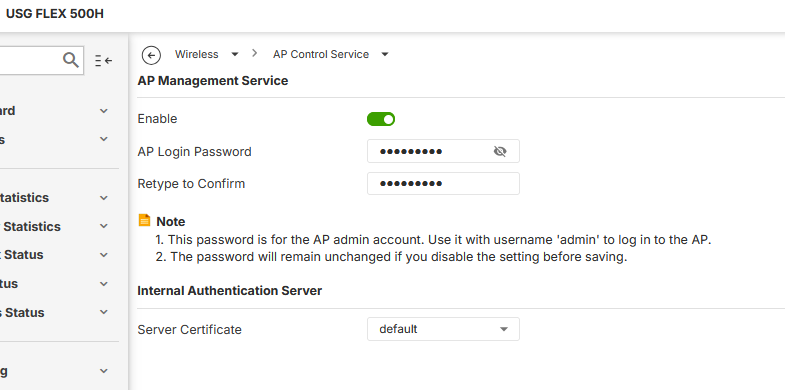
Now, when I open the webpage of the new adpted AP under "NewGroup" I can access it with admin/1234 instead of the custom password I put inside AP Control Service.
EDIT2: rebooting the 500H via webGUI gives back the issue of 3x red lights on AP and then it shutsdown being unable to gent ping via network.
0 -
Hi @Zyxel_Judy
I think there is an issue with LAN disabling in AP Settings:

If you create a new group for "AP Group" and there you select disabling these:
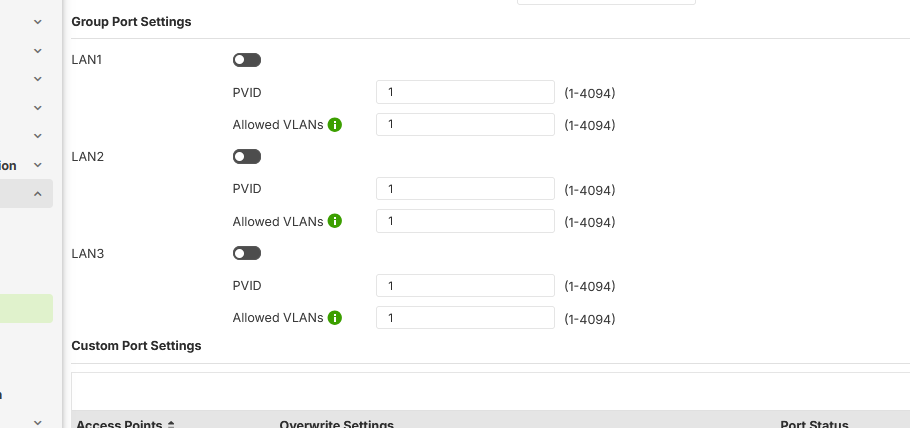
Then you reboot the 500H, you can see the AP going offline.
Maybe a conflict between LAN1 disabling and uplink disabling too.
Please let me know
0



 Zyxel Employee


 Freshman Member
Categories
- All Categories
- 442 Beta Program
- 3.1K Nebula
- 243 Nebula Ideas
- 6.8K Security
- 783 USG FLEX H Series
- 389 Security Ideas
- 1.8K Switch
- 87 Switch Ideas
- 1.5K Wireless
- 58 Wireless Ideas
- 7.2K Consumer Product
- 325 Service & License
- 527 News and Release
- 101 Security Advisories
- 31 Education Center
- 10 [Campaign] Zyxel Network Detective
- 5.3K FAQ
- 34 Documents
- 91 About Community
- 122 Security Highlight


