HELP WITH SNMP

 Freshman Member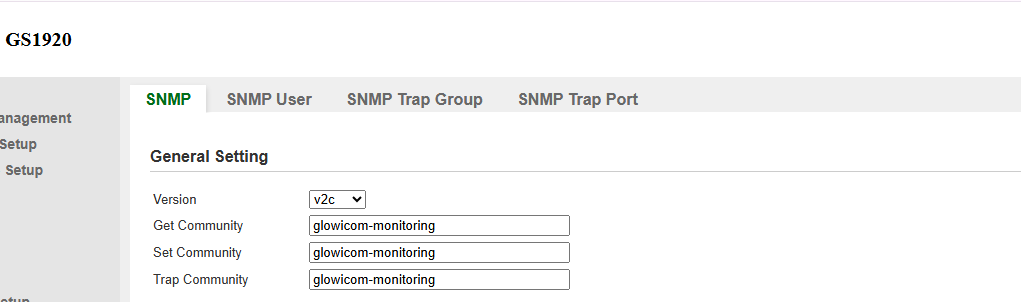
All Replies
-
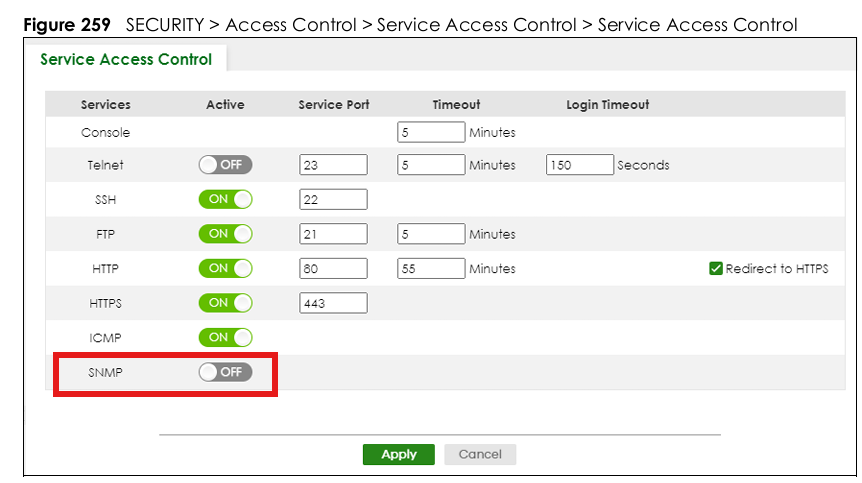
Have you ever toggled SNMP on via Security > Access Control > Security Access Control?
1 -
Hi @Jdeaza ,
Could you please provide the device model and current firmware version?
Please also check if the SNMP service is enabled in "Security" > "Access Control" > "Service Access Control"
Additionally, please ensure that LibreNMS and the Zyxel switch can ping each other, and that firewall rules allow UDP port 161 (polling) on the switch and UDP port 162 (traps) on LibreNMS.
For reference on SNMP settings, please refer to the following guide:
How to configure SNMP on a switch? — Zyxel Community
If the issue persists after verifying the settings above, please provide more details regarding the monitoring failure (e.g., error messages when LibreNMS fails to poll the GS1920), along with relevant screenshots(important) or logs, so we can assist you further.
0 -
Having all the communities set to the same name might generate issues in certain cases, can you try setting the record just on the get community?
0







 Zyxel Employee
Categories
- All Categories
- 442 Beta Program
- 3.1K Nebula
- 243 Nebula Ideas
- 6.8K Security
- 783 USG FLEX H Series
- 389 Security Ideas
- 1.8K Switch
- 87 Switch Ideas
- 1.5K Wireless
- 58 Wireless Ideas
- 7.2K Consumer Product
- 325 Service & License
- 527 News and Release
- 101 Security Advisories
- 31 Education Center
- 10 [Campaign] Zyxel Network Detective
- 5.3K FAQ
- 34 Documents
- 91 About Community
- 122 Security Highlight


