DDNS Type Cloudflare not working




 Guru Member
USG FLEX 700H V1.39(ABZI.0)ITS-260701839
So here is the thing I make a subdomain test.bridgemode.co.uk with IP 127.0.0.1 knowing that this should be updated by this API token which I have setup and put into the FLEX H that shows Success and API token shows Last used by some seconds ago but the IP never updates.
All Replies
-
Hi @PeterUK,
We noticed your DDNS profile's primary binding address is set to interface VLAN443.
Could you please clarify which IP you expect
test.bridgemode.co.ukto resolve to?Zyxel Tina
0 -
Hi Tina
have you test this type of DDNS to be working correctly your end?
The effective IP shown here its meant to change but does not at Cloudflare end

Just so you know I test DDNS no-ip on the same interface VLAN443 and that updates fine
it took me hours to find but I know it works if i do
curl -X PUT "https://api.cloudflare.com/client/v4/zones/ZONE_ID/dns_records/DNS_RECORD_ID" \

     -H "Authorization: Bearer CLOUDFLARE_API_TOKEN" \

     -H "Content-Type: application/json" \

     --data '{

       "type": "'"A"'",

       "name": "'"test.bridgemode.co.uk"'",

       "content": "'"192.168.1.1"'",

       "ttl": 120,

       "proxied": false

     }'
the 192.168.1.1 was just a test but can't seem to get it to work by FLEX H DDNS. I also tried on FLEX200H V1.39 it just will not update the IP
0 -
Hi @PeterUK,
Regarding Cloudflare, our team has recently tested another case and confirmed that it is working.
As the profile is currently in a disabled state. Could we kindly ask if you would allow us to enable it to test and check the logs?

Zyxel Tina
0 -
Yes sorry I disabled it in case it causes too many fail attempts I have enabled it if needed I can make a new API token and give it to you for testing feel free to disable and enable this test subdomain.
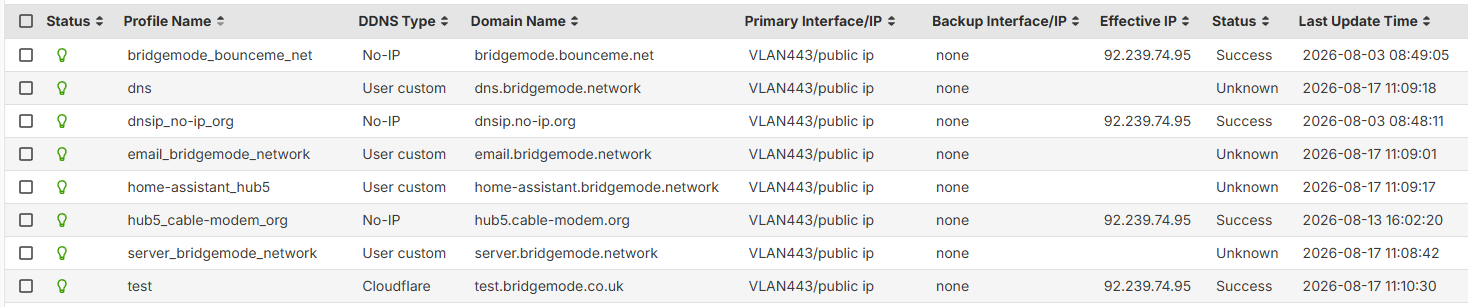

thanks
0 -
[Update]
Our team has identified the root cause: Cloudflare’s response was exceeding our firewall’s internal buffer size, causing the update to fail even though the interface displayed “Success”.
A fix for this issue will be included in a future firmware release.
Zyxel Tina
0




 Zyxel Employee
Categories
- All Categories
- 442 Beta Program
- 3.1K Nebula
- 241 Nebula Ideas
- 6.8K Security
- 755 USG FLEX H Series
- 380 Security Ideas
- 1.8K Switch
- 87 Switch Ideas
- 1.5K Wireless
- 58 Wireless Ideas
- 7.2K Consumer Product
- 321 Service & License
- 512 News and Release
- 99 Security Advisories
- 31 Education Center
- 10 [Campaign] Zyxel Network Detective
- 5.3K FAQ
- 34 Documents
- 90 About Community
- 119 Security Highlight


