Apple Configurator for VPN configs




 Ally Member
Hello,
Is there any instructions anywhere, how to use Apple Configurator- app to modify the IPSec VPN profile in iPhone? I would like to modify parameters what iOS by default only accepts, like DH14 to DH19. And the initial proposal to be based on AES-GCM. I assume, there is no other way with iPhones to improve the default parameters?
Thank's
K
All Replies
-
Hello @kelmi,
why you need to modify the profile directly in iPhone? Is the profile that you load, that "impose" the configuration for the Phase 1 and 2.
If you would like to use only the DH19, you need to configure the profile for accept only the DH19, then you need to load the profile (.mobileconfig file)
Otherwise, if you would like to create a profile, directly from iPhone, you can do this:
- Open Apple Configurator on your iPhone.
- Select File > New Profile from the top menu bar.
- Click on the VPN payload category in the left sidebar and click Configure.
- Set the Connection Type dropdown menu to IKEv2.
- Scroll down to the crypto parameters sections:
- IKE SA Params (Phase 1): Locate the Diffie-Hellman Group dropdown and select your required group (e.g., 14, 19, 20, 21).
- Child SA Params (Phase 2): Check Enable Perfect Forward Secrecy (PFS) to unlock the Phase 2 parameters, then change the Diffie-Hellman Group dropdown to match your server configuration.
- Save and export your
.mobileconfigfile.
0 -
iPhone does not seem to approve by default anything else except DH14. That it what it proposes and when 50H replies and proposes DH19, iPhone stops trying.
K
0 -
What version of iPhone? What version of iOS?
I think the important point here is that iOS does support DH19 for IKEv2, so it should not be limited to DH14 by design.
If the iPhone is only proposing DH14 and then stops when the Zyxel replies with DH19, I would first check the actual IKE_SA_INIT exchange and the configuration profile being used on the iPhone.
The
.mobileconfigshould explicitly define the IKEv2 parameters, for example:- Phase 1 / IKE SA: AES-GCM + DH19
- Phase 2 / Child SA: AES-GCM + PFS/DH19 (if PFS is required)
The important part is that DH19 must be configured in the IKEv2 payload of the profile; changing the Zyxel side alone will not make the iPhone propose DH19.
So I would suggest creating a new
.mobileconfigwith the desired IKEv2 crypto parameters using Apple Configurator, installing that profile on the iPhone, and then checking the IKE_SA_INIT packet/logs on the Zyxel.If the iPhone still proposes only DH14 after installing a profile explicitly configured for DH19, then we need to look at the exact iOS version and the contents of the
.mobileconfigfile. If you can share the relevant VPN payload (with the server address/credentials removed), I can take a look at it.Thank you
0 -
iPhone 17 Pro. Latest iOS 26.6.1
K
0 -
Can you provide the .mobileconfig used? Hide your secret/sensitivity data and if you can, share the .mobileconfig file.
Thank you
0 -
Well,
that is my original quesrion up there. How to make the .mobileconfig using Apple configurator as what you can do through iOS GUI always defaults to DH14.
k0 -
Oh sorry, you're right.
Can you share your VPN configuration screenshot inside the firewall?
0 -
The USG FLEX H series support to modify the parameters and apply to mobileconfig. I think there's no need to use Apple configuration app since delete old profile and import the new file should be easier.
Zyxel Melen0 -
Hi Melen,
Yes, sure, but first I ask the screenshot to know how kelmi set the phase1 DH1 -
Back to this topic, after a business trip.
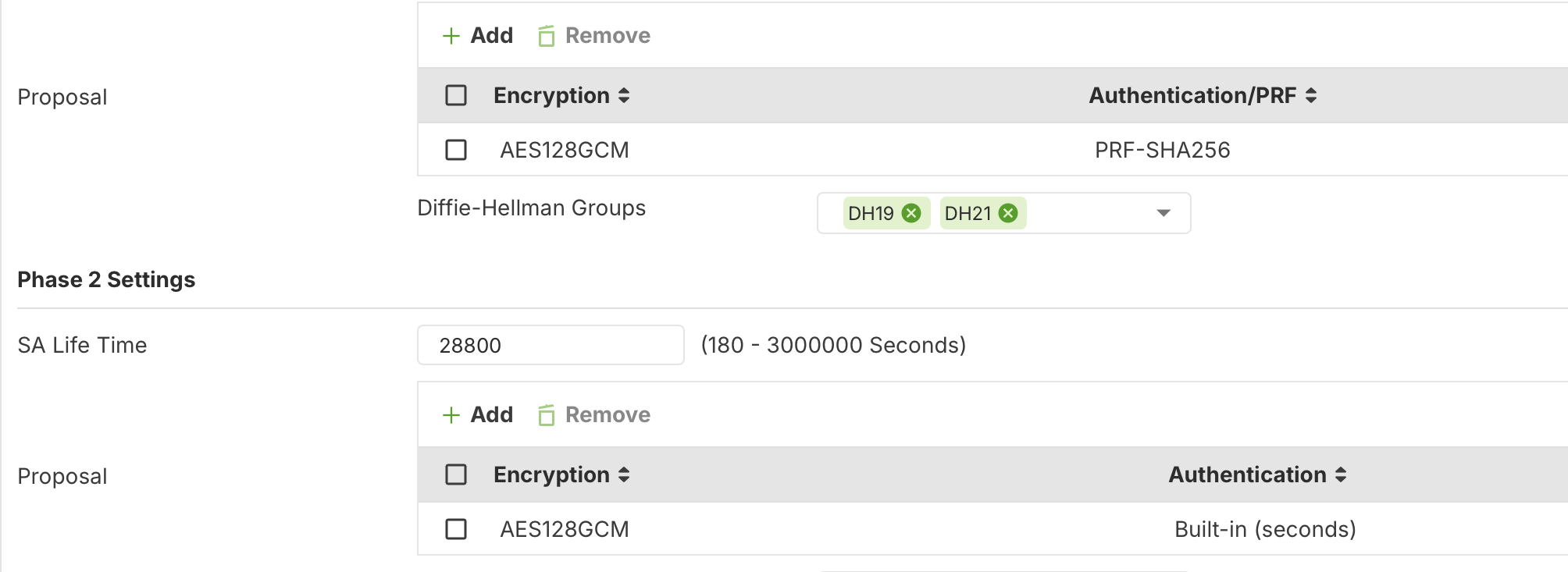
- VPN Config1 picture shows the VPN config
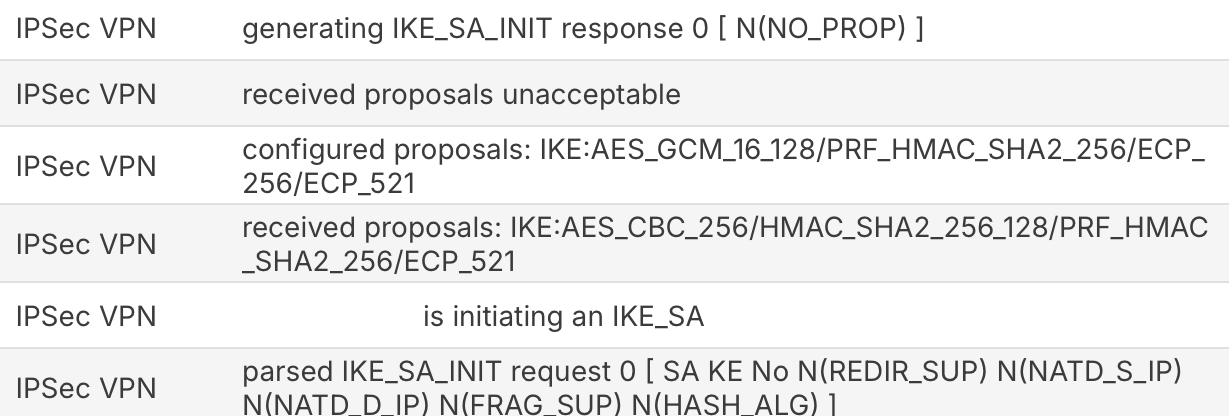
- Log file1 shows the log file
I deleted the VPN profile from iPhone and pushed the Download- button to have the config script. And installed that to my iPhone
It looks like iPhone is not getting the right script or is overriding that with default AES256 settings.
K
0





 Master Member

 Zyxel Employee
Categories
- All Categories
- 442 Beta Program
- 3.1K Nebula
- 243 Nebula Ideas
- 6.8K Security
- 783 USG FLEX H Series
- 389 Security Ideas
- 1.8K Switch
- 87 Switch Ideas
- 1.5K Wireless
- 58 Wireless Ideas
- 7.2K Consumer Product
- 325 Service & License
- 527 News and Release
- 101 Security Advisories
- 31 Education Center
- 10 [Campaign] Zyxel Network Detective
- 5.3K FAQ
- 34 Documents
- 91 About Community
- 122 Security Highlight