Delete/modify ethernet interface, cause delete of DHCP static configuration on associated VLANs





 Master Member
Hello,
I've a following interfaces configuration:
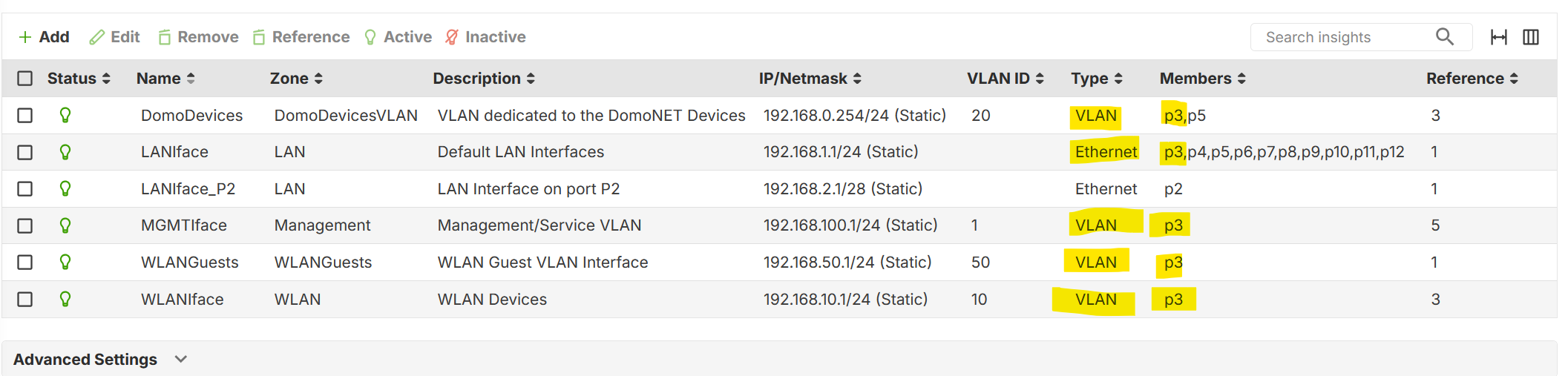
If I remove or change somethings on IP on the LANIface, seems that also deleted all the entries into the DHCP Static configuration on the others Interfaces.
Probabily because the LANIface on port P3, interest also the VLAN on the same port.
In this specified case, if I modify the IP configuration on the LANIface, all the static DHCP entry are deleted for all the other interfaces (DomoDevices, MGMTIface, WLANGuests and WLANIface).
Can you verity this strange behaviou?
Thank you
All Replies
-
Might be a specific way to cause this but I'm not seeing it.
If I have
ge12 LAN2
192.168.168.1/24 (Static)
Ethernet p12
with a DHCP entry
ge12 192.168.168.4 test-PC MAC Reservedthen
VLAN47 VLAN47
192.168.255.43/28 (Static)
47 VLAN p12
with a DHCP entry
VLAN47 192.168.255.44 testPC MAC ReservedIf I edit like DHCP Pool Size either ge12 or VLAN47 that are both on P12 both DHCP entry stay or if I change ge12 LAN2 IP from 192.168.168.1/24 to 192.168.16.1/24 I get a note saying the Reserved will be removed for ge12 LAN2 but I still keep my DHCP entry for VLAN47
0 -
Hi Peter,
I don't receive any note but seems that is connected to the same port. For example:
Now I don't have the bridge between LANIface and LANIface_2.
To create a bridge between them, I need:
- Unassociate the IP on both interface;
- Disable the DHCP Server on both interface;
- Create a new bridge interface between both, named differently but with a IP subnet/pool 192.168.1.1/24 (the old LANIface pool)
Then I revert back all the configuration, so:
- Delete the bridge
- Reconfigure an IP subnet for LANIface_P2 (192.168.2.1/28 DHCP enabled)
- Reconfigure an IP subnet for LANIface (192.168.1.1/24 DHCP enabled)
This seems that these operations cause the lost of all reserved DHCP for all the interfaces
0 -
Do I simple setup step by step that cause the lost of all reserved DHCP for all the interfaces this will help Zyxel track the problem down.
1 -
Thank you Peter
0 -
Hi @Maverick87,
Thank you for the information! We would like to ask for a bit more clarification. When you mentioned that “these operations cause the loss of all reserved DHCP entries for all the interfaces,” could you please confirm precisely which interfaces were affected?
Specifically, does this refer to:
- Reconfiguring the IP subnet for LANIface_P2 (192.168.2.1/28, DHCP enabled)
- Reconfiguring the IP subnet for LANIface (192.168.1.1/24, DHCP enabled)
Please feel free to share the complete procedure and results or screenshots with us so we can better understand the situation. Thank you.
Zyxel Tina
0 -
Hi @Zyxel_Tina,
seems that the problem occurs when you reconfigure an interface in with a port shares also VLANs.
Obviously, when you delete the 192.168.1.1/24 interface, you lost every DHCP reserved. So, first you need to backup the DHCP list for the specified interface, then you need to reapply all the DHCP reserved uploading the DHCP Table file
0




 Guru Member


 Zyxel Employee
Categories
- All Categories
- 442 Beta Program
- 3.1K Nebula
- 241 Nebula Ideas
- 6.8K Security
- 759 USG FLEX H Series
- 380 Security Ideas
- 1.8K Switch
- 87 Switch Ideas
- 1.5K Wireless
- 58 Wireless Ideas
- 7.2K Consumer Product
- 321 Service & License
- 520 News and Release
- 100 Security Advisories
- 31 Education Center
- 10 [Campaign] Zyxel Network Detective
- 5.3K FAQ
- 34 Documents
- 90 About Community
- 119 Security Highlight


