[USG Flex H - V1.39(ABZH.0)ITS-260800686] - User Custom DDNS effective IP not appear
All Replies
-
No isn't fixed for auto, the fix is relative about the problem with Dynu Basic username:
So, for update the Dynu DDNS you need to switch on "User custom" and use the API to refresh the IP.
Now, with this weekly update, the Dynu Basic configuration is fixed, and you be able to use this configuration that manage better the IP (as you can see).
I don't retry with User Custom because now the Dynu Basic works.0 -
Dynu Basic works because from interface is not the same as auto with from interface there is no need to look at the good IP because it just displays the IP the interface has.
0 -
-
-
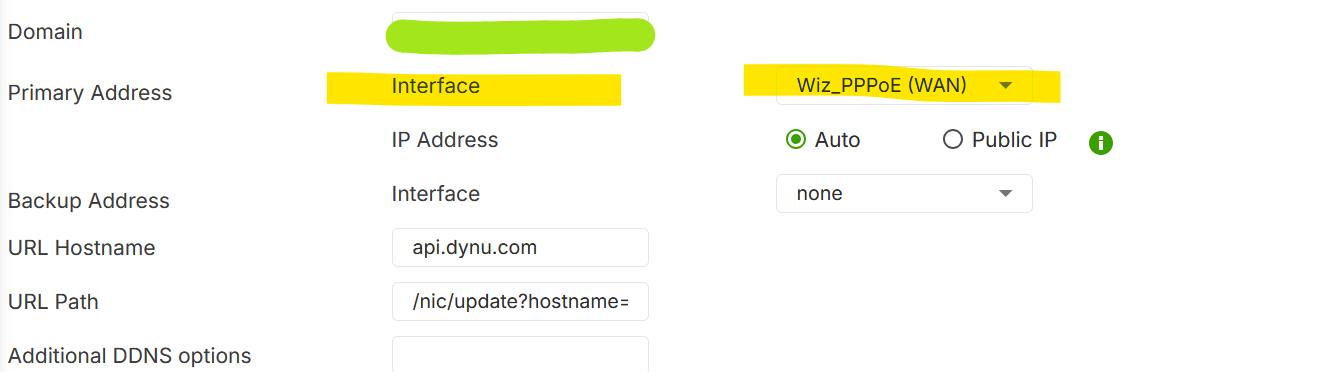
Not the same thing the "Primary address" is where DDNS sends traffic out the "IP address" is the method for how the IP is checked to be updated.
0 -
Is not make sense, also because you have a backup interface, but OK :)
So, If I sends traffic out via an Interface, I expect that the IP Address is the IP of the interface itself.
The right sense for me, is how it behaves when I choose a service. It lets me choose the interface and asks me if the IP I want to send is that of the interface itself or another one.
So… in this sense, what is the difference between:
- Interface → from interface
- Interface → auto
If I have a backup interface, I can select it and if the primary interface is not available the IP address sent is the backup interface IP.
0 -
Why not ask about Public IP too
Interface → from interface
On boot the interface get a IP then DDNS from interface updates DDNS where your interface IP changes then DDNS happens again as its from interface for the interface IP it just show that IP for effective IP.Interface → auto
On boot the interface get a IP then DDNS auto updates DDNS the effective IP display it by the DDNS traffic reply good IP if interface IP changes then DDNS happens again effective IP display it by the DDNS traffic reply good IP.Interface → Public IP
On boot you could have a static LAN IP that never changes like CGNAT where your WAN IP changes On boot the Checking Public IP URL like http://ip1.dynupdate.no-ip.com/ is checked and stored then DDNS updates the effective IP display it by the DDNS traffic reply good IP now every like Minutes 5 the Checking Public IP URL is checked if the IP is different to what is stored then DDNS updates the effective IP display it by the DDNS traffic reply good IP .From what I can tell
0 -
OK now understand, thank you for the explanation.
0 -
This is the response from Dynu, after I ask to improve the nochg message with the IP.
Hello,
Thank you for choosing Dynu!
We regret to inform you that the 'nochg' return code does not contain
the IP address. The IP address cannot be returned with the 'nochg'
because changing this behavior would break compibility with countless
existing routers, devices, and scripts that rely on this standard
response format.
We recommend that you use the advanced REST API using which you can get
the details of the record including IP address and then perform update
as needed. You can obtain the API-Key to use the API in the Control
Panel.
The endpoints of interest for your your use case would be below:
GET /dns
GET /dns/{id}/record
GET /dns/{id}/record/{recordId}
POST /dns/{id}/record/{recordId}So, from Dynu nothing! But with the fix, we have already resolved the issue.
Thank you
0 -
I think the bit about
The IP address cannot be returned with the 'nochg'
because changing this behavior would break compibility with countless
existing routers, devices, and scripts that rely on this standard
response format.Is a bit of a lie because how would always reply with good IP cause a problem if the IP in good has not changed then it has not changed it would just update the same IP unless changed.
0





 Master Member




 Guru Member
Categories
- All Categories
- 442 Beta Program
- 3.1K Nebula
- 241 Nebula Ideas
- 6.8K Security
- 759 USG FLEX H Series
- 380 Security Ideas
- 1.8K Switch
- 87 Switch Ideas
- 1.5K Wireless
- 58 Wireless Ideas
- 7.2K Consumer Product
- 321 Service & License
- 520 News and Release
- 100 Security Advisories
- 31 Education Center
- 10 [Campaign] Zyxel Network Detective
- 5.3K FAQ
- 34 Documents
- 90 About Community
- 119 Security Highlight


