[USG Flex H] - Ping packets lost and port led unusual flickering





 Master Member
Hello,
I've an 500H and from 2 days more or less, I see an unusual flickering of port status as if there were more activity than usual (DDos attach or similar).
All of these ports flickering at the same way, at the same moment and all are belonging to the same interface (LANIface in the LAN zone):
- Home Alarm
- UPS
- TVs
When I try to ping the UPS, there are more lost packet
Ping statistics for 192.168.1.252:
Packets: Sent = 161, Received = 61, Lost = 100 (62% loss)
I've tried to disconnect and reconnect the cable, but the activity are the same, 1-2 seconds normal, then continue to flickering.
I've disconnected also the other cable, internet WAN, access point, raspberry with Home Assistant, leaving also the only cable connected. The activity are the same and the ping packets are lost too.
I've exported the DHCP list of the single interface, and deleted the interface and recreating a new one with the same interface configuration, seems to work, the continuos activity terminate, the led flicker as normal and usual and the ping packets are good.
The DHCP assign a new IP to the UPS and now ping works
Ping statistics for 192.168.1.2:
Packets: Sent = 70, Received = 69, Lost = 1 (1% loss)
After this, I've released the IPs on the interface, reimported the DHCP list, disconnected and reconnected the cable, ping packets lost again
Ping statistics for 192.168.1.252:
Packets: Sent = 131, Received = 64, Lost = 67 (51% loss)
At this point I've released again the IPs, reset the interface and also the new IP packets are lost again
Ping statistics for 192.168.1.2:
Packets: Sent = 27, Received = 7, Lost = 20 (74% loss)
I've deleted again the interface, and recreate again; now when I recreate the interface all connections was lost, no internet access, and all DHCP reservation was lost. I've reapplied all the DHCP reservation, re-importing the DHCP list and reboot.
After reboot, packets on the UPS are lost again.
Ping statistics for 192.168.1.252:
Packets: Sent = 147, Received = 52, Lost = 95 (64% loss)
Re-deleted the interface, and re-created the interface, now no problem showed up; the interface was created immediately without problems. Disconnected and reconnected the UPS port, this is the ping statistics:
Ping statistics for 192.168.1.2:
Packets: Sent = 446, Received = 440, Lost = 6 (1% loss)
Imported again the DHCP reservation list of the single interface and disconnect/reconnect the cable, no packets losts:
Ping statistics for 192.168.1.252:
Packets: Sent = 80, Received = 79, Lost = 1 (1% loss)
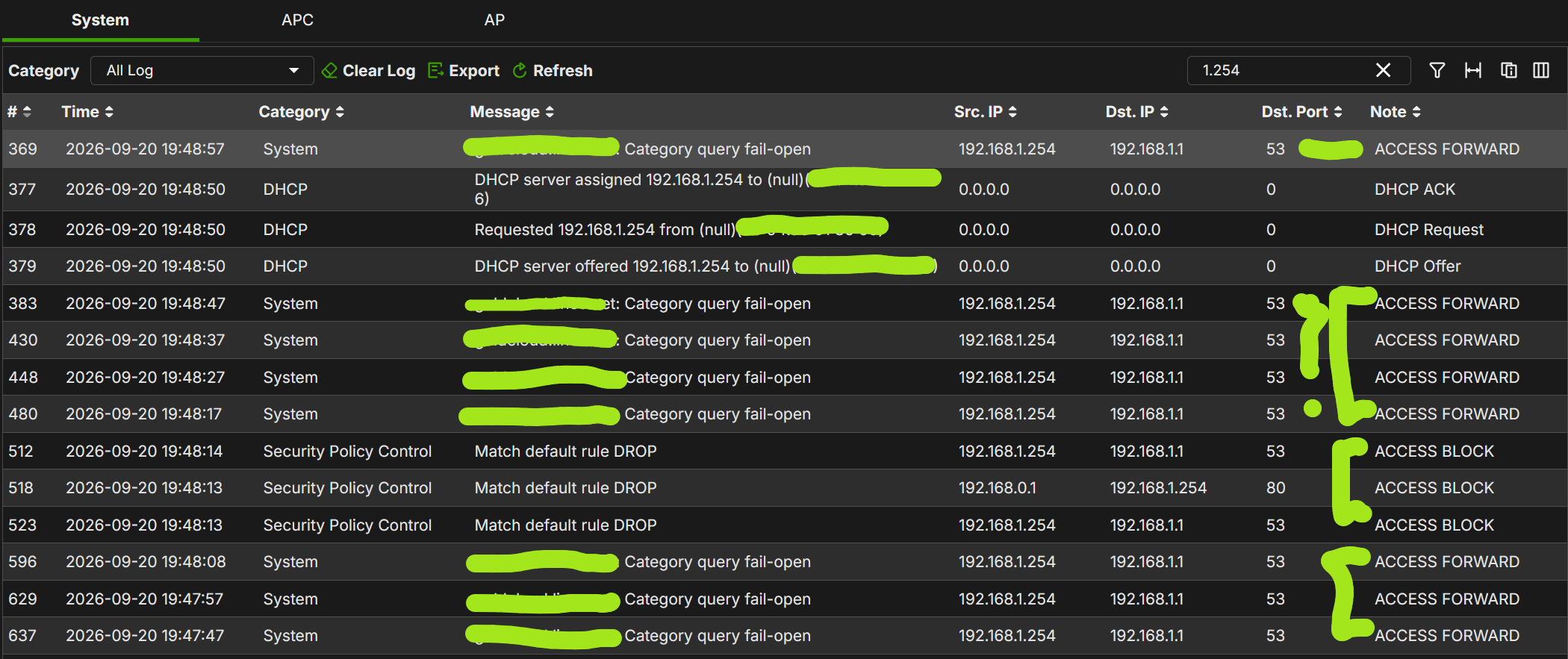
After a reboot, no DHCP served:

Instead for another device to the same interface:
This is another example, an IoT device of another interface:
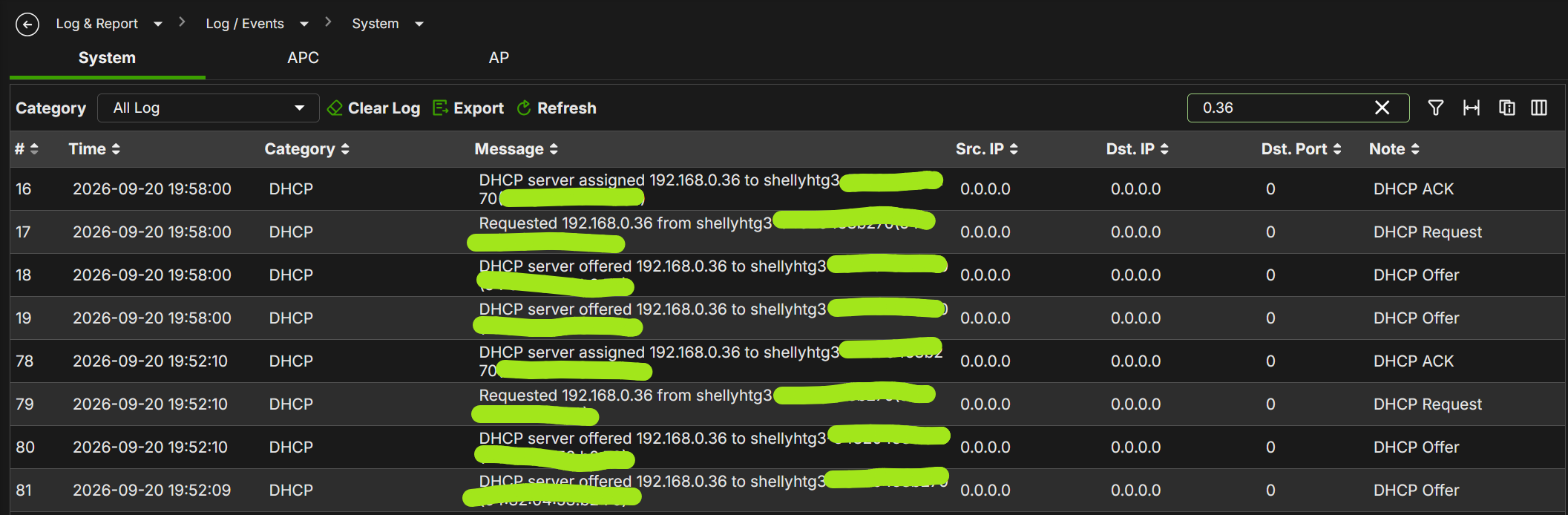
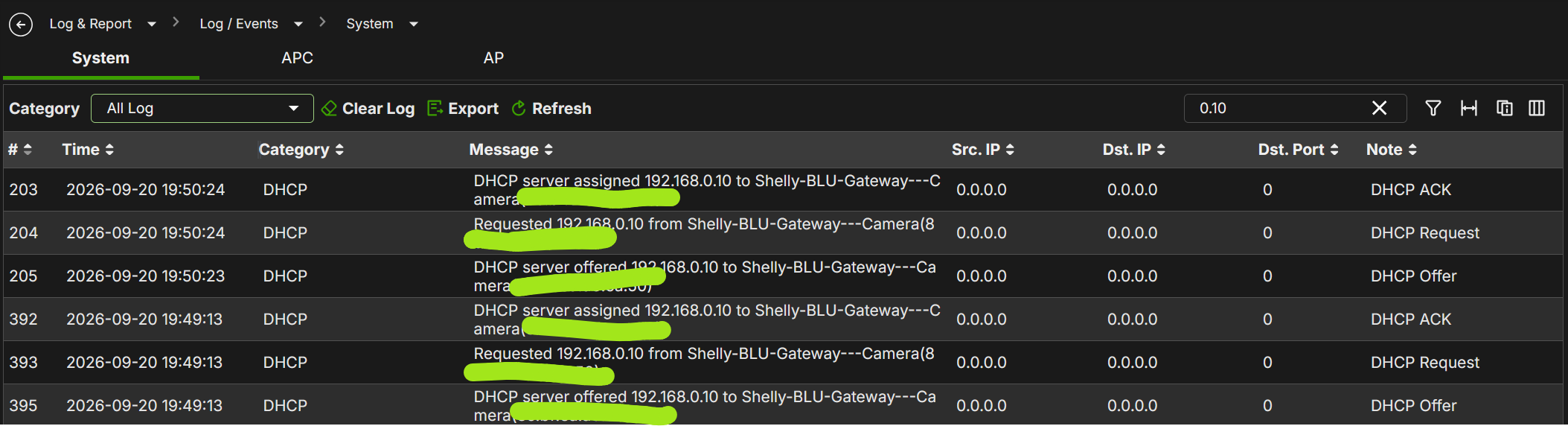
After another reboot:
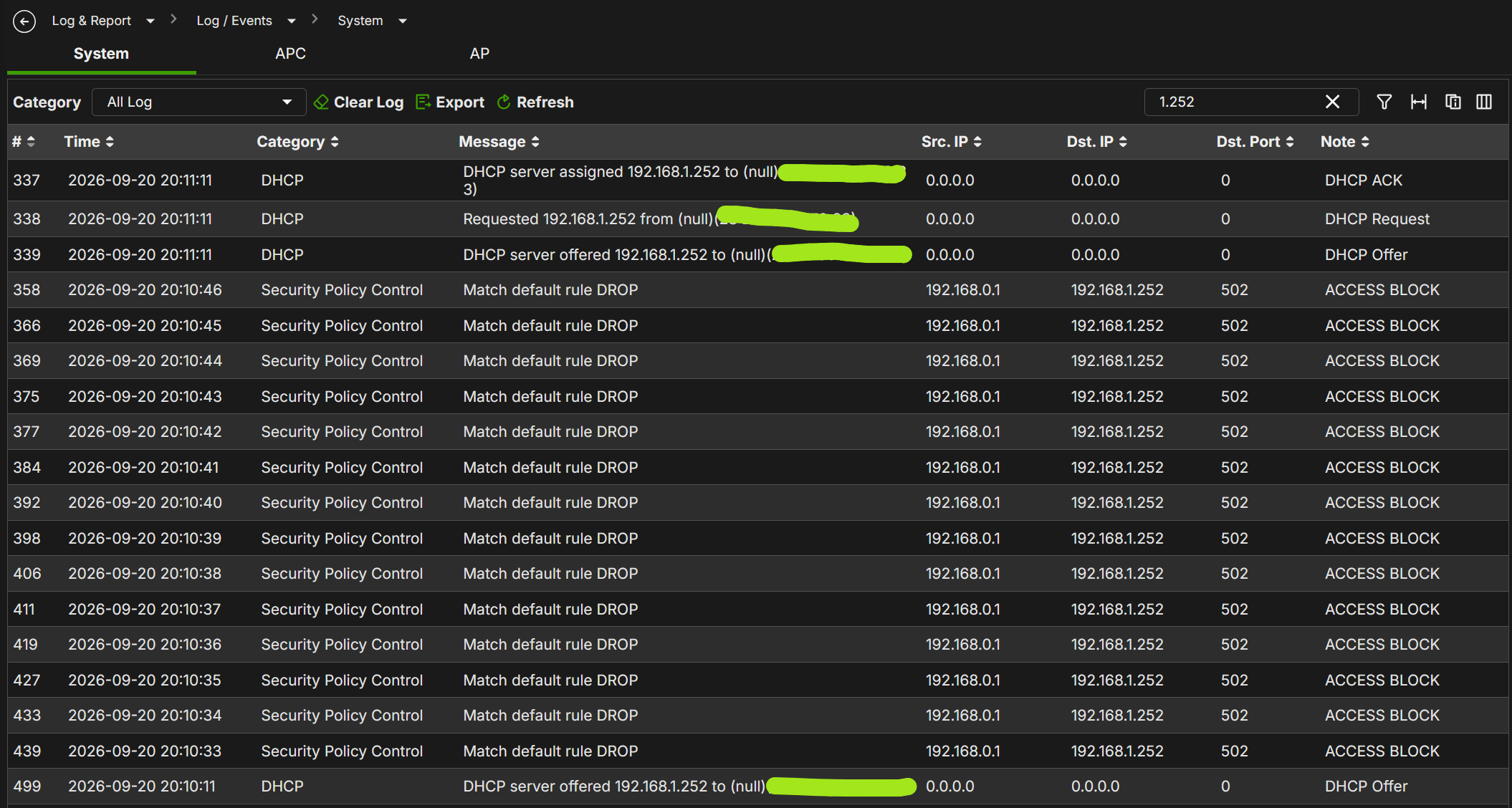
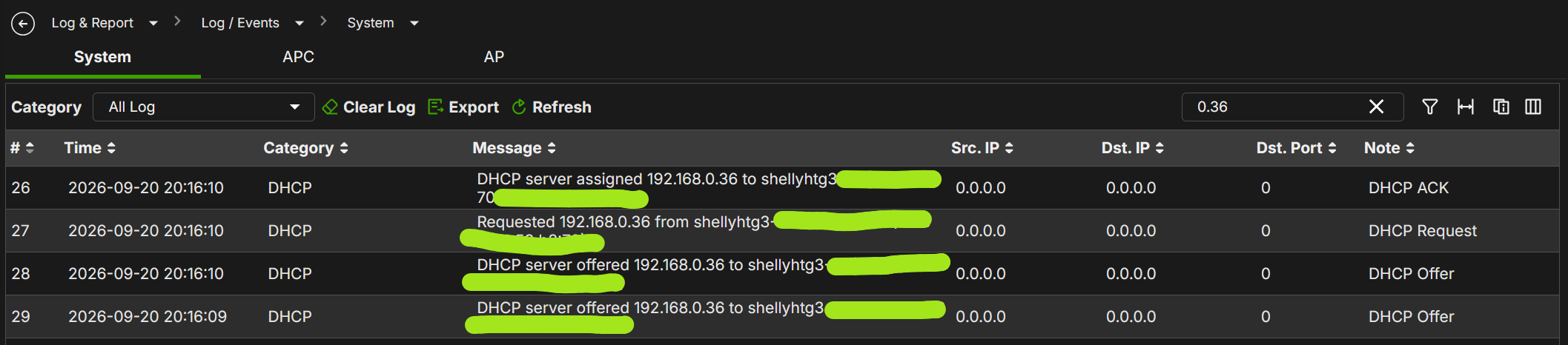
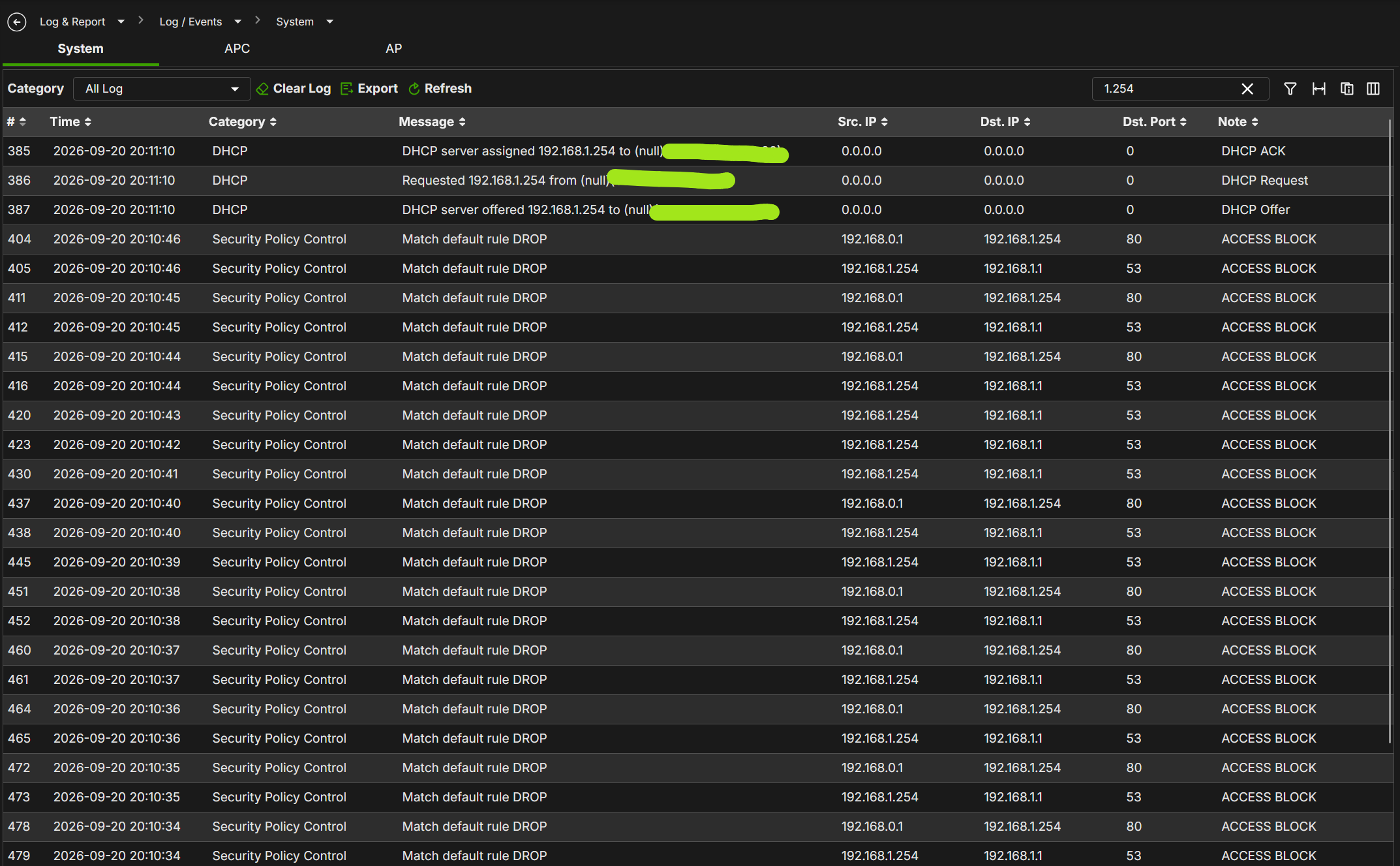
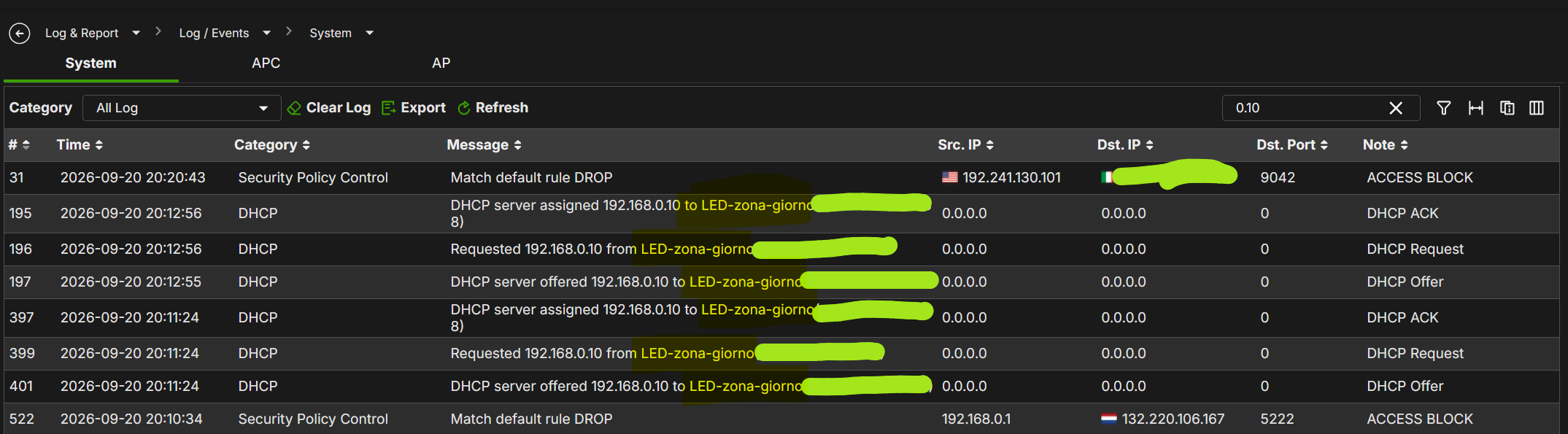
SORRY?!?!? 192.168.0.10 after the reboot, had changed the name? Before the reboot is Shelly-Blu-Gateway-Camera, now is LED-zona-giorno??
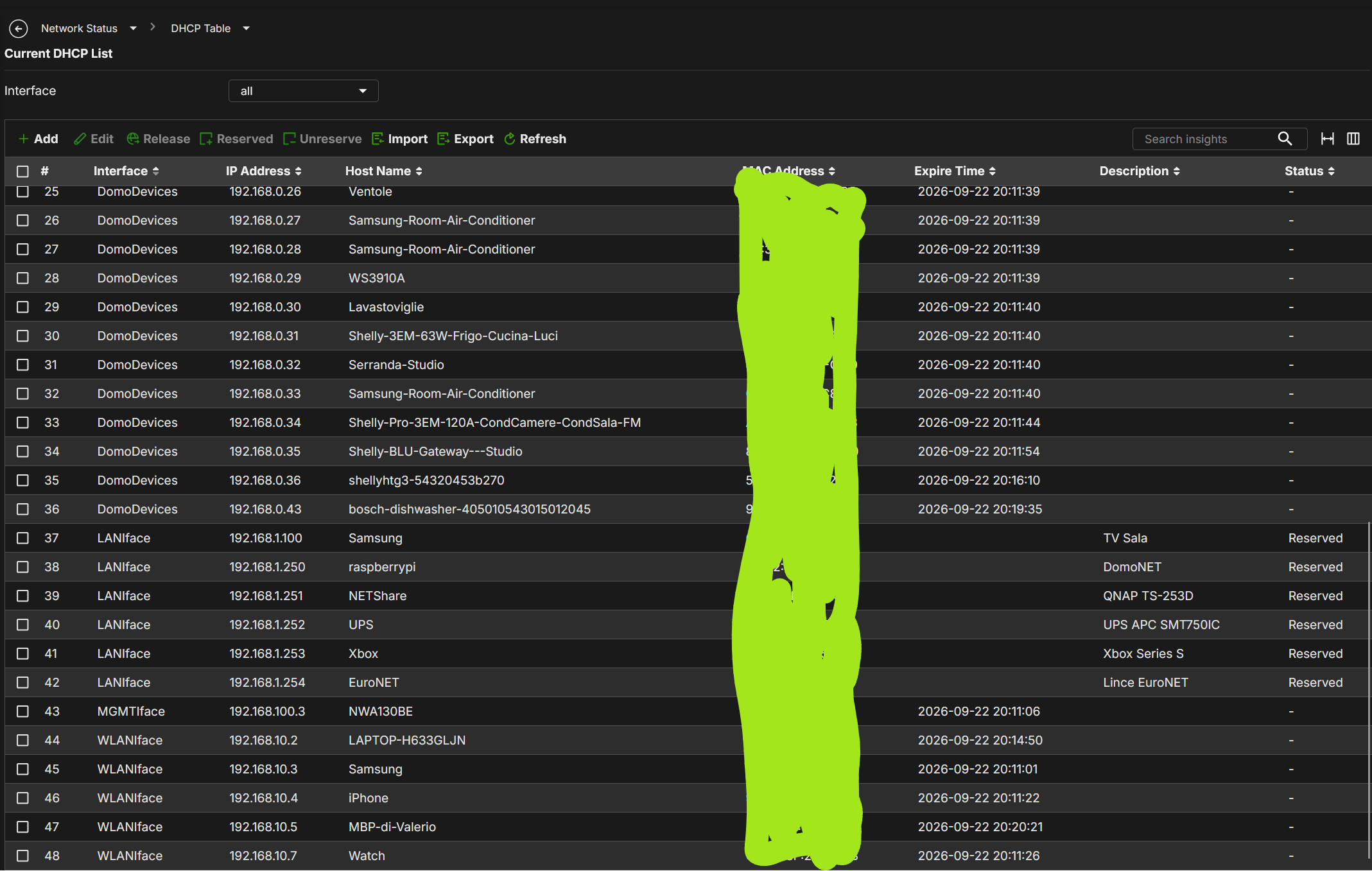
WHAT???!? WTF… I've lost all the reservation, but only an interface have maintain it???
Then:
Ping statistics for 192.168.1.252:
Packets: Sent = 223, Received = 93, Lost = 130 (58% loss)
Ping statistics for 192.168.1.254:
Packets: Sent = 417, Received = 417, Lost = 0 (0% loss)
The problem is present only for the UPS, seems that the other devices are OK.
Anyway, there are other problems reboot every reboot, DHCP that no serve IP, DHCP reservation lost, interfaces that after deleted and recreated and the 500H don't respond anymore and freeze.
I've collected a series of diag file, all of those are > 80MB also after a simple reboot, and more or less 8/10mins for collect the logs.
When all work, the led activity are normal and no any continuos flickering.
All Replies
-
Hi @Maverick87,
Thank you for providing such detailed troubleshooting steps and diagnostic logs.
To further confirm the cause of the problem, please provide the following detailed information:, please provide the following details:
1.Firmware Version and Network Topology
Current firmware version of your USG FLEX 500H (whether it is running the latest patch/release).
Which physical ports are assigned to this LAN interface (LANIface), and is there an intermediate switch between the 500H and your devices?
When testing with only a single Ethernet cable connected, was the UPS connected directly to the USG FLEX 500H?
2.Diagnostic File
If feasible, please collect the diagnostic file during the abnormal behavior (not only after rebooting the device).
Navigation path: Maintenance > Diagnostics > Diagnostics, check Collect the configuration files, and click Collect Now.
Note: Since the file is large, the collection process may take around 8–10 minutes. Thank you for your patience.
Please share the download link and collection timestamp with us via private message. Alternatively, feel free to provide the diagnostic files you previously captured if more convenient.
3.Packet Capture
If the issue is reproducible, please run a packet capture on the LAN interface (LANIface) for approximately 30 to 60 seconds (covering the continuous ping to the UPS and the DHCP assignment period).
Navigation path: Maintenance > Diagnostics > Packet Capture (you can share the .pcap file using the same download link).
4.DHCP Information and Files
If possible, please export the DHCP table both before and after a reboot (Network Status > DHCP Table > Export).
Please also share the DHCP file you used for the import.
5.Remote Access Permission
Please refer to this FAQ:
[How to turn on zyxel support access] to enable temporary remote access, and provide your organization and site name so we can assist you further.Friendly reminder: Please do not modify any settings on NCC in the meantime to avoid overwriting your on-premises configuration.
Additionally, please let us know your typical configuration preference (whether you mainly configure via NCC cloud or locally on-premises).
Thank you for your cooperation and support!
0 -
Hi @Zyxel_Luna,
- The version is:
V1.39(ABZH.0)ITS-26WK34-0909-260900106Dand the network topology is quite simple, a simple interface that map more ports. The UPS is connected to P7 port directly, without other devices;
- I'll pass to you the Diag file in PM;
- I'll pass the packet capturing of all the LANIface; during the capturing I've ping the 192.168.1.252 and 192.168.1.254 (1.252 working intermittently);
- I'll pass the DHCP file in PM;
- I've enable the Zyxel Support (Org: MyHouse - Site: MyHome) - up to 12/10/2026
Ping statistics for 192.168.1.254:
Packets: Sent = 309, Received = 309, Lost = 0 (0% loss)Ping statistics for 192.168.1.252:
Packets: Sent = 164, Received = 50, Lost = 114 (69% loss)0 - The version is:
-
Hi @Zyxel_Luna,
Very strange… flat charts with same TX and RX… before 8AM the flex was turned off.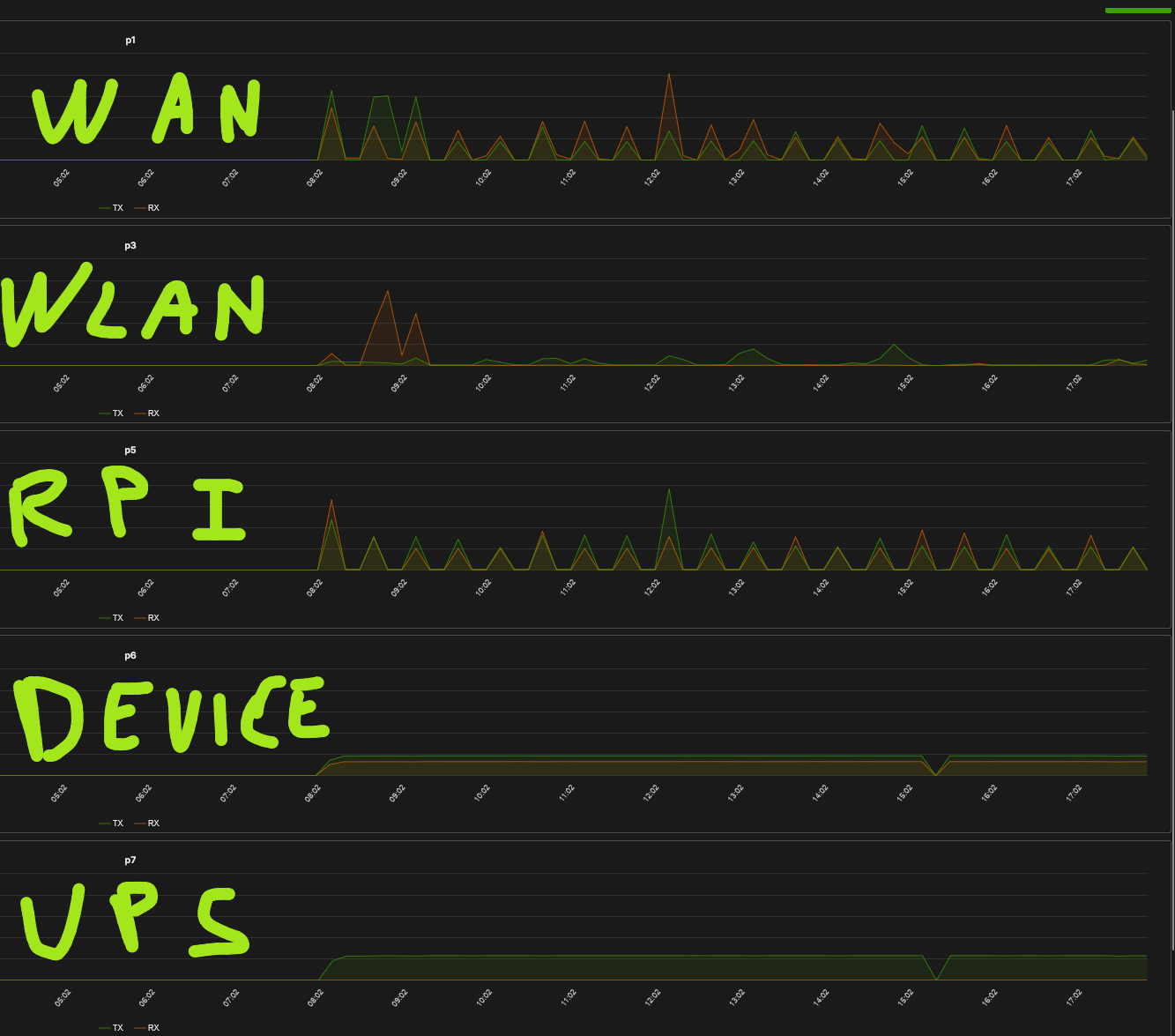
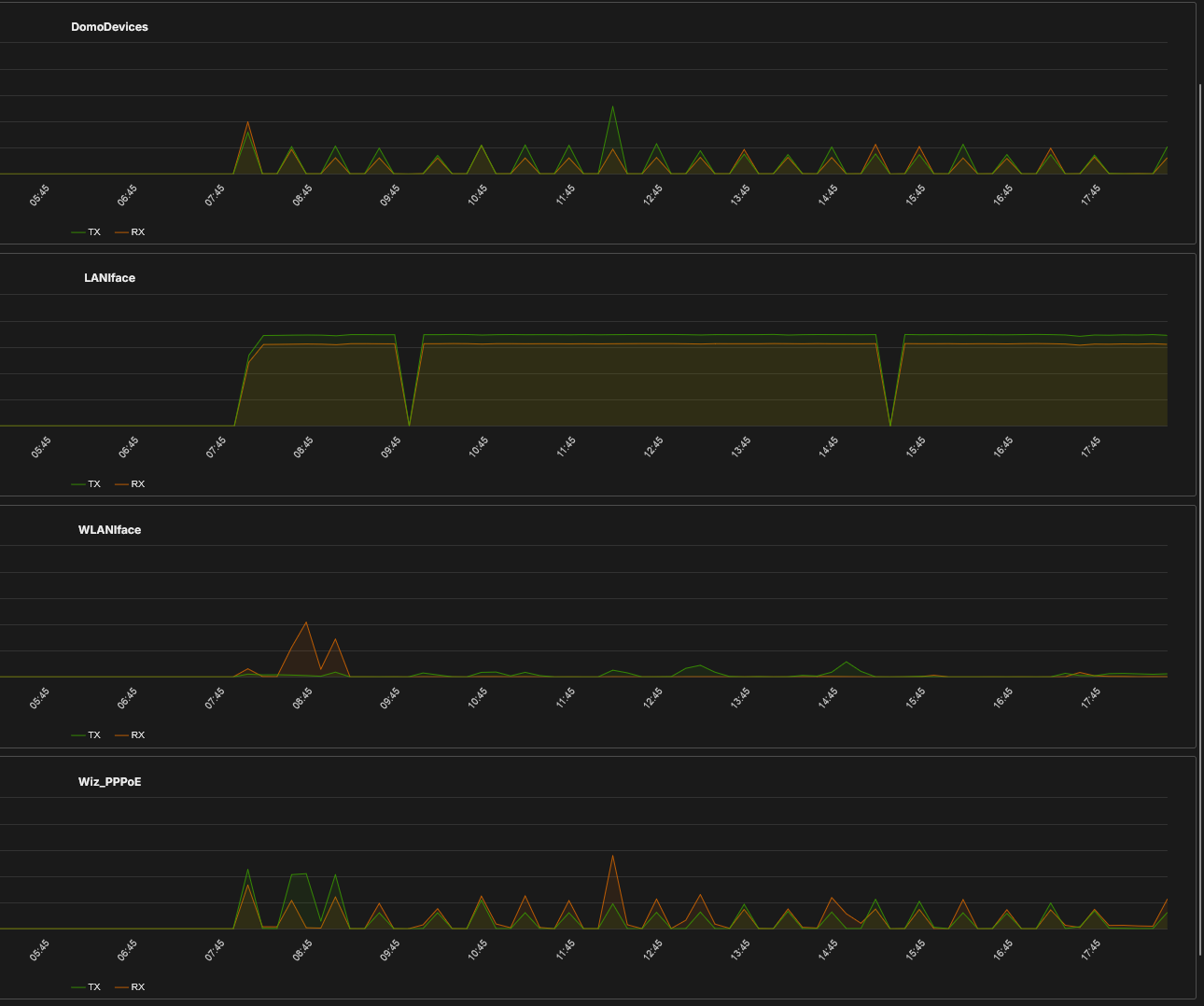
- WAN is on VLAN 835
- WLAN is on VLAN 10
- Raspberry PI is on VLAN 20
- Device and UPS is without VLAN on LANIface
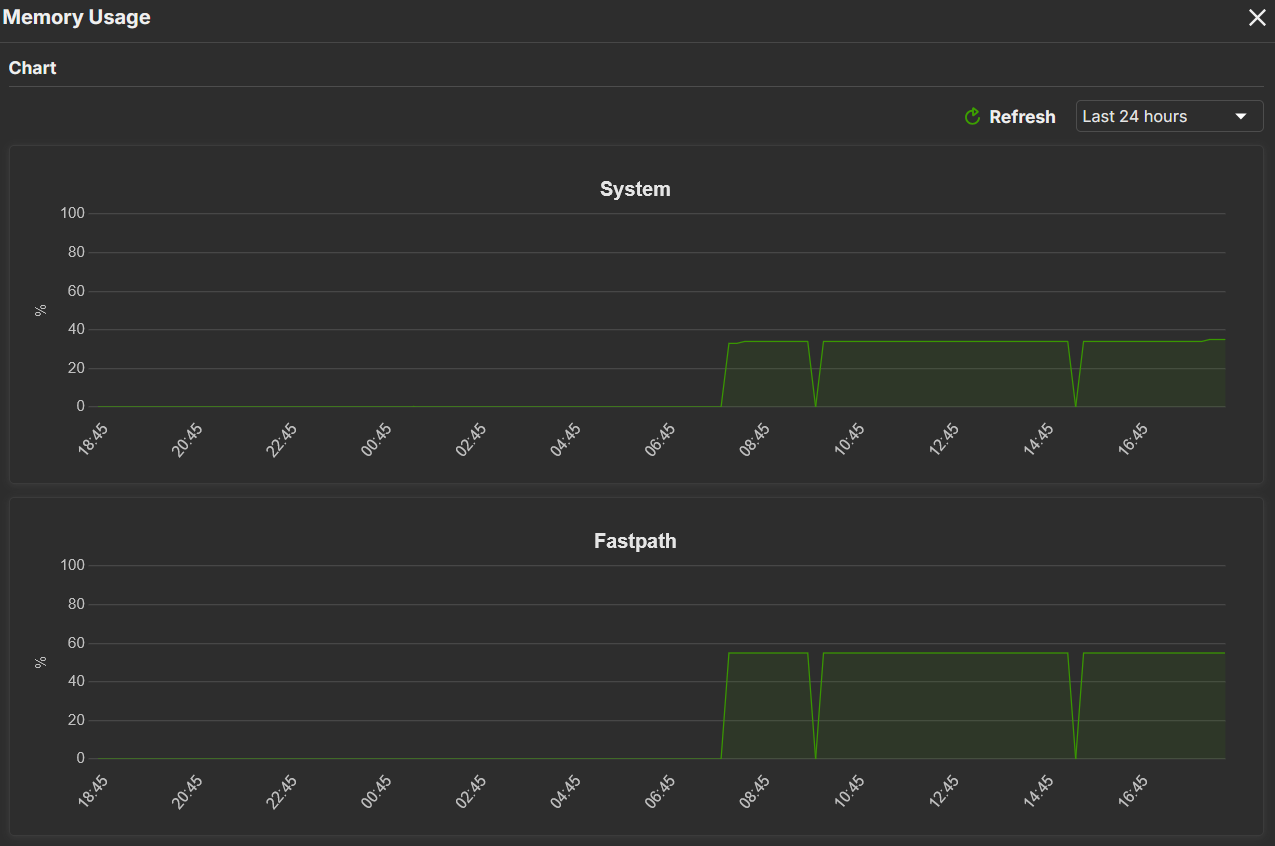
Mmmm the memory and LANIface drops at the same moments? Really strange; and also the memory are the same for every time in the day?? Strange
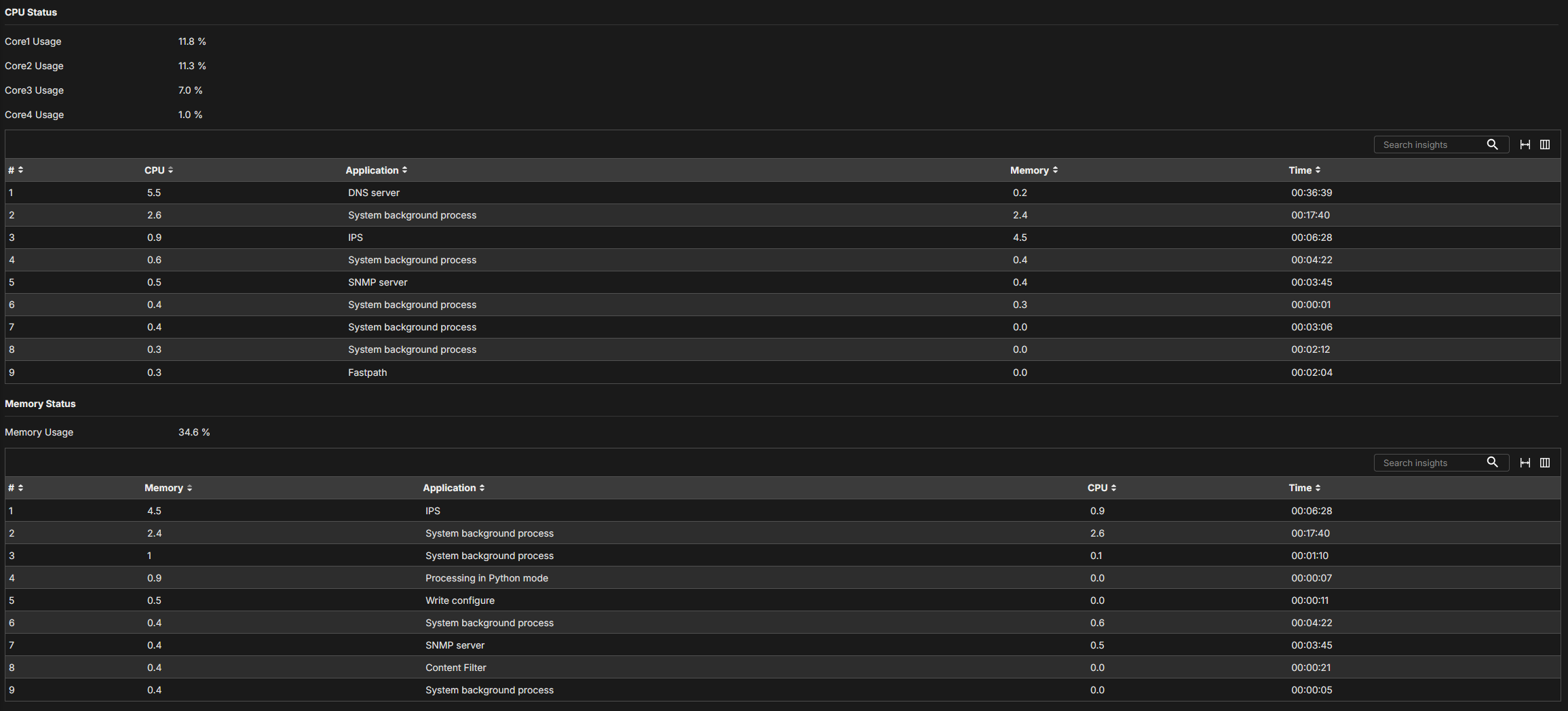
These are the Session Counts by dest IP:

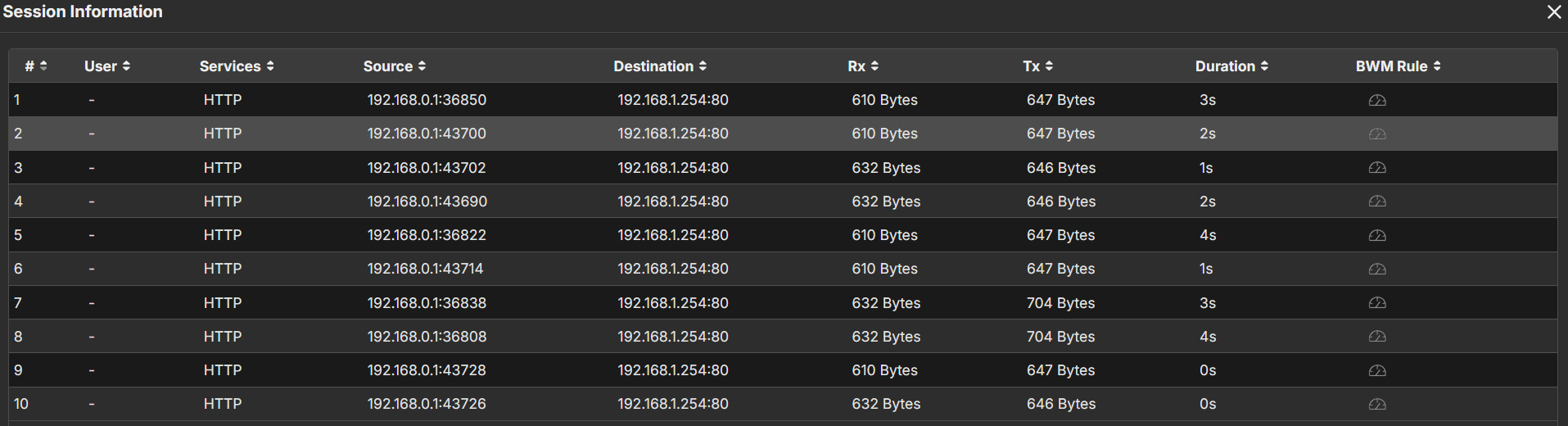
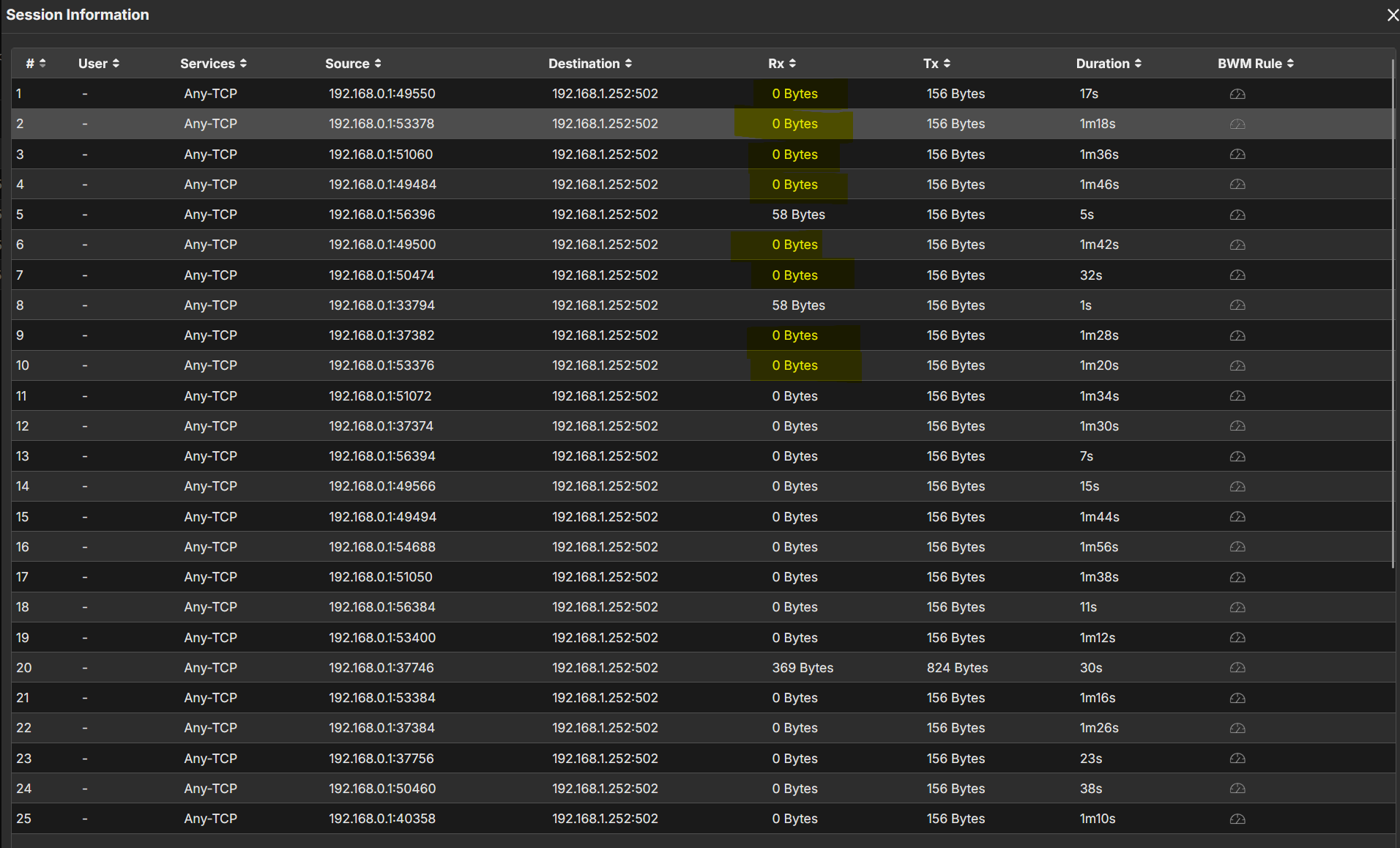
As you can see, on 192.168.1.254 there are activity, instead on 1.252 there are TX but not RX until the request going in timeout.
0 -
Hi @Zyxel_Luna,
Do you have any news about this?
I've checked again and seems that the problem is the EuroNET (192.168.1.254) module on port P6.
If I disconnect it, the ping on 192.168.1.252 seems OK and also the port activity is more quite.Thank you
0 -




 Zyxel Employee




Categories
- All Categories
- 442 Beta Program
- 3.1K Nebula
- 243 Nebula Ideas
- 6.8K Security
- 783 USG FLEX H Series
- 389 Security Ideas
- 1.8K Switch
- 87 Switch Ideas
- 1.5K Wireless
- 58 Wireless Ideas
- 7.2K Consumer Product
- 325 Service & License
- 527 News and Release
- 101 Security Advisories
- 31 Education Center
- 10 [Campaign] Zyxel Network Detective
- 5.3K FAQ
- 34 Documents
- 91 About Community
- 122 Security Highlight


