WinACME make the .pfx and crashes USG




 Guru Member
So not sure about all models but on my old USG models I import a .pfx that has root, intermediate, certificate and key it imports fine but as soon at you set it for WWW the whole USG locks up plus port 80 needing a full reset the fix is you only need certificate and key in the .pfx
All Replies
-
Hi @PeterUK,
Thank you for sharing this and glad to hear you found a workaround. To help us look into it, could you please provide the model and firmware version of your device, as well as the certificate file?
(Please note that if the device you are using is an EoL model, the support we can provide may be limited.)
Zyxel Tina
0 -
Hi Tina
This was on USG60 which is EOL but I think it may happen but not tested on other models like the FLEX 200. You can generate the certificate using win acme for a .PFX to test
https://www.win-acme.com/0 -
Hi @PeterUK,
Thanks for the update. Since the USG60 is EOL, we would like to try reproducing this on current models. To follow your setup as closely as possible, could you please share the steps you performed?
A few screenshots or a short step list would be perfect. Thank you!
Zyxel Tina
0 -
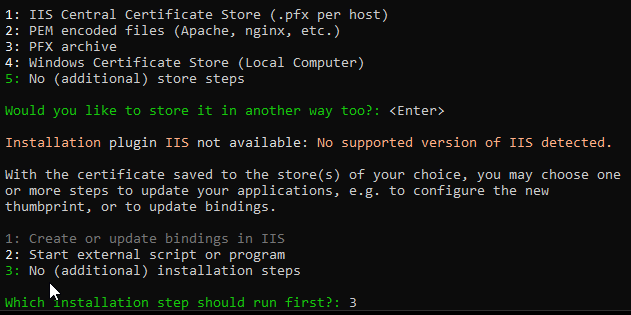
So run WinACME pick M
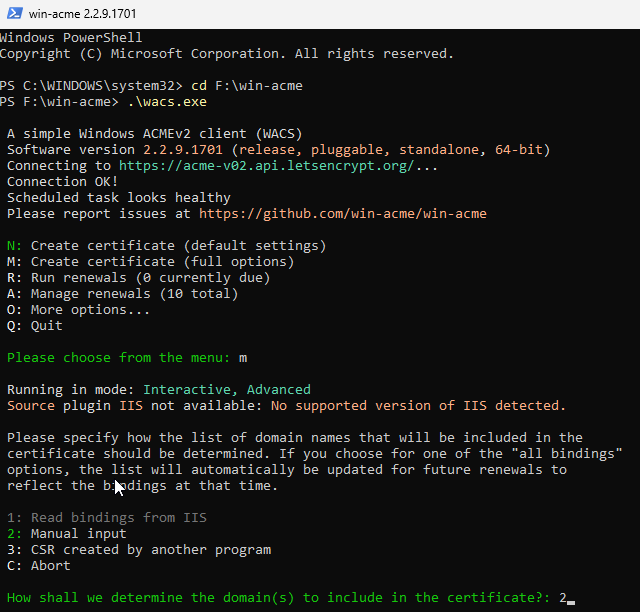
put in a domain single Certificate
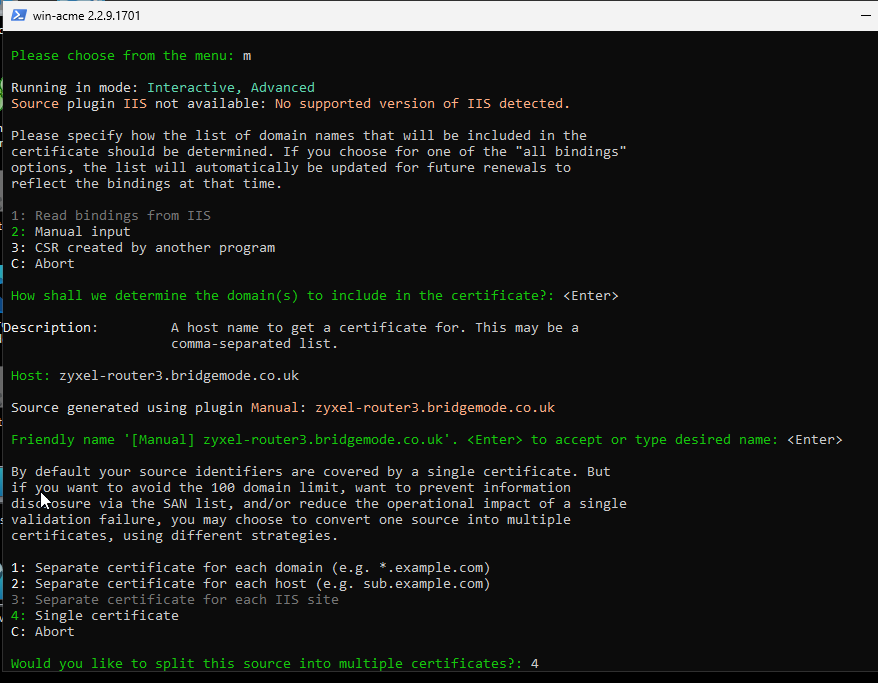
pick verification in my case 6 if you have cloudflare
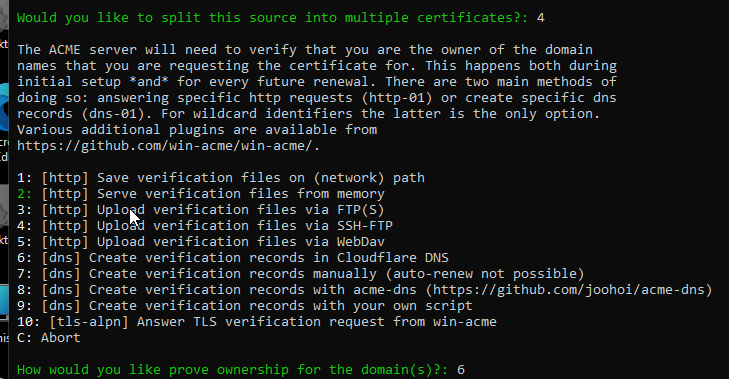
pick to save as pfx where to save it
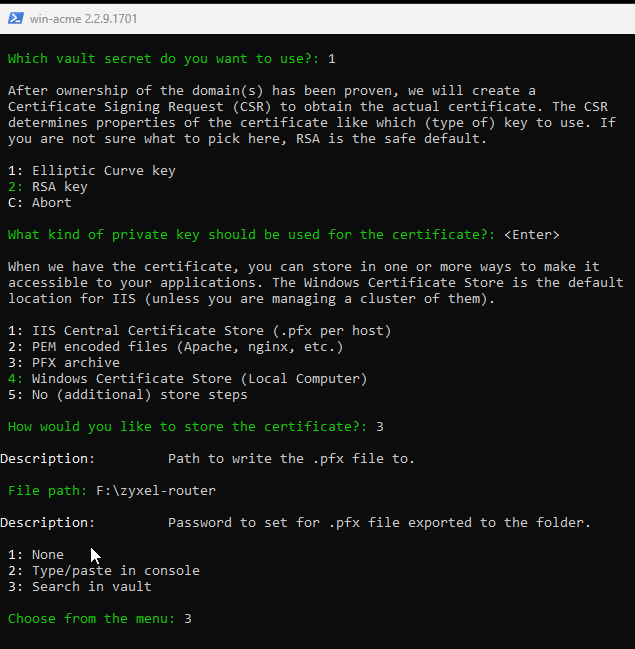
no more step and it will challenge you have that domain
When you do
openssl pkcs12 -info -in zyxel-router3.bridgemode.co.uk.pfx -legacy

you get

Enter Import Password:

MAC: sha1, Iteration 1024

MAC length: 20, salt length: 20

PKCS7 Data

Shrouded Keybag: pbeWithSHA1And3-KeyTripleDES-CBC, Iteration 1024

Bag Attributes

    localKeyID:

    friendlyName: zyxel-router3.bridgemode.co.uk

Key Attributes: <No Attributes>

Enter PEM pass phrase:

Verifying - Enter PEM pass phrase:

-----BEGIN ENCRYPTED PRIVATE KEY-----


-----END ENCRYPTED PRIVATE KEY-----

PKCS7 Encrypted data: pbeWithSHA1And40BitRC2-CBC, Iteration 1024

Certificate bag

Bag Attributes

    localKeyID:

    friendlyName: zyxel-router3.bridgemode.co.uk

subject=CN = zyxel-router3.bridgemode.co.uk

issuer=C = US, O = Let's Encrypt, CN = YR1

-----BEGIN CERTIFICATE-----


-----END CERTIFICATE-----

Certificate bag

Bag Attributes

    friendlyName: YR1

    2.16.840.1.113894.746875.1.1: <Unsupported tag 6>

subject=C = US, O = Let's Encrypt, CN = YR1

issuer=C = US, O = ISRG, CN = Root YR

-----BEGIN CERTIFICATE-----


-----END CERTIFICATE-----

Certificate bag

Bag Attributes

    2.16.840.1.113894.746875.1.1: <Unsupported tag 6>

    friendlyName: Root YR

subject=C = US, O = ISRG, CN = Root YR

issuer=C = US, O = Internet Security Research Group, CN = ISRG Root X1

-----BEGIN CERTIFICATE-----


-----END CERTIFICATE-----
This is the issue it has three certificates in the .pfx then when to import (after rename to shorter) to a USG get:

Then set that in WWW and the USG can no longer can be accessed given how the USG ZLD share some of the code for Certificates I should think this will happen on a FLEX 200 but maybe not a FLEX 200H?
To fix
openssl pkcs12 -info -in cert.pfx

or if the above fails with some errors

openssl pkcs12 -info -in cert.pfx -legacy

which you now need to copy the


-----BEGIN ENCRYPTED PRIVATE KEY-----


to


-----END ENCRYPTED PRIVATE KEY-----


in a file cert.key


the the top cert which be your subject=CN copy


-----BEGIN CERTIFICATE-----


to


-----END CERTIFICATE-----


in a file cert.crt


then do


openssl pkcs12 -export -out cert.pfx -inkey cert.key -in cert.crt

then you can import it
Now for reasons unknown to me the fix works for FLEX 200 but not USG60 so to fix that you do
openssl ec -in encrypted.key -out cert.key
with the cert.key unencrypted and  cert.crt same name you then use windows certutil
certutil –MergePFX cert.crt router3.pfx
update found reason so for USG V4.73 you do
openssl pkcs12 -export -out cert.pfx -inkey cert.key -in cert.crt -legacy
and now that works for both USG models like USG60 and FLEX200
0




 Zyxel Employee
Categories
- All Categories
- 442 Beta Program
- 3.1K Nebula
- 243 Nebula Ideas
- 6.8K Security
- 783 USG FLEX H Series
- 389 Security Ideas
- 1.8K Switch
- 87 Switch Ideas
- 1.5K Wireless
- 58 Wireless Ideas
- 7.2K Consumer Product
- 325 Service & License
- 527 News and Release
- 101 Security Advisories
- 31 Education Center
- 10 [Campaign] Zyxel Network Detective
- 5.3K FAQ
- 34 Documents
- 91 About Community
- 122 Security Highlight


