[Important Announcement] End of FTP Service Support for Home NAS Series
Comments
-
I dont understand step 19 about the text ftp://MY_IP_NAS
0 -
the trick to making this work is simple…..YOU MUST GIVE READ/WRITE access to the admin and the pc-guest after to make the folder NASXXX your model number. If you dont, the download list fail will happen..when I gave ADNIN and PC-Guest read/write…everything worked…when your done go back and turn off read/wite for the PC-Guest
0 -
My NAS is in local network. IP addres of my NAS is 192.168.1.99.
In step 16, I execute command with this address.
In step 19, I check web_prefix file. In this file there is text: ftp://192.168.1.99
0 -
hi , for those who face package fail to download even if all steps applied correctly, I had same issue and solved after applied all steps and creat folder "zy-pkgs" inside admin folder and put all files inside it and it worked.
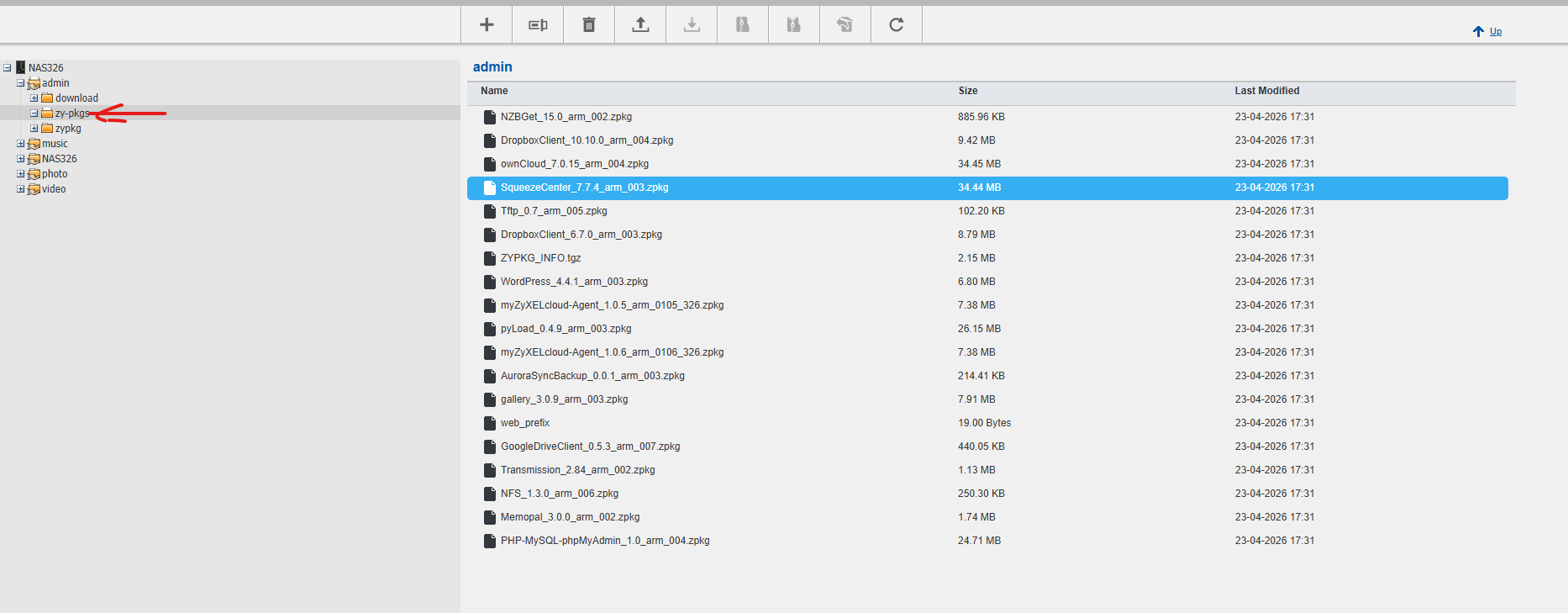 0
0

 Freshman Member




Categories
- All Categories
- 442 Beta Program
- 3.1K Nebula
- 237 Nebula Ideas
- 6.8K Security
- 745 USG FLEX H Series
- 377 Security Ideas
- 1.8K Switch
- 87 Switch Ideas
- 1.5K Wireless
- 58 Wireless Ideas
- 7.2K Consumer Product
- 319 Service & License
- 512 News and Release
- 99 Security Advisories
- 31 Education Center
- 10 [Campaign] Zyxel Network Detective
- 5.3K FAQ
- 34 Documents
- 91 About Community
- 119 Security Highlight