Why Can't the SSL VPN Configuration File Be Downloaded from the USG FLEX H?
Options

Zyxel_Emily
Posts: 1,462  Zyxel Employee




Zyxel Employee
in VPN
Question:
I get an HTTP 400 error when attempting to download the SSL VPN configuration file from the USG FLEX 50HP interface. Why can't the SSL VPN configuration file be downloaded from the USG FLEX H?
Answer:
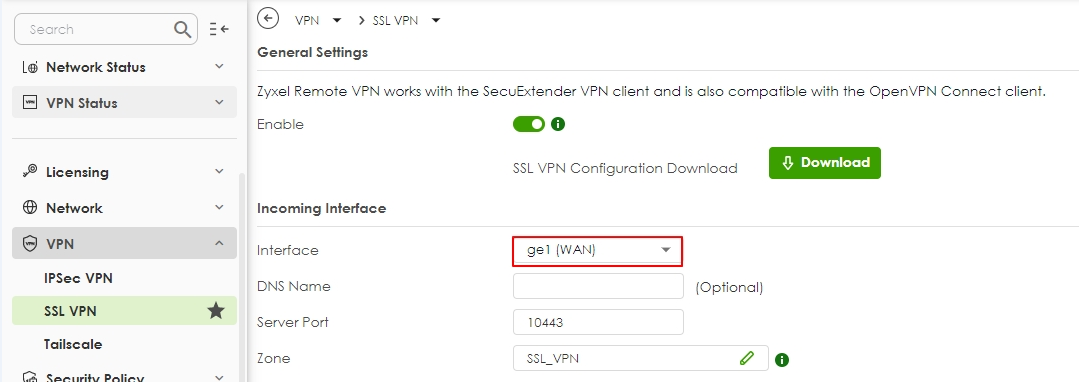
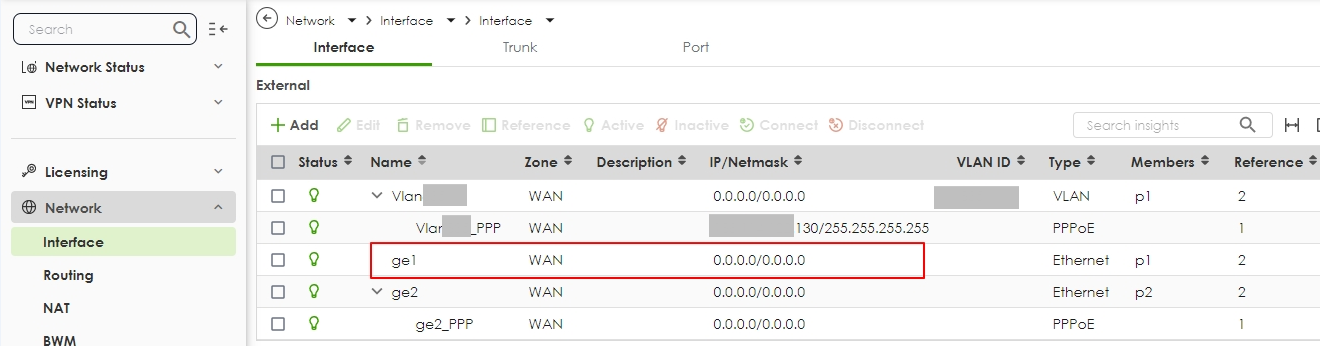
The issue was due to the selected Incoming Interface in the SSL VPN settings. The selected interface "ge1" did not have an assigned IP address. Since the interface was effectively non-operational, the system could not generate/download the SSL VPN configuration file.
Solution:
- Navigate to SSL VPN > Incoming Interface.
- Replace Incoming interface with the correct WAN interface that has an active IP address.
- Save the changes and retry downloading the SSL VPN configuration file.
Tagged:
0
Categories
- All Categories
- 442 Beta Program
- 3K Nebula
- 222 Nebula Ideas
- 129 Nebula Status and Incidents
- 6.5K Security
- 622 USG FLEX H Series
- 350 Security Ideas
- 1.7K Switch
- 84 Switch Ideas
- 1.4K Wireless
- 53 Wireless Ideas
- 7K Consumer Product
- 298 Service & License
- 488 News and Release
- 92 Security Advisories
- 31 Education Center
- 10 [Campaign] Zyxel Network Detective
- 4.8K FAQ
- 34 Documents
- 88 About Community
- 108 Security Highlight