How to force WiFi to use WPA3 security?
Options

Zyxel_HsinBo
Posts: 530




 Zyxel Employee
Zyxel Employee
1. Navigate to the Nebula » Configure » Access points » SSID advanced settings page
*If you do not see the SSID advanced settings tab from sidebar, please go to
Nebula » Configure » Access points » SSID settingstab and toggle on theAdvanced modebutton
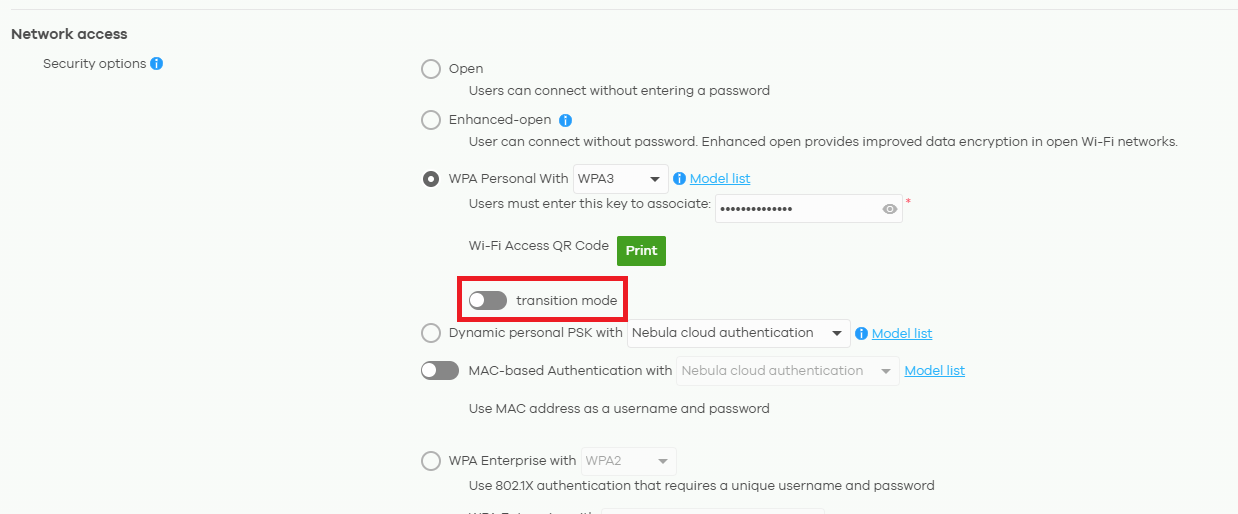
2. Security options - Select WPA Personal With WPA3 option
3. Toggle off the transition mode button (default on)
Tagged:
0
Categories
- All Categories
- 442 Beta Program
- 3.1K Nebula
- 242 Nebula Ideas
- 6.8K Security
- 779 USG FLEX H Series
- 387 Security Ideas
- 1.8K Switch
- 87 Switch Ideas
- 1.5K Wireless
- 58 Wireless Ideas
- 7.2K Consumer Product
- 324 Service & License
- 526 News and Release
- 101 Security Advisories
- 31 Education Center
- 10 [Campaign] Zyxel Network Detective
- 5.3K FAQ
- 34 Documents
- 91 About Community
- 121 Security Highlight