How to add an AP Group profile on USG FLEX H?
Options

Zyxel_Jami
Posts: 245  Zyxel Employee




Zyxel Employee
in Radio
AP Groups allow you to apply different SSID configurations to different groups of APs. APs within the same group will broadcast the same SSID and security settings, enabling seamless client roaming.
Steps to Configure AP Groups
- Navigate to Wireless > WLAN Settings > AP Group Settings.
- Click Add to create a new AP Group and apply it.
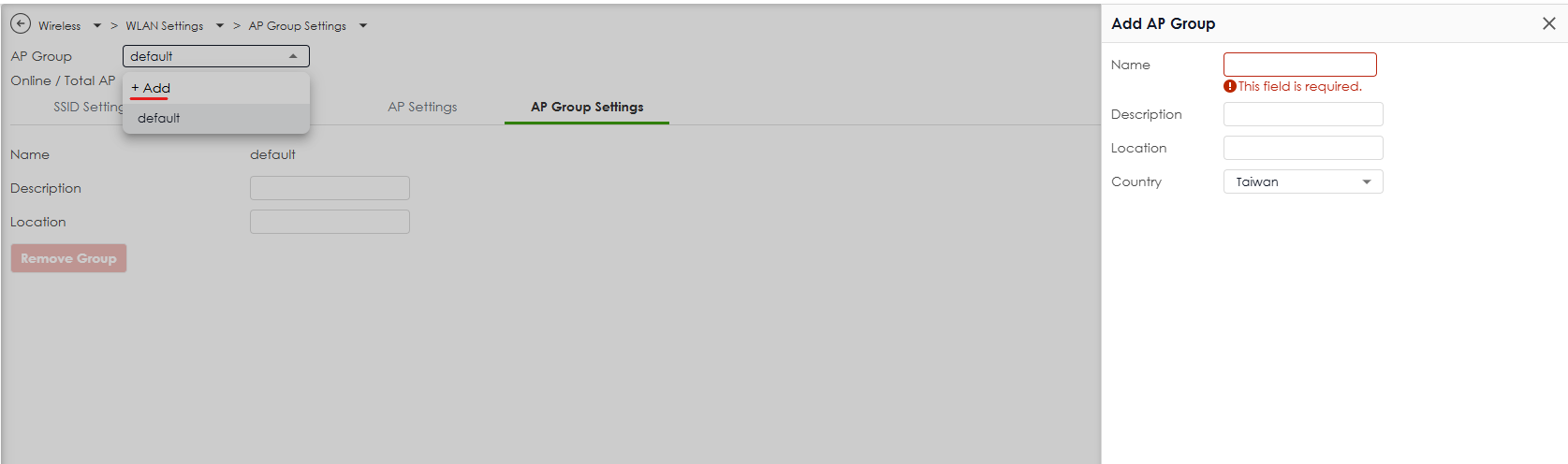
Once configured, all APs in the same AP Group will use the same SSID settings, ensuring uniform wireless behavior.
0


Categories
- All Categories
- 442 Beta Program
- 3K Nebula
- 232 Nebula Ideas
- 132 Nebula Status and Incidents
- 6.7K Security
- 691 USG FLEX H Series
- 365 Security Ideas
- 1.8K Switch
- 87 Switch Ideas
- 1.4K Wireless
- 56 Wireless Ideas
- 7.1K Consumer Product
- 312 Service & License
- 505 News and Release
- 97 Security Advisories
- 31 Education Center
- 10 [Campaign] Zyxel Network Detective
- 5.1K FAQ
- 34 Documents
- 89 About Community
- 112 Security Highlight