[NWA130BE] - Initially unable to sync date/time with personal NTP Server





 Master Member
Hello everyone,
I've the firewall USG Flex 200HP and I've configured it as a personal NTP Server, but seems that the AP (192.168.2.3) is not contacting it.
Seems that the AP is contacting the firewall (192.168.2.1) only for DNS requests.
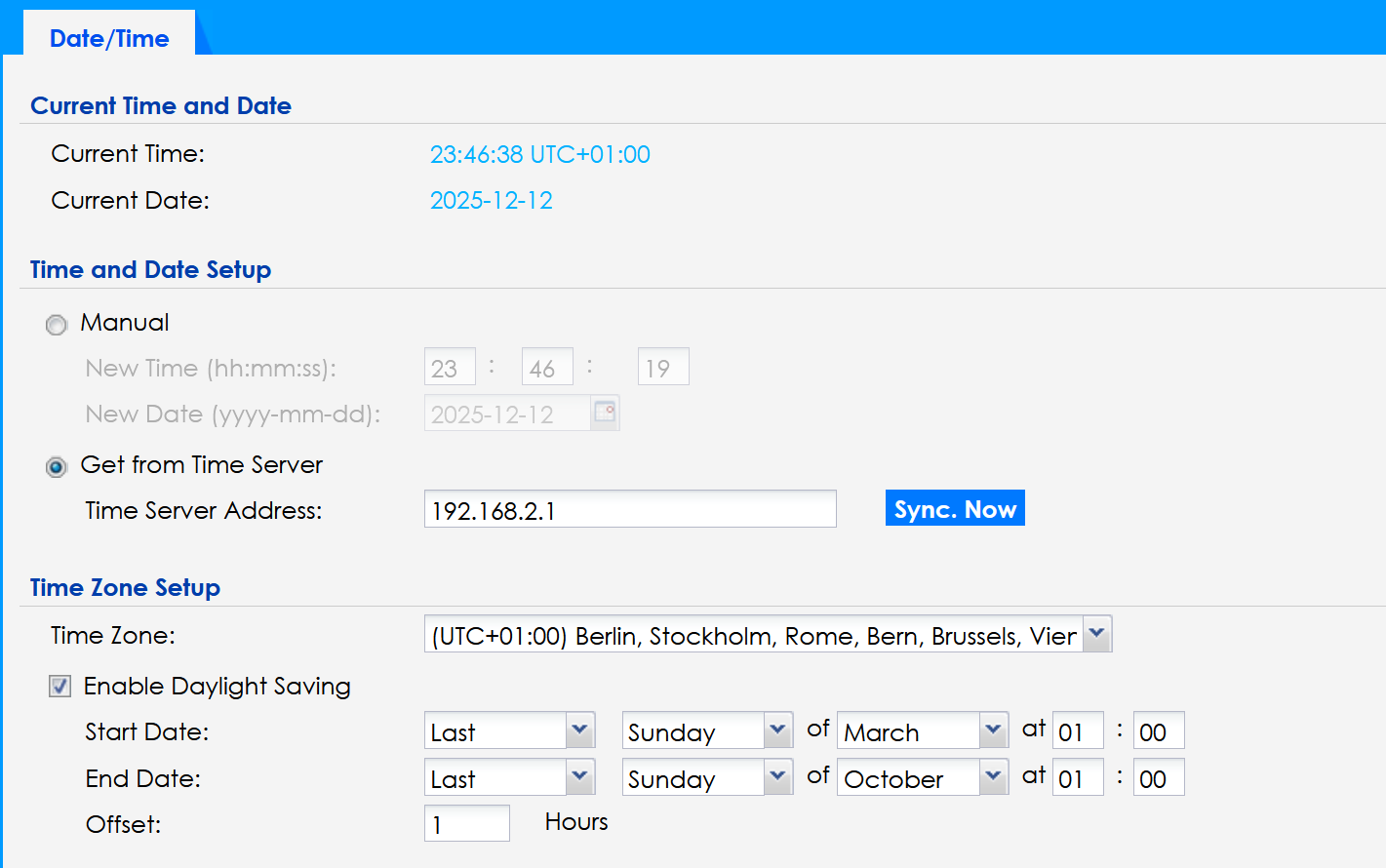
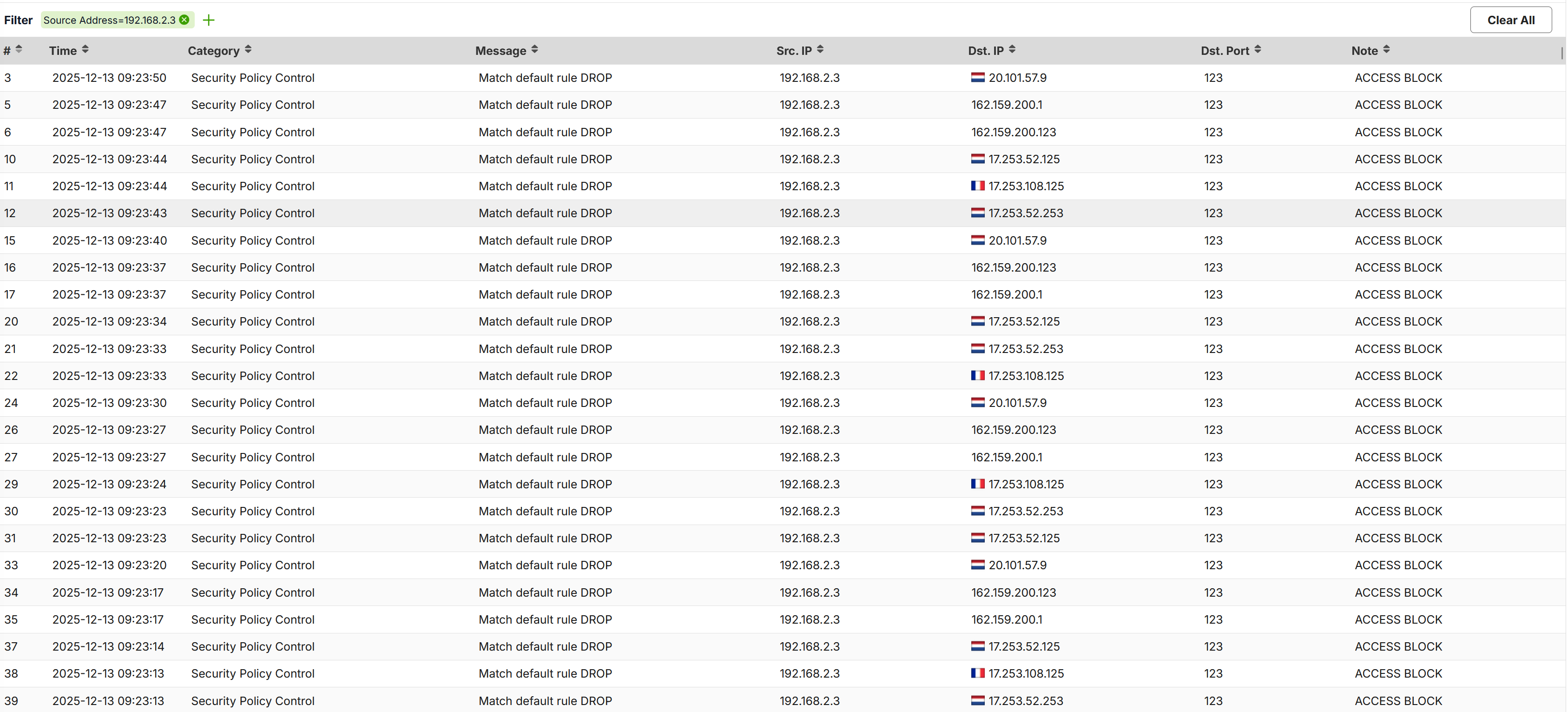
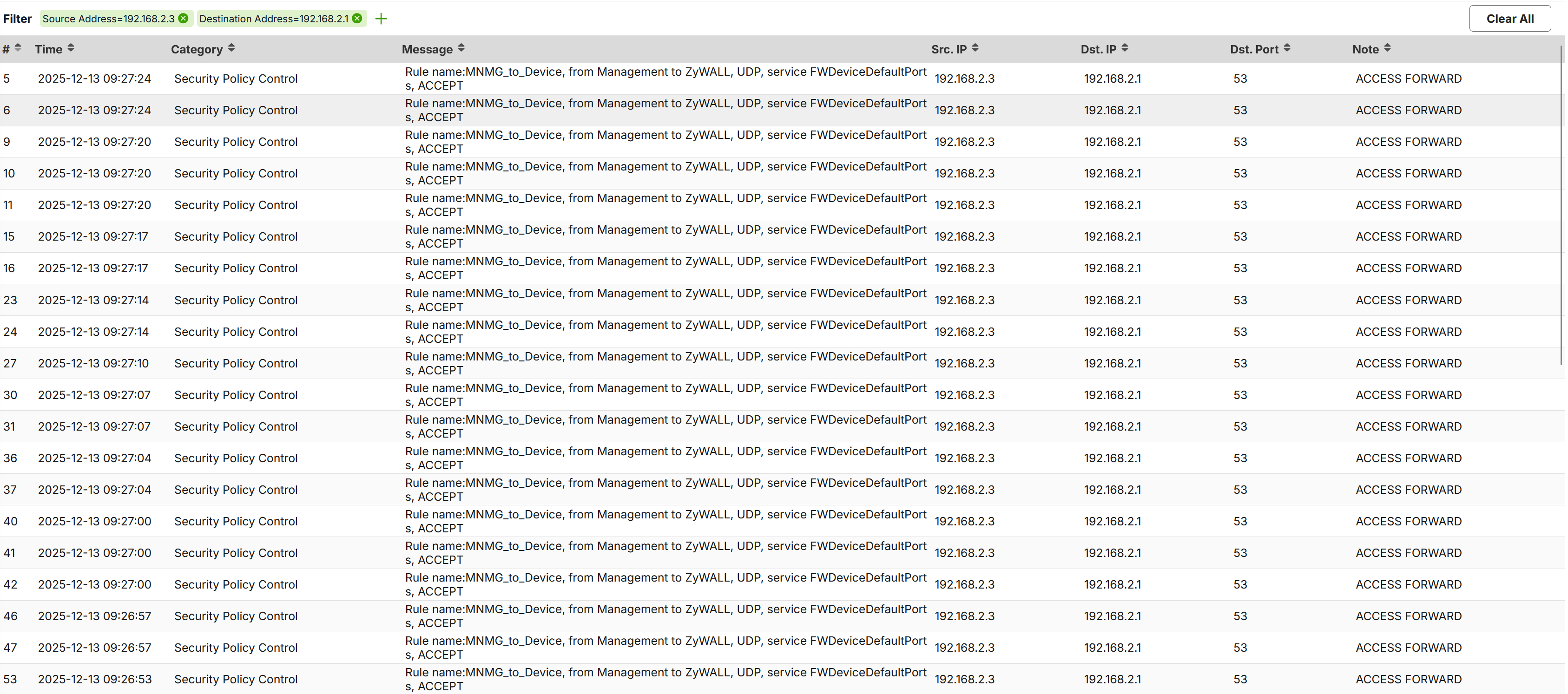
After push the button "Sync now", the AP is sync with Firewall's NTP and seems that the requests on DNS and external NTP Server is not arriving anymore on the firewall with elevated frequency (only when necessary):
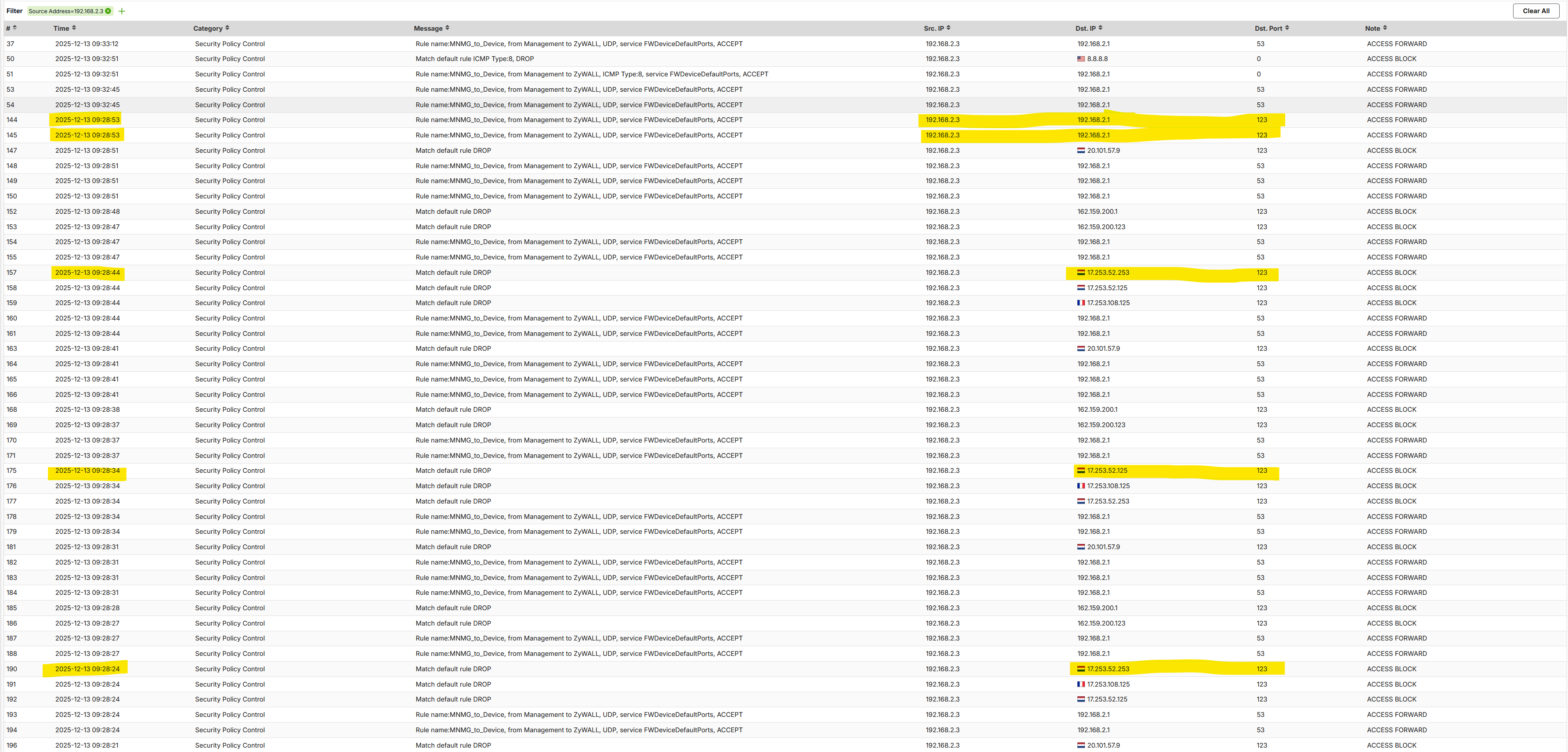
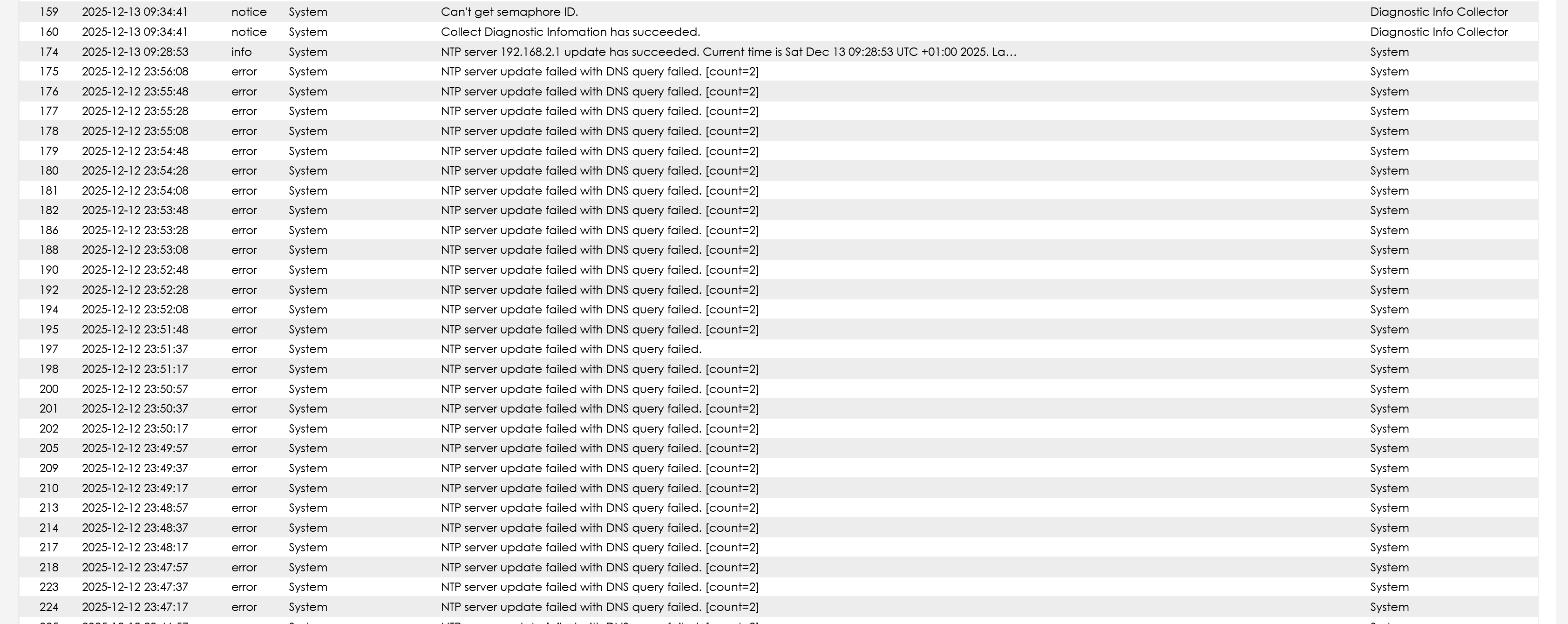
As for connection logs, seems that the AP try to reach another NTP Server (why?!? what is the NTP Server that try to contact??) every 10 seconds, and after the connection was successfully on the FW NTP Server, the situation was normalized.
Why the AP try to ask the date/time to other NTP Server and not retry to the Time Server Address specified?
I've collected the log from the AP, I can send you if requested.
My 2cents:
I switch off all my network devices on the night, and restart it on the morning.
Probably the AP (that start at the same time of the FW), not found FW ready and set it's own NTP to other address; after this the AP not retry anymore to set it's own NTP Server to the explicit address.
So, If the AP restart and found the FW ready up&running it's ok and set correctly the NTP Server; otherwise if the FW is not ready when the AP try to found the NTP Server, the AP try to set own date/time from external default NTP Server instead of retry to the NTP Server specified.
Thank you
Accepted Solution
-
Hi @Maverick87,
After discussion, we confirm that the issue stems from a timing gap during boot-up. The AP attempts to sync with the manually configured NTP server before the firewall's NTP service is fully ready. When this initial attempt fails, the current firmware behavior switches the AP to a list of built-in backup NTP servers for polling.
We recognize that this behavior can be improved. Therefore, we will mark this as a feature request to implement a spec change: the manually configured NTP server will be included in the polling list, ensuring the AP eventually returns to your designated internal server once it becomes available. We will keep the community updated on the planned firmware release that includes this improvement.
In addition, I've created an idea post for you so that we can track feedback and votes from other users. If anyone likes this idea, please show your support by leaving a comment or voting for it.
Zyxel Tina
1




 Zyxel Employee
All Replies
-
So is it now working correctly?
I've not see this happen on my NWA50AX PRO when set to a local time server (my PC)
If you reboot the AP it should run correctly, if its the first time changing the NTP server it might of wanted to check with its last known NTP server that the new NTP matches?
0 -
Hi @PeterUK
The problem is on bootup. I switch off all my network devices on the night, and restart it on the morning.
Probably the AP (that start at the same time of the FW), not found FW ready and set it's own NTP to other address; after this the AP not retry anymore to set it's own NTP Server to the explicit address.
So, If the AP restart and found the FW ready up&running it's ok and set correctly the NTP Server; otherwise if the FW is not ready when the AP try to found the NTP Server, the AP try to set own date/time from external default NTP Server instead of retry to the NTP Server specified.
0 -
Hi @Maverick87,
Thank you for the detailed information!
Before providing the next troubleshooting step, could you please clarify one detail for us?
Is your NWA130BE configured with a Static IP address, or is it obtaining its address via DHCP?
We need this information to accurately trace the device's network initialization and NTP sync workflow during the boot-up process.
Zyxel Tina
0 -
Hi @Zyxel_Tina ,
the AP is configured in DHCP, but into the DHCP Server (into the Firewall), the IP is set as static. In this way the AP take always the same IP via dedicated DHCP Server.
My network devices are:
- AP - NWA130BE - configured with VLAN
- External (non-zyxel) 2.5Gbit switch - manage VLAN and non-VLAN devices
- Firewall - USG Flex 200HP - manage VLAN and non-VLAN devices
The AP is connected to the external switch and use:
- VLAN dedicated for management (*1)
- VLAN dedicated to Main Wifi (*2)
- VLAN dedicated to Guest Wifi (*3)
- VLAN dedicated to IoT Wifi Devices (*4)
The firewall is directly connected to the external switch and manage the VLAN as Interface:
- Interface "Management" configured for dedicated VLAN (*1)
This interface use a dedicated DHCP Server and have some Policy configured:- Outbound to WAN completely denied
- Inbound only from dedicated interface
- Outbound on Firewall only on dedicated TCP port:
- DHCP Client
- DHCP Server
- NTP
- PING
… and few other
- Interface "WifiIface" configured for dedicated VLAN (*2)
- Interface "WifiGuest" configured for dedicated VLAN (*3)
- Interface "IoTWifi" configured for dedicated VLAN (*4)
So the network is:
AP Management VLAN —> Switch —> FW Interface "Management"
AP MainWifi VLAN —> Switch —> FW Interface "WifiIface"
AP WifiGuest VLAN —> Switch —> FW Interface "WifiGuest"
AP IoTWifi VLAN —> Switch —> FW Interface "IoTWifi"Thank you
0 -
Hi @Maverick87,
After discussion, we confirm that the issue stems from a timing gap during boot-up. The AP attempts to sync with the manually configured NTP server before the firewall's NTP service is fully ready. When this initial attempt fails, the current firmware behavior switches the AP to a list of built-in backup NTP servers for polling.
We recognize that this behavior can be improved. Therefore, we will mark this as a feature request to implement a spec change: the manually configured NTP server will be included in the polling list, ensuring the AP eventually returns to your designated internal server once it becomes available. We will keep the community updated on the planned firmware release that includes this improvement.
In addition, I've created an idea post for you so that we can track feedback and votes from other users. If anyone likes this idea, please show your support by leaving a comment or voting for it.
Zyxel Tina
1 -
Hi @Zyxel_Tina ,
thank you for your feedback, but I don't think is necessary to use a vote for this; I mean, seems that this is a bug.
If I selected manually an NTP Server, this must be used as primary choice. I think is also wrong retry to other servers, the entry for the server is one and one must be the server for retry; otherwise you can implement a list of 2/3 servers and retry on this.
Thank you
0




 Guru Member
Categories
- All Categories
- 442 Beta Program
- 3.1K Nebula
- 241 Nebula Ideas
- 6.8K Security
- 758 USG FLEX H Series
- 380 Security Ideas
- 1.8K Switch
- 87 Switch Ideas
- 1.5K Wireless
- 58 Wireless Ideas
- 7.2K Consumer Product
- 321 Service & License
- 520 News and Release
- 100 Security Advisories
- 31 Education Center
- 10 [Campaign] Zyxel Network Detective
- 5.3K FAQ
- 34 Documents
- 90 About Community
- 119 Security Highlight


