[NEBULA] Upgrade firmware in cloud
Options

vickyperkin
Posts: 1  Freshman Member
Freshman Member
Hello Guys, how to update the firmware with nebula web portal? In cloud!
0
All Replies
-
Hi @vickyperkin,
You can firmware upgrade your device in SITE-WIDE> Configure> General setting> Firmware upgrades to schedule the upgrade time for every product line.
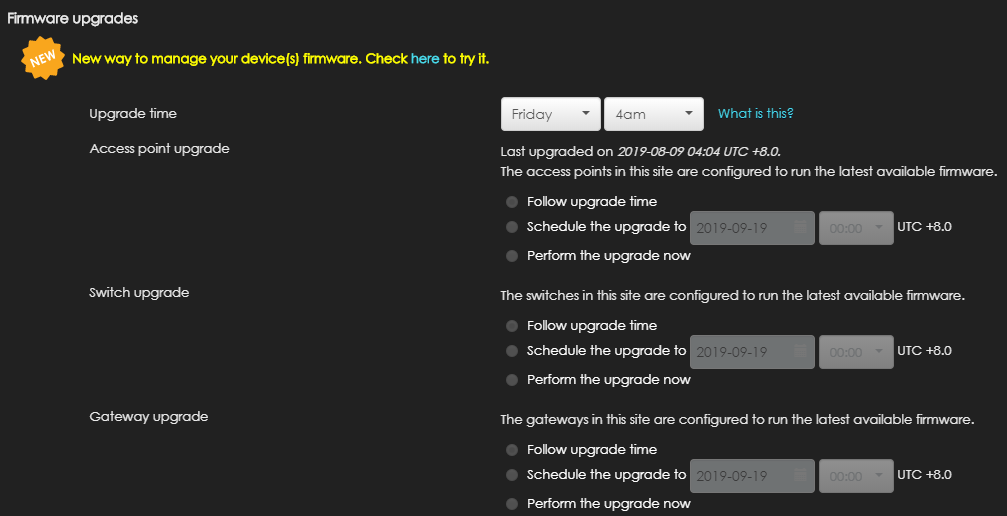
Or, if you are using NCC pro-pack and want to upgrade the specific devices, you can go to SITE-WIDE> Configure> Firmware management to do that.

Thanks.
1

 Zyxel Employee



Categories
- All Categories
- 442 Beta Program
- 3K Nebula
- 232 Nebula Ideas
- 131 Nebula Status and Incidents
- 6.7K Security
- 684 USG FLEX H Series
- 362 Security Ideas
- 1.8K Switch
- 87 Switch Ideas
- 1.4K Wireless
- 56 Wireless Ideas
- 7.1K Consumer Product
- 310 Service & License
- 504 News and Release
- 97 Security Advisories
- 31 Education Center
- 10 [Campaign] Zyxel Network Detective
- 5.1K FAQ
- 34 Documents
- 89 About Community
- 112 Security Highlight


