FWA505, changing DNS settings

 Freshman Member

I set up Google's DNS servers in FWA505 > Network Setting > Home Networking > LAN Setup > DNS Values and Broadband>ETHWAN. I only connect via Wi-Fi and use IPv4. However, the DNS shown on the home page in the Cellular Info tab belongs to my internet provider. How can I change this?
Accepted Solution
-
Hi @Amrepl,
Welcome to the Zyxel Community!
The behavior you're observing where the Cellular Info tab displays your ISP's DNS, despite your configurations, is expected. The Cellular Info tab shows the DNS server obtained directly from the cellular network, which the FWA505 uses for its internal operations and cellular-related services. This display does not mean that your configured Google DNS servers are not being used by devices connected to your FWA505. To check whether clients are using the dedicated DNS 8.8.8.8, please run
ipconfig /allin Command Prompt on a Windows PC. It will display the DNS server the client is using.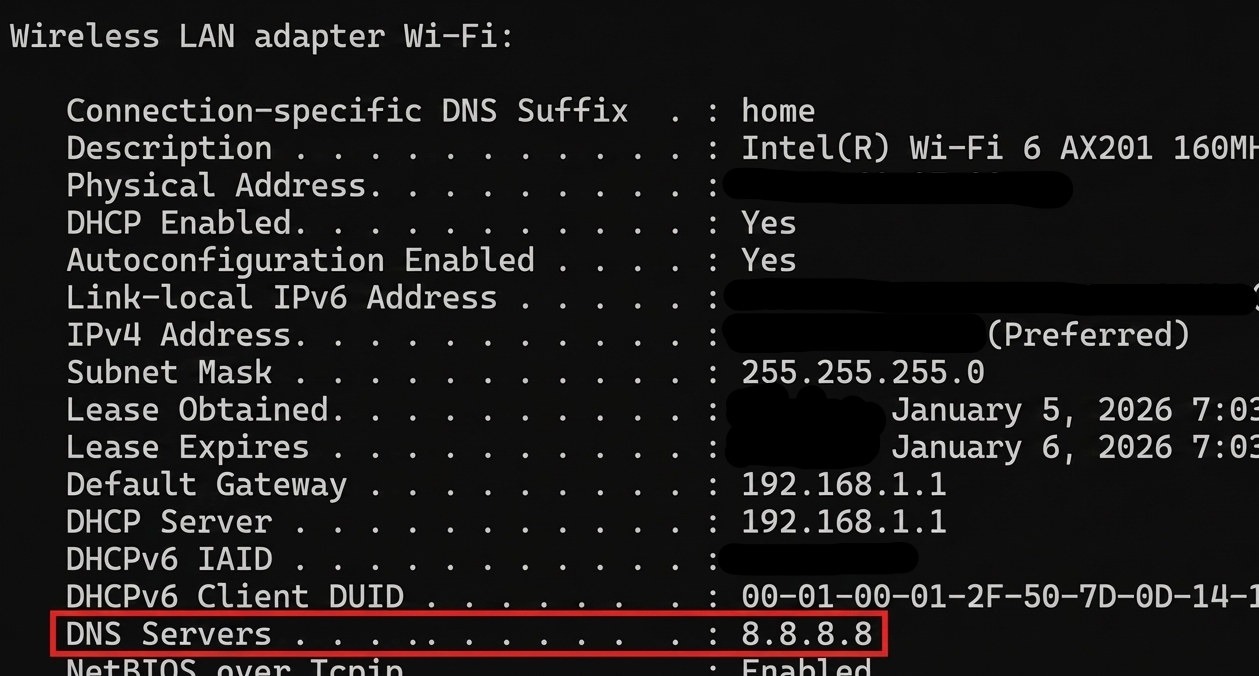
Zyxel Tina
0

 Zyxel Employee



All Replies
-
Hi @Amrepl,
Welcome to the Zyxel Community!
The behavior you're observing where the Cellular Info tab displays your ISP's DNS, despite your configurations, is expected. The Cellular Info tab shows the DNS server obtained directly from the cellular network, which the FWA505 uses for its internal operations and cellular-related services. This display does not mean that your configured Google DNS servers are not being used by devices connected to your FWA505. To check whether clients are using the dedicated DNS 8.8.8.8, please run
ipconfig /allin Command Prompt on a Windows PC. It will display the DNS server the client is using.
Zyxel Tina
0
Categories
- All Categories
- 442 Beta Program
- 3.1K Nebula
- 235 Nebula Ideas
- 6.7K Security
- 732 USG FLEX H Series
- 374 Security Ideas
- 1.8K Switch
- 87 Switch Ideas
- 1.5K Wireless
- 57 Wireless Ideas
- 7.1K Consumer Product
- 319 Service & License
- 511 News and Release
- 99 Security Advisories
- 31 Education Center
- 10 [Campaign] Zyxel Network Detective
- 5.2K FAQ
- 34 Documents
- 89 About Community
- 117 Security Highlight
