NR7103 crash on Speedtest


 Freshman Member
My NR7103 crash when Ookla speedtest are running +800Mbps speed. After a reboot I can run speedtest successful a couple of times, but then the router crash during DL or just before the UL starts, and the router doesn't restart without power being disconnected.
Normal traffic doesn't make it crash. Also speedtests under ~500Mbps seem to be stable.
I have tried to swap the PoE adapter and changed MTU from 1500 to 1492 and 1428 on both NR7103 and router.
All cables are Cat6 or Cat7 running 2.5Gbps. 5G speed is ~1200/120Mbps.
Speedtest run directly from ASUS AXE16000 Wi-Fi Router GUI via ethernet.
NR7103 is bandlocked to B3+B20+n78, TR-069 and WiFi is disabled.
Firmware: V1.00(ACCZ.4)C0
Serial number: S220Z04004716
5G ISP: Ice/Lyse Tele - Norway
What to do next?
All Replies
-
Hi @Hooveryoda,
Thank you for reaching out about the issues you're experiencing with your NR7103 crashing during high-speed Ookla speed tests.
This behavior, where the router crashes or reboots under heavy load, especially during speed tests exceeding a certain threshold, has been reported with similar Zyxel 5G devices like the NR7101 and FWA710.
Here are some steps we can take to investigate and potentially resolve this:
- Firmware Update: While your device shows V1.00(ACCZ.4)C0, it's crucial to ensure you have the absolute latest firmware available for your specific NR7103 model and region, as updates often include stability improvements and bug fixes for high-load scenarios. Please check the Zyxel support site for the most recent firmware.
- Test with a different speed test server/method: While Ookla is widely used, trying a speed test directly from a different client device (not the ASUS router GUI) or using a different speed test service might help isolate if the issue is specifically related to how the Ookla test interacts with the NR7103 at high speeds.
- Monitor Device Logs: Access the NR7103's web interface and check the system logs for any error messages or unusual entries immediately before a crash occurs. This could provide valuable clues about the root cause.
- Power Supply Verification: Even though you've swapped the PoE adapter, ensure the power supply is delivering stable and sufficient power to the NR7103, especially under load. An unstable power delivery could lead to crashes when the device tries to draw more power.
To help us further analyze the situation, please provide the following:
- A screenshot of the NR7103's system logs around the time of a crash.
- Confirmation of the exact firmware version you are running after checking for updates on the Zyxel support page.
- Details on the exact model of your ASUS AXE16000 Wi-Fi Router (e.g., GT-AXE16000).
This AI response aims to provide initial troubleshooting steps and identify information needed for further diagnosis. Feel free to share additional details based on the suggestions above — this will help community members offer more targeted assistance.
If you have feedback or idea about this AI assistant, share them in Community Feedback.0 -
Hi
There are no firmware available for NR7103 on the support site.
Running Ookla speedtest from any other device also crashes the router, but a HTTP download with speeds over 1Gb doesn't crash the router, so maybe the problem is triggered by Ookla test-method.
Device Log shows the WAN connection drops when DL speeds reached ~1Gb.
Speedtests were done 16th Jan. 18:27:45 then the router crashed.
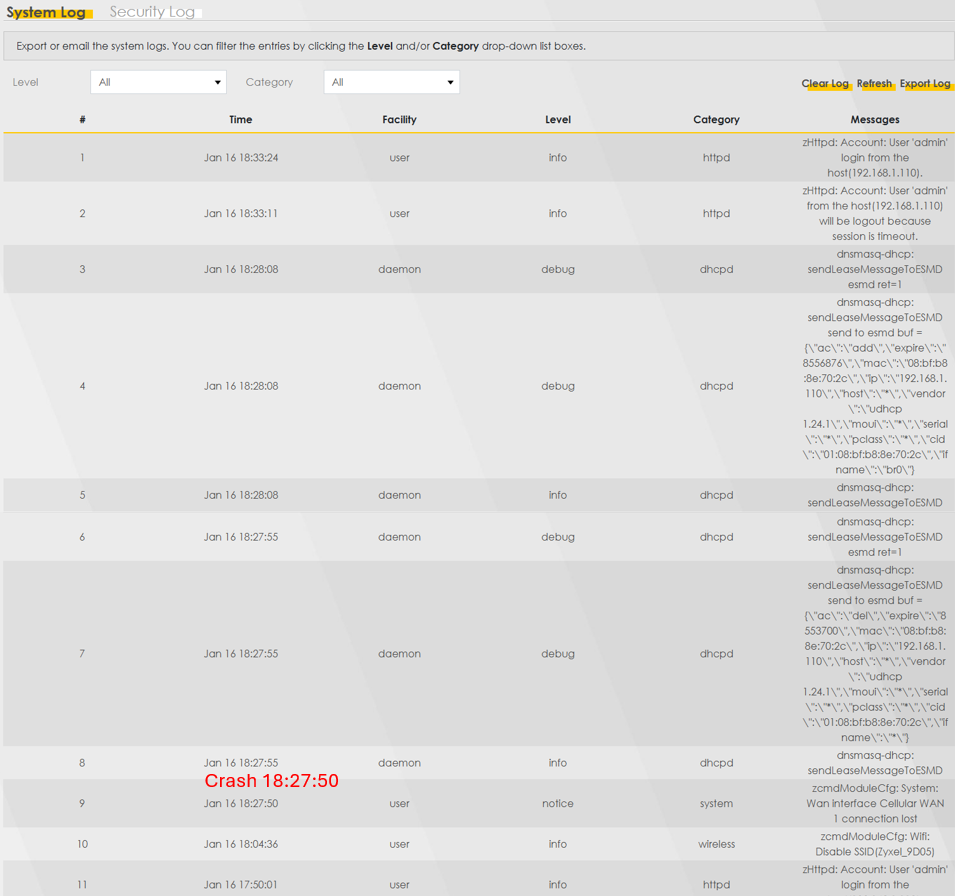
The WAN connection does not recover without a hard-reboot.
The new PoE adapter has higher power rating than the Zyxel provided version, and it worked perfectly on devices using a lot more power than the NR7103.
WiFi router is ASUS GT-AXE16000 - Firmware: 3.0.0.6.102_36422 (latest)
NR7103 Manufacture Information: (copied from logfile)
Firmware Version : V1.00(ACCZ.4)C0
Vendor Name : ZyXEL Communications Corp.
Product Model : NR7103
Serial Number : S220Z04004716moduleFirmwareVersion :MP1V120XS.2133.01.B1
I have attached some logfiles with more details.
0



 Zyxel Community Virtual Assistant
Categories
- All Categories
- 442 Beta Program
- 3.1K Nebula
- 242 Nebula Ideas
- 6.8K Security
- 779 USG FLEX H Series
- 387 Security Ideas
- 1.8K Switch
- 87 Switch Ideas
- 1.5K Wireless
- 58 Wireless Ideas
- 7.2K Consumer Product
- 324 Service & License
- 527 News and Release
- 101 Security Advisories
- 31 Education Center
- 10 [Campaign] Zyxel Network Detective
- 5.3K FAQ
- 34 Documents
- 91 About Community
- 121 Security Highlight
